

XTM Tool Qualcomm v1.8 Powerful Version Free Download | Complete Qualcomm EDL, FRP, MDM & Lock Removal Guide
Table of Contents
Introduction
In the mobile software repair and flashing industry, servicing smartphones powered by Qualcomm Snapdragon processors requires a fast, lightweight utility capable of establishing stable Emergency Download (EDL 9008) handshakes and handling complex UFS/eMMC storage partitions. XTM Tool Qualcomm v1.8 Latest Version stands out as a dedicated Windows desktop servicing utility engineered specifically for GSM technicians working on Qualcomm-based Android devices.
Operating without requiring expensive physical hardware boxes or smart-card dongles, XTM Tool Qualcomm v1.8 combines automatic Firehose loader selection, XML firmware flashing, partition management, and 1-click lock removal into one streamlined dashboard. This comprehensive guide covers every feature, lock-removal method, system requirement, and setup step.
What is XTM Tool Qualcomm v1.8?
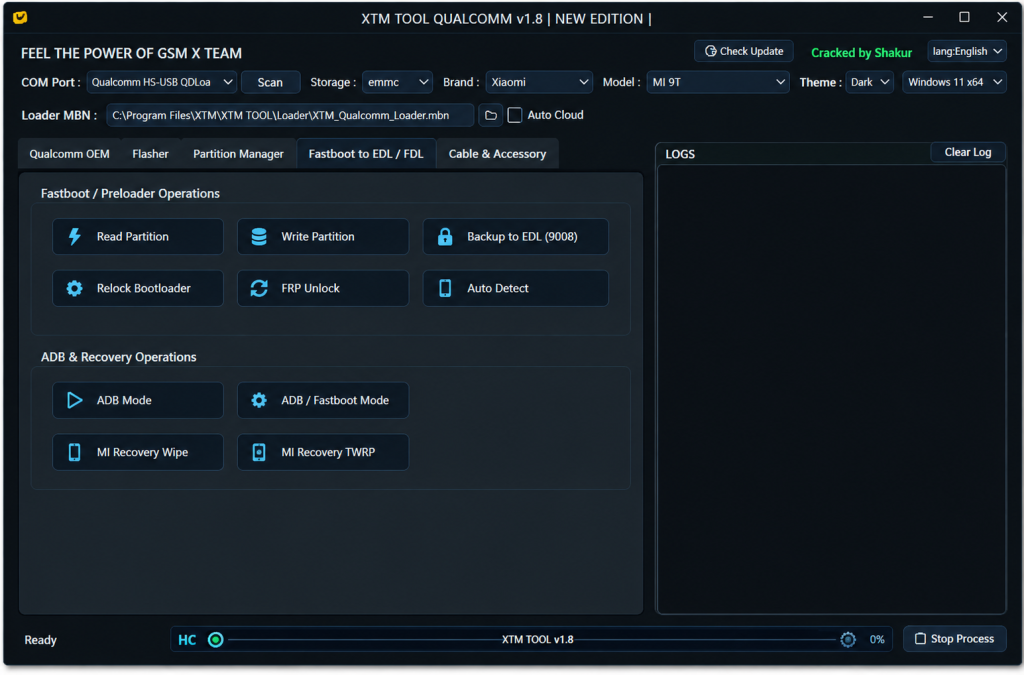
XTM Tool Qualcomm v1.8 is a specialized Windows-based mobile servicing and security unlocking application built exclusively for Android smartphones and tablets running on Qualcomm Snapdragon SoCs. Using Sahara and Firehose protocols over Qualcomm HS-USB QDLoader 9008 mode, it enables technicians to read device information, back up and restore security partitions (EFS / Persist), flash stock factory ROMs, and clear rigid security locks safely.
Key Features & Servicing Modules of XTM Tool Qualcomm v1.8
The v1.8 release packs an essential suite of low-level Qualcomm servicing functions into a clean, technician-friendly interface:
- Built-In Firehose Loader Database & Custom Loader Support: Automatically selects compatible Firehose programmers for supported models, while also allowing technicians to manually load custom
.elfor.mbnprogrammer files. - Qualcomm XML Firmware Flasher: Load and flash official factory
rawprogram0.xmlandpatch0.xmlpackages across UFS and eMMC storage chips to fix bootloops, system corruption, and soft-bricked devices. - Granular Partition Manager: Read full GPT partition tables, back up critical calibration partitions (
Persist,Modemst1,Modemst2,FSG), write individual partition images, and selectively erase corrupted blocks. - Bootloader Unlock & Relock Utilities: Execute 1-click bootloader unlocking and relocking in EDL 9008 mode on supported Xiaomi, Redmi, POCO, and generic Qualcomm handsets.
- ADB & Fastboot Helper Suite: Includes direct Fastboot to EDL rebooting, ADB Read Device Info, Disable OTA Updates, and Diagnostic (Diag) Port enabling utilities.
- Live COM Port & Operation Log Monitor: Automatically detects active
Qualcomm HS-USB QDLoader 9008COM ports and displays real-time Sahara/Firehose handshake logs.
Comprehensive Lock Removal Capabilities (FRP, MDM, Mi Account, PIN & Pattern Locks)
Modern Qualcomm Android devices incorporate multi-layered security encryption to safeguard user and enterprise data. XTM Tool Qualcomm v1.8 provides dedicated 1-click modules to clear every major type of device lock:
1. FRP Bypass (Factory Reset Protection)
When an Android smartphone is factory reset without signing out of the primary Google account, FRP locks the setup wizard. XTM Tool Qualcomm v1.8 executes a 1-Click Reset FRP directly in Qualcomm EDL 9008 Mode, cleanly erasing the frp and config verification partitions across Samsung, Xiaomi, Oppo, Realme, Vivo, and Motorola devices without damaging system firmware.
2. MDM & Enterprise Security Removal
Corporate-managed phones, school tablets, and financed devices often enforce strict Mobile Device Management (MDM) or administrative restrictions. Using targeted partition erasure, ADB device management utilities, and clean stock XML firmware flashing, technicians can neutralize active MDM profiles and restore normal device operation.
3. PIN, Password, and Pattern Lock Reset
Forgetting a screen security lock—whether a numeric PIN, alphanumeric password, or gesture pattern—renders a phone inaccessible. The software includes Factory Reset, Format Userdata, and Safe Wipe functions in EDL 9008 mode to clear forgotten screen locks safely while keeping baseband and IMEI calibration partitions intact.
4. Brand Account Locks (Xiaomi Mi Account Bypass)
Beyond standard Google locks, XTM Tool Qualcomm v1.8 provides dedicated Reset Mi Account and Disable Mi Cloud (Anti-Relock) modules for supported Qualcomm Xiaomi, Redmi, and POCO smartphones.
Supported Chipsets and Brands
XTM Tool Qualcomm v1.8 delivers broad compatibility across legacy and modern Qualcomm Snapdragon hardware architectures:
- Supported Qualcomm Chipsets: Snapdragon 400, 600, 700, and 800/8-Gen series (
MSM8916,MSM8937,MSM8953,SDM439,SDM450,SDM632,SDM660,SDM665,SM6115,SM6225,SM6375,SM7125,SM7225,SM7325,SM8250,SM8350, andSM8450). - Supported Brands: Xiaomi, Redmi, POCO, Samsung Galaxy (Qualcomm variants), OPPO, Realme, Vivo, iQOO, OnePlus, Motorola, Lenovo, Nokia/HMD, LG, ZTE, and ASUS.
System Requirements
| Component | Minimum Requirement | Recommended Specification |
| Operating System | Windows 7 / 8 / 10 (32-bit & 64-bit) | Windows 10 / 11 (64-bit) |
| Processor | Intel Core 2 Duo / AMD Dual-Core (2.0 GHz) | Intel Core i3 / AMD Ryzen 3 or higher |
| RAM | 2 GB RAM | 4 GB RAM or higher |
| Storage Space | 500 MB free disk space | 10 GB available space (for XML firmware & EFS |
| USB Drivers | Qualcomm HS-USB QDLoader 9008 Drivers | Qualcomm 9008 + ADB/Fastboot Drivers |
How to Download, Install, and Use XTM Tool Qualcomm v1.8
- Download the Setup Archive: Download the official XTM Tool Qualcomm v1.8 compressed
.zipor.rarpackage from a trusted repository. - Temporarily Pause Antivirus: Windows Defender and third-party antivirus suites often flag mobile servicing tools due to packed Firehose loaders and exploit scripts. Temporarily disable real-time protection or add an exclusion folder before extracting.
- Extract the Files: Right-click the downloaded archive and extract it into a dedicated folder on your
C:drive using WinRAR or 7-Zip. - Install Qualcomm 9008 USB Drivers: Install official Qualcomm HS-USB QDLoader 9008 Drivers (
qcusbser.sys) and ADB/Fastboot Drivers on your Windows PC so the software can recognize devices in EDL mode. - Launch XTM Tool Qualcomm v1.8: Right-click the main executable file (or included loader if applicable) and select Run as administrator.
- Connect Device in EDL 9008 Mode & Execute Task: Select your brand and model (or load a custom Firehose programmer), choose your desired servicing task (Reset FRP, Format Userdata / Factory Reset, Reset Mi Account, or Flash XML), boot your phone into EDL 9008 Mode (via hardware test points, EDL cable, or
fastboot oem edl), and click Start.
Frequently Asked Questions (FAQ)
Q1: Is XTM Tool Qualcomm v1.8 free to use, and does it require a dongle?
Ans: Yes, XTM Tool Qualcomm v1.8 is a dongle-free Windows servicing utility that runs directly on your PC without requiring a physical smart-card dongle or hardware box.
Q2: How do I boot my Qualcomm phone into EDL 9008 mode for XTM Tool?
Ans: Depending on your device model, you can enter Qualcomm HS-USB QDLoader 9008 mode by powering off the phone and holding Volume Up + Volume Down while plugging in the USB cable, using a specialized EDL Deep Flash Cable, running fastboot oem edl (on unlocked bootloaders), or shorting the motherboard’s dedicated EDL Test Points.
Q3: Will removing a PIN, pattern, or FRP lock delete personal data?
Ans: Performing a Factory Reset or Format Userdata operation to clear a forgotten PIN or pattern lock will erase all personal files on the device. Removing FRP on an already-reset phone clears the Google verification partition so you can complete setup. Always back up EFS and Persist partitions before servicing.
Q4: Why is XTM Tool showing a “Sahara Fail” or “Firehose Error” during connection?
Ans: Sahara handshake errors typically occur when a device sits in EDL mode for too long before starting the job, or when the selected Firehose programmer does not match the phone’s exact security/CPU signature. Reboot the phone completely back into fresh EDL 9008 mode, verify your USB cable connection to a rear motherboard port, and select the exact model loader before clicking Start.
Conclusion
The XTM Tool Qualcomm v1.8 Latest Version is a practical, lightweight servicing utility for mobile repair technicians working with Qualcomm Snapdragon smartphones. By combining built-in Firehose loader selection, XML firmware flashing, granular partition management, and 1-click FRP, MDM, Mi Account, PIN, and pattern lock removal in EDL 9008 mode, it streamlines complex daily repairs. Always ensure official Qualcomm 9008 USB drivers are installed and back up EFS and Persist partitions before executing low-level operations.


