

MotoWork Tool Latest Version Free Download 2026
Table of Contents
In the mobile software repair and flashing industry, servicing modern Motorola smartphones often requires specialized protocols for MediaTek DA SLA connections, carrier network unlocking, and baseband IMEI calibration without expensive per-device server credits. MotoWork Tool Latest Version stands out as a focused, credit-free Windows desktop servicing utility built specifically for GSM technicians working on Motorola devices (with extended support for select Honor models).
Operating as a standalone solution with zero recurring server credit deductions per operation, MotoWork Tool combines Native XFlash protocols, Factory State patching, Cert Patch, NV Unlocker, and partition management into a compact, technician-friendly dashboard. This comprehensive guide covers every feature, lock-removal method, system requirement, and setup step.
What is MotoWork Tool?
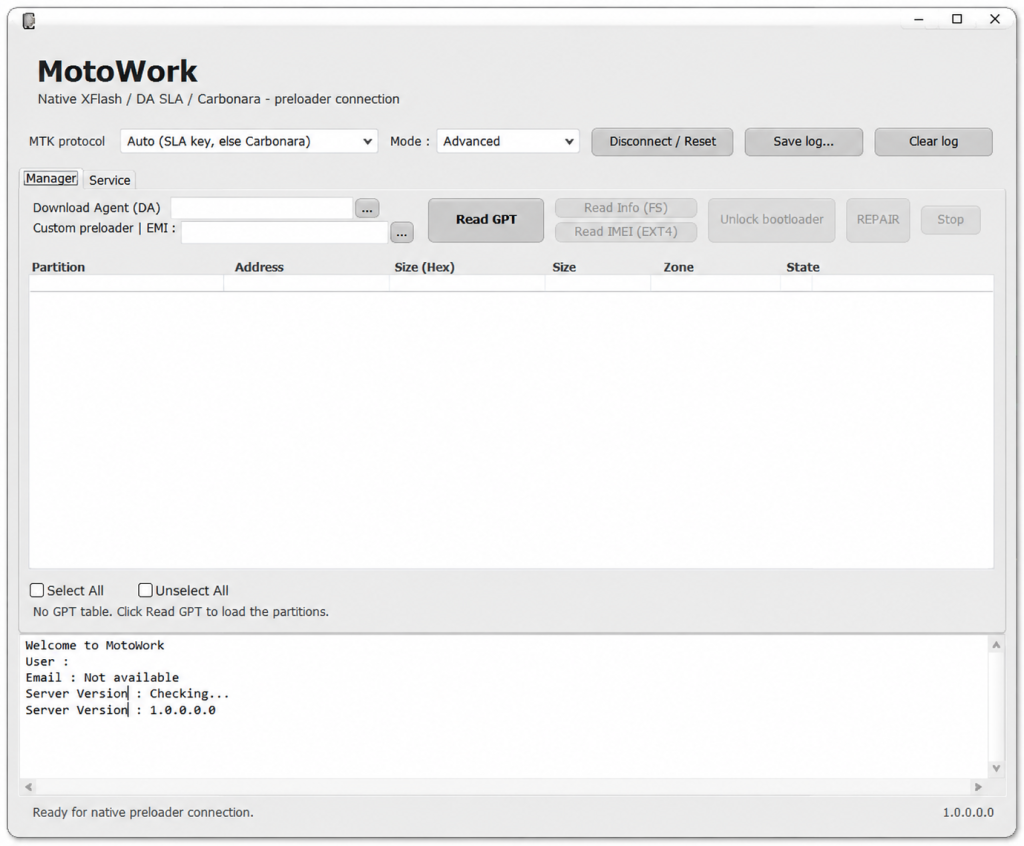
MotoWork Tool is a Windows-based mobile servicing and unlocking application engineered primarily for Motorola smartphones. Designed to eliminate recurring server credit expenses, it provides Advanced Mode and Listed Models Mode workflows allowing repair professionals to repair corrupted IMEI numbers, calculate direct NCK unlock codes, unlock bootloaders, back up critical security partitions, and clear device locks from one streamlined interface.
What’s New & Complete Feature Modules in MotoWork Tool
The latest MotoWork Tool release introduces stability enhancements alongside its full suite of Motorola servicing modules:
1. What’s New in the Latest Update
- Server Update Bypass & Auto-Launch: Resolves the “New version available” interruption by bypassing server version checks and automatically launching the main application from
C:\MotoWork\. - Compact, Streamlined Dashboard: Replaces bulky license panels with a clean, lightweight UI and displays a detailed post-patch diagnostic report confirming applied fixes.
2. Core Servicing Features in MotoWork Tool
- Credit-Free Standalone Operation: Performs supported IMEI repairs, network unlocks, and partition operations without deducting recurring server credits per job.
- Native XFlash & DA SLA Protocols: Supports direct Native XFlash connections and DA SLA handshakes for MediaTek-powered Motorola smartphones without external auth workarounds.
- Genuine IMEI Read & Repair: Reads existing IMEI values directly from
FS / EXT4partitions and executes Genuine IMEI Writing and baseband repair on supported models. - Factory State, Cert Patch & NV Unlocker: Includes dedicated Factory State Method, Cert Patch, and NV Unlocker servicing routines tailored to specific Motorola hardware revisions.
- Automatic Pre-Service Security Backup: Automatically creates safety backups of critical calibration and security partitions before executing sensitive repair tasks.
- Advanced Partition & Bootloader Management: Read, write, and manage device partitions alongside Direct Bootloader Unlock capabilities.
Comprehensive Lock Removal Capabilities (Network, FRP, MDM, PIN & Pattern Locks)
Modern Motorola smartphones incorporate multi-layered carrier, enterprise, and user security locks. MotoWork Tool provides targeted servicing methods to address every major type of lock:
1. Carrier Network Lock & Direct NCK Calculation
Motorola handsets locked to domestic or international carriers require valid network unlock codes or NV security patches. MotoWork Tool features Direct NCK Calculation, NV Unlocker, and 1-Click Network Unlock modules to free carrier-restricted phones cleanly.
2. FRP Bypass (Factory Reset Protection)
When a Motorola smartphone is factory reset without signing out of the primary Google account, FRP blocks setup access. Using low-level MediaTek DA SLA / Native XFlash connections and partition management, technicians can erase persistent frp verification blocks and restore normal setup wizard access.
3. MDM, PayJoy & Carrier Financing Lock Removal
Corporate-managed devices, retail units, and carrier-financed Motorola smartphones (such as Claro, Telcel, or PayJoy-restricted devices) often enforce strict Mobile Device Management (MDM) or white-screen locks. Combining Factory State restoration, partition-level editing, and clean firmware servicing helps neutralize enterprise and financing restrictions.
4. PIN, Password, and Pattern Lock Reset
Forgetting a screen security credential whether a numeric PIN, alphanumeric password, or gesture pattern renders a phone inaccessible. MotoWork Tool’s low-level connection protocols and partition formatting tools enable technicians to wipe userdata partitions safely and reset forgotten screen locks without corrupting IMEI or NV calibration data.
5. Bootloader Lock Removal
Beyond network and screen locks, the utility provides Direct Bootloader Unlock support on compatible Motorola models (such as the Moto G05/G06/G15 series) to facilitate custom firmware flashing and deep software repairs.
Supported Motorola Models and Chipsets
MotoWork Tool specializes in Motorola smartphones across MediaTek and supported platforms (alongside select Honor models):
- Supported Chipsets: MediaTek (
MT6765,MT6768,MT6789,MT6833,MT6878Helio & Dimensity series via Native XFlash and DA SLA) and compatible Qualcomm/Unisoc models via Listed Models Mode. - Popular Supported Models: Motorola
Moto G05,Moto G06 / G06 Power,Moto G15 / G15 Power,Moto E15,Moto G13,Moto G22,Moto G23,Moto G24 / G24 Power,Moto G31,Moto G41,Moto G54,Moto G72,Moto G84,Moto E20 / E22, and additional models listed in the tool’s internal model database.
System Requirements
| Component | Minimum Requirement | Recommended Specification |
| Operating System | Windows 7 / 8 / 10 (32-bit & 64-bit) | Windows 10 / 11 (64-bit) |
| Processor | Intel Core 2 Duo / AMD Dual-Core (2.0 GHz) | Intel Core i3 / AMD Ryzen 3 or higher |
| RAM | 4 GB RAM | 8 GB RAM or higher |
| Storage Space | 500 MB free disk space | 5 GB available space (for automatic security backups) |
| USB Drivers | Motorola Device Manager + MTK VCOM Drivers | Motorola USB Drivers + MediaTek Preloader & USBDK |
How to Download, Install, and Use MotoWork Tool
- Download the Setup Package: Download the official MotoWork Tool compressed archive (
Moto_Work_Tool_GSMYOGESH.rar) and server patch archive from a trusted repository. - Temporarily Pause Antivirus: Windows Defender and third-party antivirus suites often flag servicing tools and patchers due to packed DA SLA loaders. Temporarily disable real-time protection or add an exclusion folder (
C:\MotoWork) before extracting. - Extract & Install MotoWork Setup: Right-click the downloaded
.rararchive, unpack it using WinRAR or 7-Zip, open the extractedMotoWork_Freedirectory, runMotoWork_installer.exeas an administrator, keep the default installation pathC:\MotoWork, and complete installation. - Apply Server Fix (If Included): Extract the supplied server fix archive (standard archive password:
gsmyogeshorgsmyogesh.comif prompted) and run the patch utility as an administrator—which applies the server bypass and launches MotoWork automatically. - Install Motorola & MTK USB Drivers: Ensure official Motorola USB Drivers (
Motorola Device Manager) and MediaTek Preloader VCOM Drivers are installed in Windows Device Manager. - Log In & Execute Repair Task: Enter the login credentials if prompted (e.g., Username/Password:
gsmyogeshfor patched builds or your authorized account details), select Listed Models Mode or Advanced Mode, choose your servicing method (Factory State, Cert Patch, NV Unlocker, IMEI Repair, Network Unlock, or FRP/Userdata Reset), power off your Motorola phone, and connect it via USB in the required boot mode.
Frequently Asked Questions (FAQ)
Q1: Does MotoWork Tool require server credits for IMEI repair or network unlocking?
Ans: No, MotoWork Tool is designed as a credit-free standalone servicing solution for Motorola devices—meaning there are no recurring server credit deductions per operation once the tool is set up.
Q2: Does MotoWork Tool back up security data before modifying IMEI or network locks?
Ans: Yes, MotoWork Tool includes an Automatic Backup feature that creates a backup of critical security and calibration partitions prior to executing supported IMEI repair or network unlock operations.
Q3: Will removing a PIN, pattern, or FRP lock delete personal data?
Ans: Performing a userdata format or factory reset to clear a forgotten PIN or pattern lock will erase personal photos, apps, and files on the device. Removing FRP or unlocking a carrier network lock on an active system generally preserves existing user files, though you should always back up accessible data beforehand.
Q4: Why is Windows failing to detect my Motorola phone in MediaTek BROM / Preloader mode?
Ans: Detection issues usually occur when Motorola USB Drivers or MediaTek VCOM / USBDK Drivers are missing, or when the phone’s battery is completely drained. Install both driver packages, power off the Motorola device completely, hold Volume Up + Volume Down (or the model-specific boot key) while connecting to a direct rear motherboard USB port, and verify port detection in Windows Device Manager.
Conclusion
The MotoWork Tool Latest Version is a specialized, credit-free servicing utility tailored for mobile repair technicians working with Motorola smartphones. By combining Native XFlash and DA SLA connectivity, genuine IMEI repair, direct NCK network unlocking, bootloader unlocking, automatic security backups, and partition-level FRP, MDM, PIN, and pattern lock removal into a compact dashboard, it streamlines complex Motorola repairs. Always ensure official Motorola and MediaTek USB drivers are installed and verify your device’s exact model and method (Factory State, Cert Patch, or NV Unlocker) before servicing.


