CMD Tool 2026 (ADB Tuner) Free Download
Table of Contents
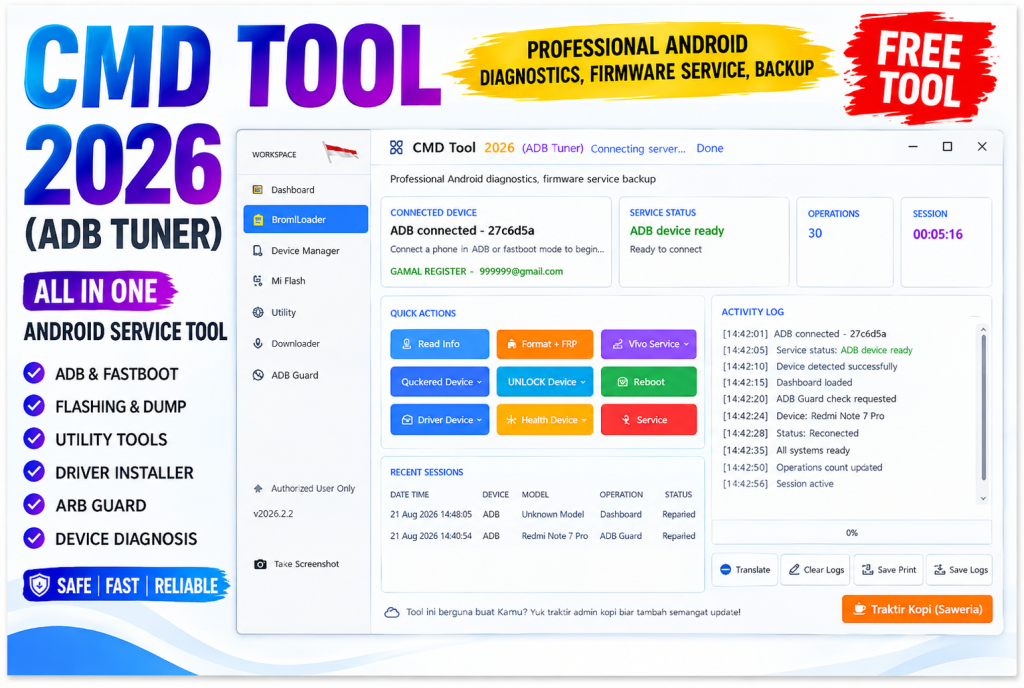
In the mobile software repair and servicing industry, technicians regularly rely on command-line Android Debug Bridge (ADB) and Fastboot operations to diagnose smartphones, install APKs, remove system bloatware, and bypass setup locks. Typing lengthy terminal syntax manually slows down daily bench work and increases the risk of syntax errors. CMD Tool 2026 (ADB Tuner) solves this problem by wrapping powerful ADB and Fastboot commands inside a fast, lightweight, single-click Windows graphical interface.
Operating completely free without requiring an expensive physical dongle, paid server credits, or complex configuration, CMD Tool 2026 (ADB Tuner) streamlines everyday Android diagnostics, tuning, and lock-removal tasks. This comprehensive guide covers every feature, lock-handling capability, system requirement, and setup step
What is CMD Tool 2026 (ADB Tuner)?
CMD Tool 2026 (ADB Tuner) is a lightweight, standalone Windows desktop servicing utility built around the Android Debug Bridge (ADB) and Fastboot protocols. Engineered for GSM repair professionals and Android power users, it translates complex shell and bootloader commands into intuitive one-click actions—allowing technicians to read hardware/software diagnostics, batch-install .apk files, clear Factory Reset Protection (FRP), freeze MDM/carrier bloatware, and reboot into specialized service modes cleanly.
Complete Features & Servicing Modules of CMD Tool 2026 (ADB Tuner)
The 2026 ADB Tuner release packs an essential suite of ADB, Fastboot, and system optimization tools into a clean, easy-to-navigate dashboard:
- 1-Click ADB Device Detection & Diagnostics: Automatically scans USB connections, verifies RSA authorization status, and reads complete device details including Brand, Model, Android Version, Security Patch Level, Build Number, Serial Number, and Battery/Storage stats.
- 1-Click APK Installer & App Manager: Browse and push
.apkpackages directly onto connected Android smartphones in seconds, or inspect, freeze, and uninstall stubborn system bloatware without requiring root privileges. - Multi-Mode Reboot Controller: Instantly reboot connected handsets into Normal System Mode, Android Recovery Mode, Fastboot / Bootloader Mode, Samsung Download (Odin) Mode, or Qualcomm EDL 9008 Mode in a single click.
- Interactive ADB & Fastboot Command Tuner: Provides quick-access command presets alongside a live activity log console so technicians can execute custom shell commands and monitor real-time responses without opening separate Windows Command Prompt windows.
- Firmware & Self-Diagnosis Utilities: Includes ROM integrity verification, device self-diagnosis checks, and integrated USB driver helpers to resolve missing ADB or Fastboot port recognition.
- ADB Server Reset & Port Stabilization: Built-in daemon restart controls (
kill-server/start-server) resolve stuckofflineorunauthorizedUSB states rapidly.
Comprehensive Lock Removal Capabilities (FRP, MDM, PIN, Pattern & Screen Locks)
Modern Android smartphones incorporate multi-layered security protocols to safeguard user and enterprise data. CMD Tool 2026 (ADB Tuner) provides targeted ADB and Fastboot routines to address every major type of device lock:
1. FRP Bypass (Factory Reset Protection)
When an Android smartphone is factory reset without signing out of the primary Google account, FRP restricts setup access. Once USB Debugging (ADB) is enabled on the device (via *#0*# Test Mode on supported Samsung phones, Setup QR provisioning, or MTP ADB enablers), CMD Tool 2026 (ADB Tuner) executes automated setup-completion scripts (user_setup_complete) and clears persistent FRP flags—exiting the setup wizard directly to the home screen without relocking.
2. MDM, IT Admin & Carrier Bloatware Removal
Corporate-managed phones, school tablets, and carrier-restricted devices often enforce Mobile Device Management (MDM), Device Owner policies, or aggressive carrier lock agents. Using ADB package disabling (pm disable-user), active admin clearing on supported builds, and OTA update blockers, technicians can neutralize enterprise and carrier restrictions cleanly without flashing full firmware.
3. PIN, Password, and Pattern Lock Reset
Forgetting a screen security credential—whether a numeric PIN, alphanumeric password, or gesture pattern—renders a phone inaccessible. On handsets where USB Debugging was previously authorized (or on rooted/legacy Android builds), the utility helps reset screen-lock states or reboots the device directly into Recovery Mode or Fastboot Mode (fastboot erase userdata / fastboot -w) to perform a clean factory data wipe.
4. Brand Account & Relock Prevention (Xiaomi Mi Account / Samsung Account)
Beyond standard Google locks, CMD Tool 2026 (ADB Tuner) assists in freezing background cloud-sync and relock services for Xiaomi Mi Account and Samsung Account setups via ADB package management on supported firmware builds.
Supported Brands and Chipsets
CMD Tool 2026 (ADB Tuner) delivers universal compatibility across virtually any Android brand and hardware architecture using standard ADB and Fastboot communication:
- Supported Chipsets: Qualcomm Snapdragon, MediaTek (MTK Helio & Dimensity), Samsung Exynos, Unisoc / Spreadtrum (SPD), HiSilicon Kirin, and Google Tensor.
- Supported Brands: Samsung Galaxy (S, A, F, M, J, and Tab series), Xiaomi, Redmi, POCO, OPPO, Realme, Vivo, iQOO, OnePlus, Motorola, TECNO, Infinix, Itel, Lenovo, LG, HTC, and generic Android smartphones/tablets.
System Requirements
| Component | Minimum Requirement | Recommended Specification |
| Operating System | Windows 7 / 8 / 10 (32-bit & 64-bit) | Windows 10 / 11 (64-bit) |
| Processor | Intel Core 2 Duo / AMD Dual-Core (1.8 GHz) | Intel Core i3 / AMD Ryzen 3 or higher |
| RAM | 2 GB RAM | 4 GB RAM or higher |
| Storage Space | 200 MB free disk space | 2 GB+ available space |
| USB Drivers | Universal ADB & Fastboot Drivers | Google Platform-Tools + Samsung/Xiaomi/MTK Drivers |
How to Download, Install, and Use CMD Tool 2026 (ADB Tuner)
- Download the Setup Archive: Download the official CMD Tool 2026 (ADB Tuner) compressed
.zipor.rarpackage from a trusted repository. - Temporarily Pause Antivirus: Windows Defender and third-party antivirus suites often flag lightweight ADB wrapper tools due to packed
adb.exebinaries. Temporarily disable real-time protection or add an exclusion folder before extracting. - Extract All Files to One Folder: Unpack the archive into a dedicated folder on your
C:drive (e.g.,C:\CMD_Tool_2026) using WinRAR or 7-Zip—entering the standard archive password123if prompted. Ensureadb.exe,fastboot.exe, and supporting.dllfiles remain in the exact same directory as the main executable. - Install Required USB Drivers: Ensure official Universal ADB Drivers, Fastboot Drivers, and manufacturer USB drivers (Samsung, Xiaomi, Motorola, MediaTek) are installed in Windows Device Manager.
- Launch CMD Tool 2026: Right-click the main executable file and select Run as administrator.
- Connect Device & Execute Task: Connect your Android smartphone via a reliable USB data cable with USB Debugging enabled (or in Fastboot mode), tap Allow on the phone’s “Allow USB debugging?” RSA authorization prompt, verify device detection in the tool’s dashboard, and select your desired action (Remove FRP, Install APK, Clean Bloatware / MDM, Read Info, or Reboot Mode).
Frequently Asked Questions (FAQ)
Q1: Is CMD Tool 2026 (ADB Tuner) free to use, and what is the archive password?
Ans: Yes, CMD Tool 2026 (ADB Tuner) is a completely free, dongle-free Windows utility. If your downloaded archive asks for an extraction password, use 123 (or check the included readme note).
Q2: How does CMD Tool 2026 bypass FRP on locked Android devices?
Ans: Once USB Debugging (ADB) is enabled on a locked device—using brand-specific triggers like *#0*# on supported Samsung devices or Setup QR provisioning—CMD Tool 2026 sends automated shell commands that mark the Google Setup Wizard as complete (user_setup_complete) and clear active FRP restrictions without relocking.
Q3: Will removing FRP or disabling MDM/bloatware via ADB Tuner erase personal data?
Ans: Performing an ADB FRP Bypass, APK Install, or Bloatware / MDM Package Disable preserves existing personal files on the device. However, if you use Recovery or Fastboot wipe options to clear a forgotten PIN or pattern lock, all user data on the phone will be erased. Always back up accessible files before servicing.
Q4: Why is CMD Tool 2026 showing “Device Unauthorized” or failing to detect my phone?
Ans: A “Device Unauthorized” status means the phone has not yet trusted your computer’s RSA debugging key. Wake the phone screen, disconnect and reconnect the USB cable, and tap Always allow from this computer – Allow on the pop-up prompt. If the device does not appear at all, reinstall Universal ADB Drivers and use a direct rear motherboard USB port.
Conclusion
The CMD Tool 2026 (ADB Tuner) utility is a practical, time-saving companion for mobile repair technicians and Android enthusiasts who rely on ADB and Fastboot workflows. By replacing repetitive command-line typing with 1-click device diagnostics, APK installation, bloatware/MDM management, multi-mode rebooting, and ADB FRP bypass across major Android brands, it streamlines everyday servicing tasks. Always ensure official Universal ADB/Fastboot USB drivers are installed and verify device authorization before performing system modifications.