Fastboot Bulk Flasher by OXYGEN Amazing Version Download
Table of Contents
In high-volume mobile software repair workshops, refurbishing centers, and flashing labs, installing stock firmware one device at a time via standard command-line Fastboot or single-port flashers slows down productivity. Fastboot Bulk Flasher by OXYGEN Latest Version solves this bottleneck by enabling technicians to flash multiple Android smartphones simultaneously in parallel.
Built specifically for Windows workstations and engineered with automated hardware safety protections including anti-rollback verification, product mismatch checks, and low-battery warnings Fastboot Bulk Flasher by OXYGEN streamlines multi-device firmware deployment using standard flash_all.bat scripts. This comprehensive guide covers every feature, lock-servicing role, system requirement, and setup step.
What is Fastboot Bulk Flasher by OXYGEN?
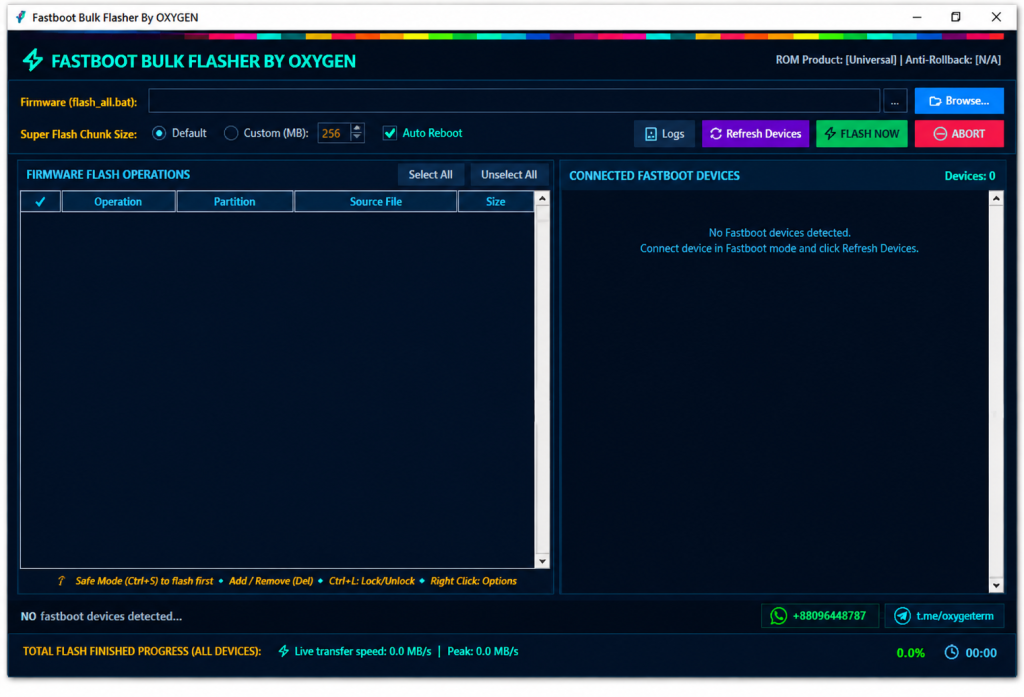
Fastboot Bulk Flasher by OXYGEN is a multi-device Windows desktop Fastboot firmware flashing utility created by developer OXYGEN. Instead of opening multiple Command Prompt windows or running separate single-device flashers, technicians can load a single flash_all.bat firmware script, connect multiple Android devices in Fastboot Mode over USB, and execute synchronized parallel flashing with live per-device and fleet-wide telemetry.
Complete Features & Safety Modules of Fastboot Bulk Flasher by OXYGEN
The latest release combines high-speed parallel flashing with strict brick-prevention safeguards and a modern dark interface:
1. Parallel Multi-Device Flashing & Script Engine
- Simultaneous Bulk Device Flashing: Flash multiple Android smartphones or tablets concurrently in a single session without manual per-port scripting.
flash_all.batScript Loader: Directly loads standard Fastbootflash_all.batfirmware scripts (commonly packaged in Xiaomi, Redmi, POCO, Motorola, and generic Fastboot ROMs) and parses all partition commands automatically.- Automatic Fastboot Device Detection: Scans connected USB ports and auto-populates active Fastboot devices with one-click refresh support.
- Smart Operation Ordering: Executes partition writes and system commands in a strict, brick-safe sequence: Standard Partitions → Critical Bootloader →
set_active(A/B Slot) → OEM Commands → Lock State → Reboot. - Sparse Mode & Auto Reboot Controls: Supports configurable Sparse Mode (
DefaultorCustom MBchunk size) for largesuper.img/userdata.imgtransfers, alongside a toggleable Auto Reboot option after completion.
2. Built-In Brick Prevention & Safety Checks
- Anti-Rollback (ARB) Protection Check: Inspects device rollback indices against the loaded firmware before flashing to prevent permanent anti-rollback bricks.
- Product Name Mismatch Detection: Verifies the connected device’s codename/product string against the
flash_all.batscript so technicians do not accidentally flash the wrong model’s ROM. - Low Battery Warning: Checks battery voltage/percentage prior to flashing and alerts the technician if charge levels are dangerously low.
3. Real-Time Telemetry, Logging & Workflow Controls
- Per-Device & Fleet-Wide Progress Bars: Displays individual progress bars with live percentage, transfer speed (
MB/s), elapsed timer, and active task name for every connected phone, plus an overall fleet-wide rainbow progress bar and combined transfer speed readout. - Global Abort Button: Immediately halts all active flashing jobs across every port if an emergency stop is required.
- Automatic Session Logging & Sleep Prevention: Saves detailed session logs automatically inside
Documents/FastbootBulkFlasher, prevents Windows from entering sleep mode during active transfers, plays an audio notification when a device finishes, and features a modern dark UI with animated rainbow accents.
Lock Handling & Servicing Capabilities (FRP, MDM, PIN, Pattern & Bootloader Locks)
While Fastboot Bulk Flasher by OXYGEN is engineered primarily as a bulk Fastboot firmware installation utility rather than a BROM/EDL exploit box, clean Fastboot flashing plays an essential role in resolving software-level device locks on bootloader-unlocked or factory-serviceable handsets:
1. FRP Bypass (Factory Reset Protection)
When servicing devices with unlocked bootloaders or factory engineering states where standard setup locks persist, loading a clean stock Fastboot ROM (flash_all.bat) or flashing clean frp / persistent / config images clears corrupted Google verification states cleanly.
2. MDM, Retail Demo & Enterprise Profile Removal
Refurbished corporate phones, school tablets, and retail display units often carry Mobile Device Management (MDM) overlays or demo software partitions. Performing a bulk clean stock firmware flash via flash_all.bat overwrites modified vendor/system demo overlays and restores clean factory OS builds on eligible unlocked units.
3. PIN, Password, and Pattern Lock Reset
Forgetting a screen security credential whether a numeric PIN, alphanumeric password, or gesture pattern renders a phone inaccessible. Running a standard flash_all.bat script flashes a clean userdata.img and cache.img across all connected units simultaneously, erasing forgotten screen locks and resetting devices to out-of-box factory condition.
4. Bootloader Lock & Relock Management
Because the tool’s Smart Operation Ordering explicitly handles OEM → Lock → Reboot sequences, technicians can flash stock firmware and cleanly relock bootloaders (fastboot oem lock / fastboot flashing lock) on refurbished devices when instructed by the flash_all.bat script.
Supported Brands and Chipsets
Fastboot Bulk Flasher by OXYGEN works with any Android smartphone or tablet that supports standard Android Fastboot flashing protocols and flash_all.bat firmware packages:
- Supported Brands: Xiaomi, Redmi, POCO, Motorola, OnePlus, ASUS, Google Pixel, Nokia/HMD, Lenovo, and generic Fastboot-compatible Android devices.
- Supported Chipsets: Qualcomm Snapdragon, MediaTek (MTK), Unisoc / Spreadtrum (SPD), and Google Tensor (operating in Fastboot / Bootloader mode).
System Requirements
| Component | Minimum Requirement | Recommended Specification |
| Operating System | Windows 8 / 10 (64-bit) | Windows 10 / 11 (64-bit) |
| Processor | 4 GB RAM | Intel Core i5 / AMD Ryzen 5 or higher (for multi-port I/O) |
| RAM | 4 GB RAM | 8 GB RAM or higher |
| Storage Space | 2 GB free disk space | 30 GB+ SSD space (for fast concurrent Fastboot ROM reads) |
| USB & Drivers | Android Bootloader / Fastboot USB Drivers | Powered USB 3.0 Hub + Google Platform-Tools Drivers |
How to Download, Install, and Use Fastboot Bulk Flasher by OXYGEN
- Download the Setup Archive: Download the official Fastboot Bulk Flasher by OXYGEN Latest Version
.zipor.exepackage from a trusted repository. - Extract the Files: If downloaded as a
.ziparchive, right-click and extract all files into a dedicated folder on yourC:drive using WinRAR or 7-Zip. - Install Android Fastboot Drivers: Ensure official Google Android Bootloader Interface / Fastboot USB Drivers are properly installed in Windows Device Manager so every connected device is recognized cleanly.
- Launch Fastboot Bulk Flasher: Right-click the Fastboot Bulk Flasher executable and select Run as administrator.
- Load the
flash_all.batFirmware Script: Click the Browse button in the top interface, navigate to your extracted Fastboot ROM directory, and select theflash_all.batscript (inspect whether the script locks the bootloader if you intend to keep it unlocked). - Connect Multiple Devices in Fastboot Mode: Boot one or more target Android smartphones into Fastboot Mode (typically
Volume Down + Power), connect them to your PC via reliable USB data cables, and click the Refresh button to detect all active devices. - Configure Options & Start Bulk Flashing: Select your preferred Sparse Mode setting (
DefaultorCustom MB), toggle Auto Reboot if desired, click Flash, confirm any anti-rollback or product verification prompts, and monitor the live progress bars until completion.
Frequently Asked Questions (FAQ)
Q1: How many devices can I flash at the same time with Fastboot Bulk Flasher by OXYGEN?
Ans: Fastboot Bulk Flasher by OXYGEN supports simultaneous parallel flashing across multiple connected Fastboot devices—limited primarily by your Windows PC’s available USB host controllers, powered USB hub bandwidth, and storage read speed.
Q2: Does Fastboot Bulk Flasher work on phones with a locked bootloader?
Ans: Standard Fastboot partition flashing (flash_all.bat) requires an unlocked bootloader on most commercial Android devices (such as Xiaomi, Redmi, POCO, and Motorola). If the bootloader is locked, Fastboot commands will be rejected unless the device is running an authorized factory/engineering bootloader state.
Q3: Will flashing a flash_all.bat script erase PIN, pattern, and user data?
Ans: Yes, standard flash_all.bat scripts include userdata and cache flashing commands, which completely wipe all personal photos, apps, and forgotten PIN, password, or pattern locks—restoring the device to clean factory firmware. Always back up accessible user data before flashing.
Q4: Where are the flashing logs saved after a bulk session finishes?
Ans: Fastboot Bulk Flasher by OXYGEN automatically records and saves detailed session logs inside your Windows user directory at Documents\FastbootBulkFlasher for troubleshooting and quality-control tracking.
Conclusion
The Fastboot Bulk Flasher by OXYGEN Latest Version is a purpose-built productivity powerhouse for repair shops, refurbishers, and technicians handling multi-device Fastboot firmware installations. By pairing parallel flash_all.bat execution and live fleet telemetry with anti-rollback checks, product mismatch protection, low-battery warnings, and smart partition ordering, it eliminates repetitive single-device bottlenecks while protecting hardware from accidental bricks. Always verify bootloader unlock status and model codenames before starting a bulk flash session.