AKS Fastboot Firmware Flasher V1.0 Free Download
Table of Contents
In the mobile software repair and flashing industry, restoring bricked smartphones, downgrading or upgrading system builds, and wiping stubborn software locks via Fastboot Mode often requires typing manual fastboot commands or relying on heavy manufacturer suites. AKS Fastboot Firmware Flasher V1.0 provides a lightweight, streamlined Windows desktop utility designed to automate Fastboot firmware flashing and essential lock-servicing operations from a clean graphical interface.
Operating completely free without requiring an expensive physical dongle, smart-card box, or paid server credits, AKS Fastboot Firmware Flasher V1.0 simplifies stock ROM installation, partition formatting, and multi-mode reboot controls for GSM repair technicians and Android enthusiasts. This comprehensive guide covers every feature, lock-removal role, system requirement, and step-by-step usage instruction.
What is AKS Fastboot Firmware Flasher V1.0?
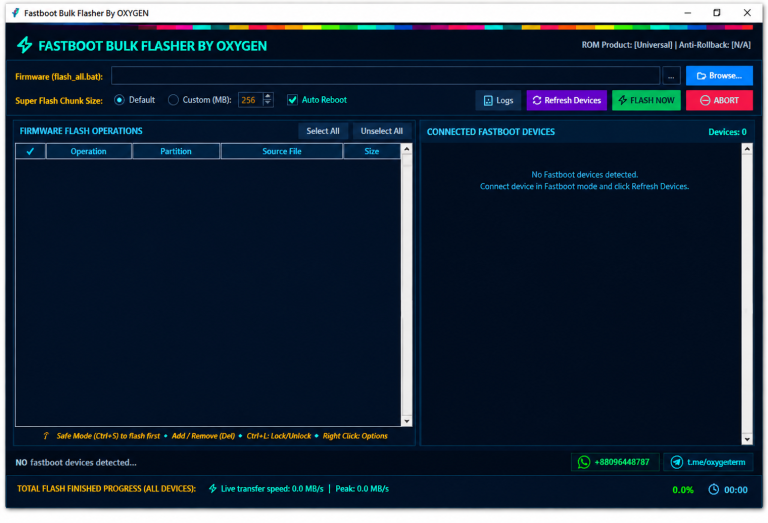
AKS Fastboot Firmware Flasher V1.0 is a standalone Windows-based Fastboot firmware flashing and device servicing utility built for Android smartphones and tablets. Engineered to eliminate repetitive command-line typing, it bundles official Fastboot binaries inside a single-window interface—allowing technicians to detect connected Fastboot handsets, load stock firmware packages or flash scripts, wipe corrupted partitions, and restore clean factory software safely.
Complete Features & Servicing Modules of AKS Fastboot Firmware Flasher V1.0
The V1.0 release packs a practical set of Fastboot flashing, partition management, and diagnostic utilities into a fast, lightweight layout:
- 1-Click Fastboot Stock Firmware Flasher: Automatically parses standard Fastboot ROM packages and batch flash scripts (
flash_all.bat/ partition lists), writingboot,vbmeta,dtbo,recovery,system,vendor, andsuperimages cleanly in sequence. - Automatic Fastboot Device Detection & Info Reader: Scans connected USB ports to verify Fastboot interface recognition and reads essential device diagnostics including product codename, serial number, bootloader lock state, and active slot (
_a/_b). - Selective Partition Wipe & Format Utilities: Includes quick actions to erase
userdata,cache, andmetadatapartitions—resolving boot loops, soft-bricks, and corrupted system states without complex syntax. - Bootloader Unlock & Relock Commands: Provides direct one-click triggers for standard OEM bootloader unlocking (
fastboot flashing unlock/fastboot oem unlock) and stock bootloader relocking on supported models. - Multi-Mode Reboot Controller: Reboot connected smartphones instantly into Normal System Mode, Android Recovery Mode, Fastboot / Bootloader Mode, Fastbootd Mode, or Qualcomm EDL 9008 Mode (on supported models).
- Real-Time Live Execution Console: Displays every Fastboot command and device response in real time so technicians can monitor transfer progress and troubleshoot partition errors immediately.
- Portable, Dongle-Free Standalone Execution: Runs directly on Windows workstations without requiring a physical USB dongle or recurring server credit deductions.
Lock Removal & Servicing Capabilities (FRP, MDM, PIN, Pattern & Bootloader Locks)
Because AKS Fastboot Firmware Flasher V1.0 provides direct Fastboot partition flashing, userdata formatting, and bootloader control, it plays a valuable role in clearing software-level device locks on Fastboot-accessible or bootloader-unlocked handsets:
1. FRP Bypass (Factory Reset Protection)
When servicing Fastboot-accessible or unlocked Android devices where lingering setup verification or corrupted frp / persistent states block normal startup, flashing a clean stock Fastboot ROM or executing targeted Fastboot FRP erase commands restores clean out-of-box setup access.
2. MDM, Retail Demo & Enterprise Profile Removal
Corporate-managed phones, school tablets, and retail display units often enforce Mobile Device Management (MDM) overlays or demo software packages embedded inside system and vendor partitions. Performing a full clean stock firmware flash via AKS Fastboot Firmware Flasher V1.0 overwrites modified demo/enterprise partitions and restores clean factory firmware on eligible unlocked units.
3. PIN, Password, and Pattern Lock Reset
Forgetting a screen security credential—whether a numeric PIN, alphanumeric password, or gesture pattern—renders a phone inaccessible. By executing Format Userdata / Cache (fastboot erase userdata / fastboot -w) or flashing a clean stock ROM package, the tool erases forgotten PIN, password, and pattern locks cleanly while keeping baseband calibration intact.
4. Bootloader Lock & Relock Management
Beyond screen and setup locks, AKS Fastboot Firmware Flasher V1.0 assists technicians with OEM Bootloader Unlocking (required before flashing custom or regional stock ROMs) as well as Bootloader Relocking after restoring official signed firmware.
Supported Brands and Chipsets
AKS Fastboot Firmware Flasher V1.0 supports any Android smartphone or tablet that communicates via standard Android Fastboot / Bootloader protocols:
- Supported Brands: Xiaomi, Redmi, POCO, Motorola, OnePlus, ASUS, Google Pixel, Nokia/HMD, Lenovo, TECNO, Infinix (Fastboot/Fastbootd builds), and generic Android devices.
- Supported Chipsets: Qualcomm Snapdragon, MediaTek (MTK), Unisoc / Spreadtrum (SPD), and Google Tensor (operating in Fastboot / Bootloader mode).
System Requirements
| Component | Minimum Requirement | Recommended Specification |
| Operating System | Windows 7 / 8 / 10 (32-bit & 64-bit) | Windows 10 / 11 (64-bit) |
| Processor | Intel Core 2 Duo / AMD Dual-Core (2.0 GHz) | Intel Core i3 / AMD Ryzen 3 or higher |
| RAM | 2 GB RAM | 4 GB RAM or higher |
| Storage Space | 500 MB free disk space | 15 GB+ available space (for extracted Fastboot ROMs) |
| USB Drivers | Android Bootloader / Fastboot USB Drivers | Google Platform-Tools + Brand USB Drivers |
How to Download, Set Up, and Use AKS Fastboot Firmware Flasher V1.0
- Download the Setup Archive: Download the official AKS Fastboot Firmware Flasher V1.0 compressed
.zipor.rarpackage from a trusted repository. - Temporarily Pause Antivirus: Windows Defender and third-party antivirus suites occasionally flag lightweight Fastboot wrapper utilities due to packed
fastboot.exebinaries. Temporarily disable real-time protection or add an exclusion folder before extracting. - Extract All Files to One Folder: Unpack the archive into a dedicated folder on your
C:drive (e.g.,C:\AKS_Fastboot_Flasher_V1.0) using WinRAR or 7-Zip sofastboot.exe,adb.exe, and supporting.dllfiles remain in the exact same directory as the main executable. - Install Android Fastboot Drivers: Ensure official Google Android Bootloader Interface / Fastboot USB Drivers and manufacturer USB drivers (Xiaomi, Motorola, OnePlus, etc.) are properly installed in Windows Device Manager.
- Boot Device into Fastboot Mode & Connect: Power off your Android smartphone, press and hold the Fastboot key combination (typically Volume Down + Power), and connect it to a direct rear motherboard USB port using a reliable data cable.
- Launch Tool & Execute Flashing / Lock Servicing: Right-click the AKS Fastboot Firmware Flasher V1.0 executable, select Run as administrator, verify device detection in the console, load your extracted Fastboot firmware folder/script (or select Format Userdata / Erase FRP), and click Start / Flash to complete the process.
Frequently Asked Questions (FAQ)
Q1: Is AKS Fastboot Firmware Flasher V1.0 free to use, and does it require a dongle?
Ans: Yes, AKS Fastboot Firmware Flasher V1.0 is a completely free, dongle-free Windows desktop utility that operates over standard USB connections without requiring a hardware box or paid server credits.
Q2: Can AKS Fastboot Firmware Flasher V1.0 flash firmware on a phone with a locked bootloader?
Ans: On most commercial Android smartphones (such as Xiaomi, Redmi, POCO, and Motorola), flashing full Fastboot firmware packages or erasing userdata via Fastboot requires an unlocked bootloader. If the bootloader is locked, Fastboot write commands will be blocked unless the device is running an authorized factory bootloader.
Q3: Will flashing stock firmware or formatting userdata remove PIN, pattern, and user data?
Ans: Yes, running a full Fastboot firmware flash or executing Format Userdata / Wipe Data completely erases personal photos, apps, and forgotten PIN, password, or pattern locks—restoring the device to clean out-of-box factory condition. Always back up accessible data before flashing.
Q4: Why is Windows failing to recognize my phone in Fastboot Mode?
Ans: Fastboot detection failures typically happen when Windows assigns a generic USB driver instead of the Android Bootloader Interface driver. Open Windows Device Manager while the phone is in Fastboot Mode, update the driver manually to Android Bootloader Interface, and connect directly to a rear PC USB port without using a USB hub.
Conclusion
The AKS Fastboot Firmware Flasher V1.0 utility is a clean, reliable, and time-saving solution for mobile repair technicians and Android enthusiasts handling Fastboot firmware installations and system restorations. By combining 1-click Fastboot ROM flashing, live command telemetry, bootloader controls, and partition-level FRP, MDM, PIN, and pattern lock clearing into a lightweight Windows interface, it eliminates manual command-line friction. Always ensure official Fastboot USB drivers are installed and verify your device’s exact model codename before starting any flash operation.