Pixel Utility Tool v2026-11-18-0 Latest Version Download
Table of Contents
In the mobile software repair and flashing industry, Google Pixel smartphones present unique servicing requirements due to their Google Tensor (G1 through G5) and Qualcomm Snapdragon architectures, strict verified-boot chains (vbmeta), and dual-slot (_a / _b) dynamic partitions. Pixel Utility Tool v2026-11-18-0 Latest Version provides a dedicated, all-in-one Windows desktop utility engineered specifically for servicing Google Pixel phones and tablets.
Updated with the November 18, 2026 definitions for Android 15, Android 16, and late-2026 Pixel security patches, Pixel Utility Tool v2026-11-18-0 unifies ADB, Fastboot, Fastbootd, Sideload / Recovery, and Qualcomm EDL 9008 (for legacy Snapdragon Pixel models) into one clean technician dashboard. This comprehensive guide covers every feature, lock-handling capability, system requirement, and setup step.
What is Pixel Utility Tool v2026-11-18-0?
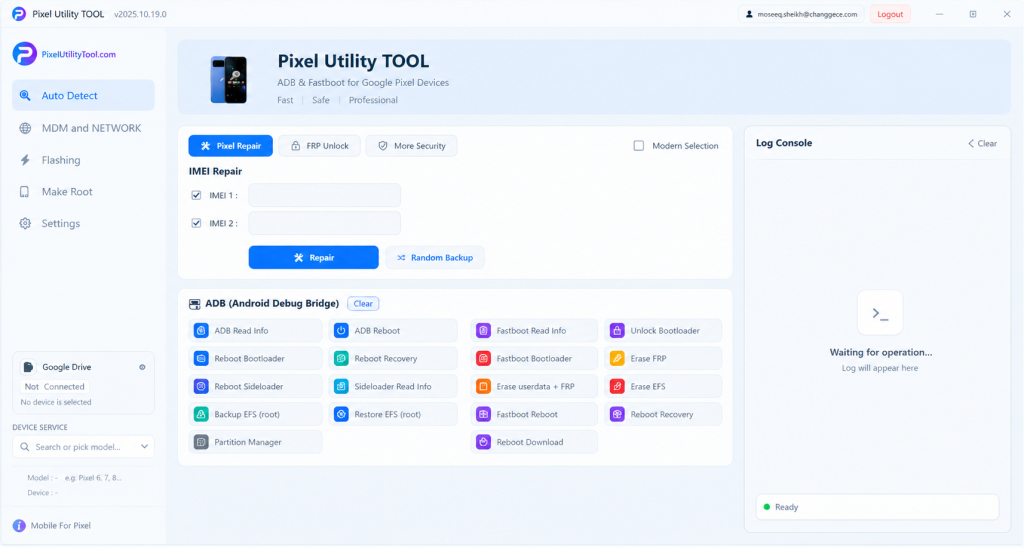
Pixel Utility Tool v2026-11-18-0 is a specialized Windows desktop repair, flashing, and unlocking utility built exclusively for Google Pixel devices. Operating without requiring an expensive physical dongle or complicated manual command-line typing, it enables GSM repair technicians to read detailed Pixel hardware/bootloader diagnostics, flash full factory images or OTA updates, manage A/B boot slots, bypass Factory Reset Protection (FRP), neutralize Mobile Device Management (MDM) and carrier restrictions, and reset forgotten screen locks cleanly.
Complete Features & Servicing Modules of Pixel Utility Tool v2026-11-18-0
The v2026-11-18-0 release organizes its specialized Google Pixel toolset into dedicated servicing modules:
1. Fastboot, Fastbootd & Factory Image Flasher
- 1-Click Full Factory Image & OTA Sideload Flasher: Parses official Google Pixel factory
.zippackages (bootloader,radio,init_boot,boot,vendor_boot,vbmeta, andsuper.img) and flashes them cleanly via Fastboot /fastbootd, or pushes rescue.zipbuilds via Recovery ADB Sideload. - Dual-Slot (
_a/_b) &vbmetaControl: Inspects current active boot slots, switches slots with one click, and patches/disablesdm-verityand verification flags onvbmetafor custom or rooted workflows. - Complete Device & Bootloader Diagnostics: Reads exact Pixel codename (e.g.,
panther,cheetah,shiba,husky,tokay,caiman,komodo), serial number, baseband version, bootloader lock state, and anti-rollback status.
2. ADB, Diagnostic & Carrier / Enterprise Utilities
- ADB System & Bloatware / Enterprise Manager: Freeze, disable, or uninstall unwanted carrier overlays, retail demo packages, and OTA update agents without root on supported builds.
- Diagnostic & Carrier Port Enabler: Enables USB Debugging / Diag ports on supported builds and assists with carrier provisioning / APN diagnostics.
- Multi-Mode Reboot Controller: Reboot connected Pixel handsets instantly into System, Recovery, Bootloader / Fastboot, Fastbootd, ADB Sideload, or Qualcomm EDL 9008 (for supported Snapdragon models).
3. Partition Backup, Wipe & Unbrick Tools
- Selective Partition Erase & Format: Safely wipes
userdata,cache, andmetadatapartitions in Fastboot/Recovery to resolve boot loops, soft-bricks, and corrupted system updates. - Legacy Qualcomm EDL 9008 & EFS Support: Provides Firehose loader support and
EFS/Persistbackup utilities for earlier Snapdragon-powered Pixel models (Pixel 1throughPixel 5a).
Comprehensive Lock Removal Capabilities (FRP, MDM, PIN, Pattern & Bootloader Locks)
Google Pixel devices utilize Titan M / Titan M2 security chips alongside Android Verified Boot to protect user and corporate data. Pixel Utility Tool v2026-11-18-0 provides targeted routines to address every major lock category:
1. FRP Bypass (Factory Reset Protection)
When a Google Pixel smartphone is factory reset without removing the primary Google account, FRP blocks setup access. Pixel Utility Tool v2026-11-18-0 includes dedicated ADB / Setup Wizard FRP Bypass, Fastboot FRP Erase (on unlocked bootloaders), and EDL FRP Reset (on supported Snapdragon Pixel models) to restore clean out-of-box setup access.
2. MDM, Enterprise & Carrier / Retail Demo Lock Removal
Corporate-managed Pixel phones, school tablets, financed units, and store display models often enforce Mobile Device Management (MDM), IT Admin policies, or Retail Demo restrictions. Using the ADB Device Owner / MDM Disabler, Retail Demo Mode Remover, and OTA Update Blocker, technicians can neutralize enterprise and demo overlays cleanly.
3. PIN, Password, and Pattern Lock Reset
Forgetting a screen security credential—whether a numeric PIN, alphanumeric password, or gesture pattern—renders a Pixel device inaccessible. Technicians can execute Fastboot Format Userdata (fastboot -w) or guided Recovery Wipe Data / Factory Reset routines to erase forgotten PIN, password, and pattern locks while preserving baseband calibration.
4. Bootloader Unlock & Relock Management
Beyond screen and account locks, Pixel Utility Tool v2026-11-18-0 provides 1-click OEM Bootloader Unlocking (fastboot flashing unlock—when OEM Unlocking is toggled on in Developer Options) as well as Bootloader Relocking (fastboot flashing lock) after restoring clean official Google factory firmware.
Supported Google Pixel Models and Chipsets
Pixel Utility Tool v2026-11-18-0 supports the full lineup of Google Pixel smartphones, foldables, and tablets:
- Google Tensor Series: Pixel 6, Pixel 6 Pro, Pixel 6a (
Tensor G1), Pixel 7, Pixel 7 Pro, Pixel 7a, Pixel Fold, Pixel Tablet (Tensor G2), Pixel 8, Pixel 8 Pro, Pixel 8a (Tensor G3), Pixel 9, Pixel 9 Pro, Pixel 9 Pro XL, Pixel 9 Pro Fold, Pixel 9a (Tensor G4), and Pixel 10 series (Tensor G5). - Qualcomm Snapdragon Series: Pixel 2 / 2 XL, Pixel 3 / 3 XL / 3a / 3a XL, Pixel 4 / 4 XL / 4a / 4a 5G, and Pixel 5 / 5a 5G.
System Requirements
| Component | Minimum Requirement | Recommended Specification |
| Operating System | Windows 8 / 10 (64-bit) | Windows 10 / 11 (64-bit) |
| Processor | Intel Core 2 Duo / AMD Dual-Core (2.0 GHz) | Intel Core i3 / AMD Ryzen 3 or higher |
| RAM | 4 GB RAM | 8 GB RAM or higher |
| Storage Space | 1 GB free disk space | 20 GB+ available space (for Pixel factory .zip images) |
| USB Drivers | Google USB Driver (ADB & Bootloader Interface) | Latest Google Platform-Tools + Google USB Drivers + Qualcomm 9008 |
How to Download, Install, and Use Pixel Utility Tool v2026-11-18-0
- Download the Setup Package: Download Pixel Utility Tool v2026-11-18-0 compressed
.zipor.rararchive from a trusted repository. - Temporarily Pause Antivirus: Windows Defender and third-party antivirus suites occasionally flag multi-mode Android servicing tools due to bundled ADB/Fastboot exploit scripts. Temporarily disable real-time protection or add an exclusion folder (
C:\Pixel_Utility_Tool) before extracting. - Extract & Install / Launch: Unpack the archive using WinRAR or 7-Zip into a clean directory, right-click the executable, and select Run as administrator.
- Install Official Google USB Drivers: Ensure Google Android Bootloader Interface and Android ADB Interface drivers are properly installed in Windows Device Manager (plus Qualcomm HS-USB QDLoader 9008 if servicing older Snapdragon Pixel models).
- Connect Your Google Pixel Device: Boot your Pixel into Fastboot / Bootloader Mode (hold Volume Down + Power while powered off), Recovery / Sideload Mode, or connect via ADB / EDL 9008, and plug it into a direct rear motherboard USB port using a high-quality USB-C data cable.
- Select Operation & Execute: Verify device detection in the top status bar, choose your desired action (Remove FRP, Remove MDM / Demo, Factory Reset / Wipe Data, Unlock / Relock Bootloader, or Flash Factory / OTA Firmware), and click Start to complete the task.
Frequently Asked Questions (FAQ)
Q1: Does Pixel Utility Tool v2026-11-18-0 require a physical hardware dongle?
Ans: No, Pixel Utility Tool v2026-11-18-0 runs as a standalone Windows desktop servicing utility over standard USB-C connections without requiring a physical smart-card box.
Q2: Can I unlock the bootloader on a carrier-locked Verizon or AT&T Google Pixel using this tool?
Ans: No, carrier-branded Google Pixel models (such as Verizon variants) permanently disable the OEM Unlocking toggle at the hardware/carrier provisioning level. Fastboot bootloader unlocking only works on factory-unlocked or carrier-eligible Pixel models where OEM Unlocking can be enabled.
Q3: Will removing a PIN, pattern, or FRP lock delete personal data on a Google Pixel?
Ans: Performing a Factory Reset, Recovery Wipe Data, or Fastboot Format Userdata to clear a forgotten PIN or pattern lock will erase all personal photos, apps, and files on the device. Removing FRP via ADB setup exploits on an already-reset phone or disabling MDM overlays generally preserves existing files, though you should always back up accessible data first.
Q4: Why is Windows failing to recognize my Google Pixel in Fastboot Mode?
Ans: Fastboot detection issues usually occur when Windows installs a generic USB driver instead of the official Google Android Bootloader Interface driver. Open Windows Device Manager while the Pixel is in Fastboot Mode, manually update the driver to Android Bootloader Interface, and connect directly to a rear PC USB port.
Conclusion
The Pixel Utility Tool v2026-11-18-0 Latest Version is an essential, specialized servicing suite for mobile repair technicians handling Google Pixel smartphones and tablets. By uniting Fastboot/Fastbootd factory image flashing, A/B slot control, ADB diagnostics, and targeted FRP, MDM, Demo, Bootloader, PIN, and pattern lock removal into a single Windows dashboard, it simplifies complex Pixel repairs. Always install official Google USB drivers and double-check your exact Pixel device codename before flashing any firmware package.