XTM Multi Tool Vivo Special Edition v1.0.0 Latest Version Download
Table of Contents
In the mobile software repair and flashing industry, Vivo and iQOO smartphones running modern Funtouch OS and OriginOS security patches require specialized ADB, MTP, Fastboot, and temporary privilege-escalation routines to service locks without risky hardware disassembly. XTM Multi Tool Vivo Special Edition v1.0.0 Latest Version provides a dedicated Windows desktop servicing utility engineered specifically for Vivo devices.
Combining five distinct root exploit engines (RootMyVivo, GhostLock App, OpenRoot Engine, KernelSU, and DFRoot Legacy) alongside Vivo ADB / MTP, Vivo Fastboot, a dedicated Vivo FRP Service Section, and real-time daemon/interface telemetry, XTM Multi Tool Vivo Special Edition v1.0.0 streamlines authorized Vivo lock removal and diagnostics. This complete guide covers every feature, lock-removal role, system requirement, and setup step.
What is XTM Multi Tool Vivo Special Edition v1.0.0?
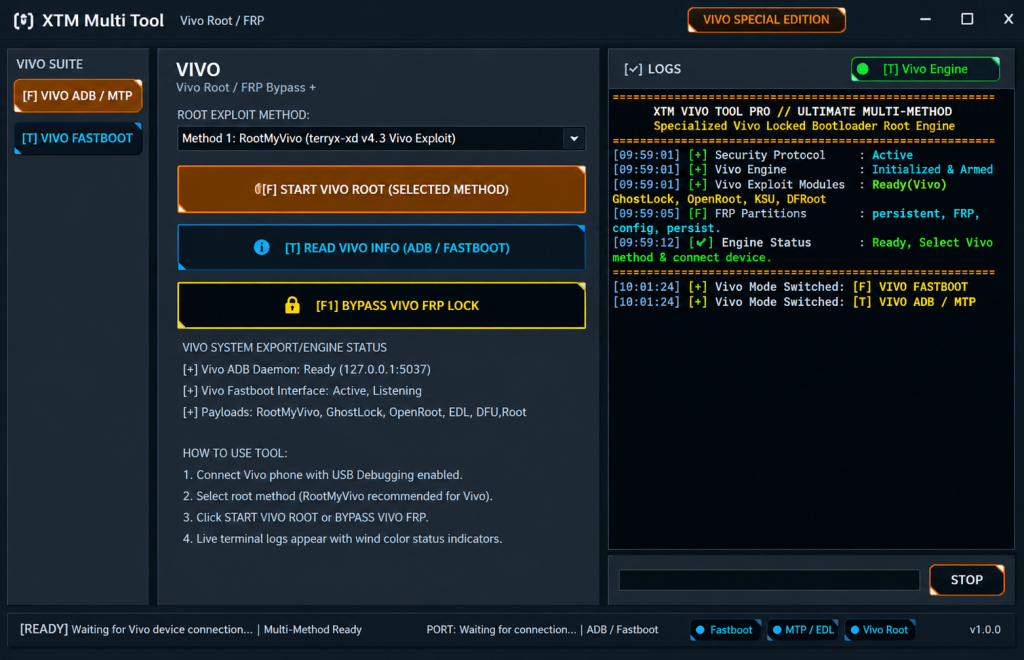
XTM Multi Tool Vivo Special Edition v1.0.0 is a standalone Windows desktop servicing and unlocking application built specifically for Vivo smartphones. Distributed as an installable Windows setup utility (XTMROOT_Setup_v1.0.exe), it consolidates Vivo connection protocols, temporary/privilege-elevation exploit engines, device information reading, and FRP servicing into a clean single-window dashboard with color-coded live terminal logs.
Complete Features & Servicing Modules of XTM Multi Tool Vivo Special Edition v1.0.0
The initial v1.0.0 release packs a focused set of Vivo-specific connection modes, exploit engines, and live status monitors:
1. Vivo Connection Modes & Device Diagnostics
- Vivo ADB / MTP Mode: Dedicated connection mode for servicing Vivo devices over Android Debug Bridge (ADB) and Media Transfer Protocol (MTP).
- Vivo Fastboot Mode: Separate Fastboot communication mode for supported bootloader-level diagnostics and servicing operations.
- Read Vivo Info: Instantly reads detailed Vivo device hardware, firmware build, and security status via ADB or Fastboot.
- Dedicated Vivo FRP Section: Includes a built-in FRP servicing module engineered for authorized Factory Reset Protection removal on supported Vivo builds.
2. Five Specialized Vivo Root Exploit Engines
Technicians can select from five distinct root/privilege-escalation methods from the dropdown menu and launch them with the Start Vivo Root button:
- Method 1 – RootMyVivo: Powered by the
zenyxx-xd v1.4.3Vivo exploit engine. - Method 2 – GhostLock App: Utilizes the
YuKong ADB-2026-43499exploit method. - Method 3 – OpenRoot Engine: Implements the
hexo141multi-exploit framework. - Method 4 – KernelSU: Integrates
KSUSuperuser Manager privilege handling. - Method 5 – DFRoot Legacy: Provides an automated Auto Temp Root routine for compatible Vivo firmware builds.
3. Real-Time Engine & Interface Status Telemetry
- Vivo Engine Monitor: Displays active engine initialization and security protocol status.
- ADB Daemon & Fastboot Interface Indicators: Shows live connection health for both the ADB Daemon Status and Fastboot Interface Status.
- Connection Status & Color-Coded Live Terminal Logs: Tracks the active device link, selected working mode, and step-by-step execution feedback with color-coded status messages.
Comprehensive Lock Removal Capabilities (FRP, MDM, Demo, PIN & Pattern Locks)
Modern Vivo smartphones use layered Funtouch OS / OriginOS security policies to protect user, enterprise, and retail data. XTM Multi Tool Vivo Special Edition v1.0.0 assists technicians across every major Vivo lock scenario:
1. FRP Bypass (Factory Reset Protection)
When a Vivo smartphone is factory reset without signing out of the synced Google account, FRP blocks setup access. By pairing Vivo ADB / MTP Mode and its five privilege-escalation engines (RootMyVivo, GhostLock App, OpenRoot Engine, KernelSU, and DFRoot Legacy) with the dedicated Vivo FRP Section, technicians can clear FRP restrictions cleanly without opening the back cover.
2. MDM, Enterprise & Retail Demo Lock Removal
Corporate-issued Vivo devices, school units, and retail store display models often enforce Mobile Device Management (MDM), Device Owner policies, or Vivo Retail Demo overlays. Establishing temporary root/ADB privilege via the tool’s exploit engines enables technicians to disable or remove enterprise management agents and retail demo packages cleanly.
3. PIN, Password, and Pattern Lock Reset
Forgetting a screen security credential whether a numeric PIN, alphanumeric password, or gesture pattern locks users out of their Vivo handset. Using Vivo Fastboot Mode and ADB/Recovery servicing workflows alongside device diagnostics, technicians can reset forgotten screen locks and resolve post-reset setup locks while keeping hardware calibration intact.
4. Vivo Account & Security Protocol Diagnostics
Beyond standard screen and Google locks, the Vivo Engine and Read Vivo Info modules help technicians verify security patch levels, bootloader status, and ADB/Fastboot accessibility before applying targeted lock-servicing routines.
Supported Vivo Models and Chipsets
XTM Multi Tool Vivo Special Edition v1.0.0 is engineered for Vivo and iQOO Android smartphones across major hardware platforms:
- Supported Brands & Series: Vivo
Yseries,Vseries,Tseries,Xseries,Sseries, and iQOO smartphones running Funtouch OS / OriginOS. - Supported Chipsets: MediaTek (
MTKHelio & Dimensity series) and Qualcomm Snapdragon Vivo handsets communicating via ADB, MTP, or Fastboot modes.
System Requirements
| Component | Minimum Requirement | Recommended Specification |
| Operating System | Windows 7 / 8 / 10 (32-bit & 64-bit) | Windows 10 / 11 (64-bit) |
| Processor | Intel Core 2 Duo / AMD Dual-Core (2.0 GHz) | Intel Core i3 / AMD Ryzen 3 or higher |
| RAM | 2 GB RAM | 4 GB RAM or higher |
| Storage Space | 500 MB free disk space | 2 GB+ available space |
| USB Drivers | Vivo USB Driver + Universal ADB & Fastboot Drivers | Official Vivo MTP/ADB Drivers + Google Platform-Tools |
How to Download, Install, and Use XTM Multi Tool Vivo Special Edition v1.0.0
- Download the Setup File: Download the XTM Multi Tool Vivo Special Edition v1.0.0 installer (
XTMROOT_Setup_v1.0.exe) from a trusted repository. - Temporarily Pause Antivirus: Windows Defender and third-party antivirus suites routinely flag ADB privilege-escalation and root-exploit utilities. Temporarily disable real-time protection or add an exclusion folder before installing.
- Run the Setup Wizard as Administrator: Locate the downloaded setup executable, right-click it, and select Run as administrator. Follow the installation wizard (Next > Next), tick Create Desktop Shortcut, and click Install.
- Install Vivo USB Drivers: Ensure official Vivo USB Drivers and Universal ADB / Fastboot Drivers are installed in Windows Device Manager so ADB Daemon and Fastboot interfaces initialize cleanly.
- Launch Tool & Connect Vivo Device: Open XTM Multi Tool from your desktop shortcut as administrator, connect your Vivo smartphone via a reliable rear USB cable, and enable USB Debugging (for ADB operations) or boot into Fastboot Mode.
- Select Mode / Root Method & Execute: Confirm green ADB Daemon / Fastboot Interface status, click Read Vivo Info to verify communication, select your required root exploit (RootMyVivo, GhostLock App, OpenRoot Engine, KernelSU, or DFRoot Legacy) or the Vivo FRP Section, and click Start Vivo Root / Execute while monitoring the live color-coded terminal log.
Frequently Asked Questions (FAQ)
Q1: Does XTM Multi Tool Vivo Special Edition v1.0.0 require a physical hardware dongle?
Ans: No, XTM Multi Tool Vivo Special Edition v1.0.0 is an installable Windows desktop utility that operates over standard USB connections without requiring a physical smart-card dongle.
Q2: What are the five root methods included in XTM Multi Tool Vivo Special Edition v1.0.0?
Ans: Version v1.0.0 includes RootMyVivo (zenyxx-xd v1.4.3), GhostLock App (YuKong ADB-2026-43499), OpenRoot Engine (hexo141), KernelSU (KSU Superuser Manager), and DFRoot Legacy (Auto Temp Root).
Q3: Will removing FRP or a screen lock with this tool delete personal data?
Ans: Performing an ADB-based FRP reset or temporary root privilege operation on an already-reset phone generally preserves remaining files, whereas executing a Fastboot or Recovery factory reset to clear a forgotten PIN, password, or pattern lock will erase personal photos, apps, and user data. Always back up accessible files before servicing.
Q4: Why is the ADB Daemon Status not detecting my Vivo phone?
Ans: Detection issues usually occur when USB Debugging is not enabled, the RSA authorization prompt on the phone screen was not accepted, or official Vivo ADB USB Drivers are missing. Reinstall the Vivo USB drivers, reconnect to a rear motherboard USB port, and tap Allow on the phone’s USB debugging popup.
Conclusion
The XTM Multi Tool Vivo Special Edition v1.0.0 Latest Version is a specialized, lightweight servicing utility for mobile repair technicians working with Vivo smartphones. By combining Vivo ADB/MTP, Vivo Fastboot, a dedicated Vivo FRP Section, and five distinct root exploit engines (RootMyVivo, GhostLock App, OpenRoot Engine, KernelSU, and DFRoot Legacy) with real-time terminal diagnostics, it streamlines software-level Vivo lock servicing without requiring test points. Always install official Vivo USB drivers and verify device compatibility before running exploit routines.