

QSM Unlock Tool V1.1 Latest Version 2026 Free Download
QSM Unlock Tool V1.1 is one of the most powerful and reliable Windows-based mobile repair utilities available for completely free. Specifically engineered for Android devices, this multi-functional servicing tool has quickly become a popular asset within the GSM mobile repair sector.
If you are looking for a hassle-free, free-login solution to bypass factory locks, reset accounts, or perform deep software repairs on modern smartphones, the QSM Unlock Tool 2026 version is a perfect choice.
| Name | INFO |
| Tool Name | QSM Unlock TOOL |
| Version | 1.1 |
| Free Or Paid | Free |
What is QSM Unlock Tool?
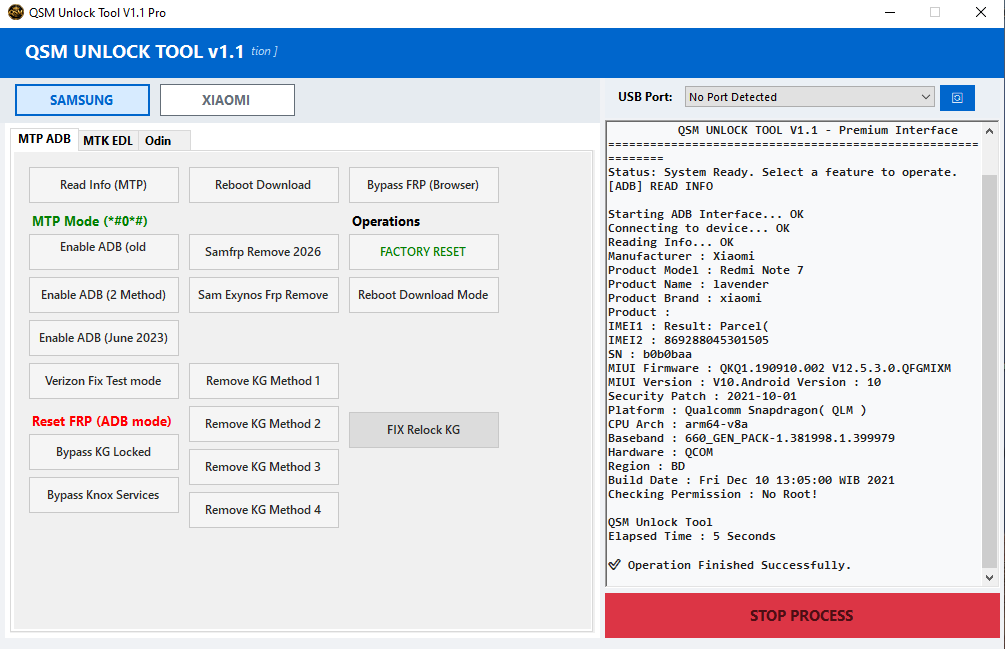
QSM Unlock Tool is a lightweight yet comprehensive software package that allows mobile technicians to bypass Google FRP verification, remove Mi Accounts, clear lock screen security (Pattern/PIN/Password), and fix bricked devices. It offers extensive deep-level functions for both Samsung and Xiaomi/POCO chipsets without needing expensive hardware boxes or premium activation licenses.
Key Features of QSM Unlock Tool V1.1
1. Samsung Functions (MTP, ADB & EDL/MTK Modes)
- MTP/ADB Mode: Read comprehensive device info, reboot directly to download mode, and trigger browser-based FRP bypass.
- ADB Access: Enable ADB protocol using legacy and modern methods (including security patches up to June 2023).
- FRP & Security Removal: One-click Samsung FRP removal (Exynos & Qualcomm), factory reset, and Verizon test mode fixes.
- MDM & Knox Bypass: Easily bypass Knox services, remove MDM locks, and handle continuous KG Relocks using 4 structural variations.
- EDL MTK Protocol: Erase FRP/KG/MDM via secure boot bypass (BROM), back up or erase NV RAM data, and safely handle bootloader locking/unlocking.
2. Xiaomi & POCO Functions (ADB, MTP, EDL & Sideload)
- ADB & MTP Operations: Extract logs, reset Mi Accounts, install essential USB drivers, and trigger diagnostic ports.
- BROM/EDL Flashing: Securely execute structural formats, erase Google FRP, toggle factory reset protocols, and directly disable active locks.
- Sideload Mode Security: Wipe EFS configuration files, install standard stock firmware packages, and permanently disable official OTA updates or Mi Cloud sync trackers directly through the stock recovery terminal.
How to Use QSM Unlock Tool (Step-by-Step)
Step 1: Install Required USB Drivers
Before executing any action, ensure your PC can communicate with the phone’s underlying processor. Download and install these essential drivers:
- MediaTek (MTK) USB Driver: Crucial for secure [BROM] operations (Highly recommended to install LibUSB Filter to avoid sudden device drops).
- Qualcomm QDLoader 9008 Driver: Mandatory for processing all [EDL] operations.
- ADB & Fastboot Drivers: Required for basic [SIDELOAD] and stock recovery commands.
Step 2: Choose Connection Method Based on Device Mode
Connection Methods Overview
To execute repairs via the QSM Unlock Tool, connect your device using one of these primary methods depending on your hardware type:
- MediaTek (MTK) BROM Mode: Launch the tool, select an operation (e.g., BROM Factory Reset), power off the phone, hold Volume Up (+) and Volume Down (-) simultaneously, and connect the USB cable.
- Qualcomm EDL Mode (9008): Power off the device, expose the motherboard test points, bridge them with tweezers while plugging in the USB cable, verify the Qualcomm HS-USB QDLoader 9008 port in Windows Device Manager, and run your command.
- Xiaomi / POCO Sideload Mode: Boot the phone into stock recovery via Volume Up + Power, select “Connect with MiAssistant”, connect to the PC, and trigger the sideload function in the tool.
Download Link


