

SamFw Tool v6.2 Amazing Version Free Download | Complete Samsung Exynos FRP, EDL, MDM & Lock Removal Guide
Table of Contents
In the mobile software repair and flashing industry, servicing modern Samsung Galaxy smartphones and tablets requires an up-to-date, reliable utility capable of handling strict security patches across Exynos, Qualcomm, and MediaTek platforms. SamFw Tool v6.2 Latest Version introduces major breakthroughs for technicians, including direct Samsung Exynos FRP unlocking in Download Mode, support for Android 16 security iterations, and newly added Qualcomm EDL Firehose loaders.
If you want to explore every feature of SamFw Tool v6.2, its official changelog, and how it handles FRP, MDM, PIN, and pattern locks, this comprehensive guide covers all the details
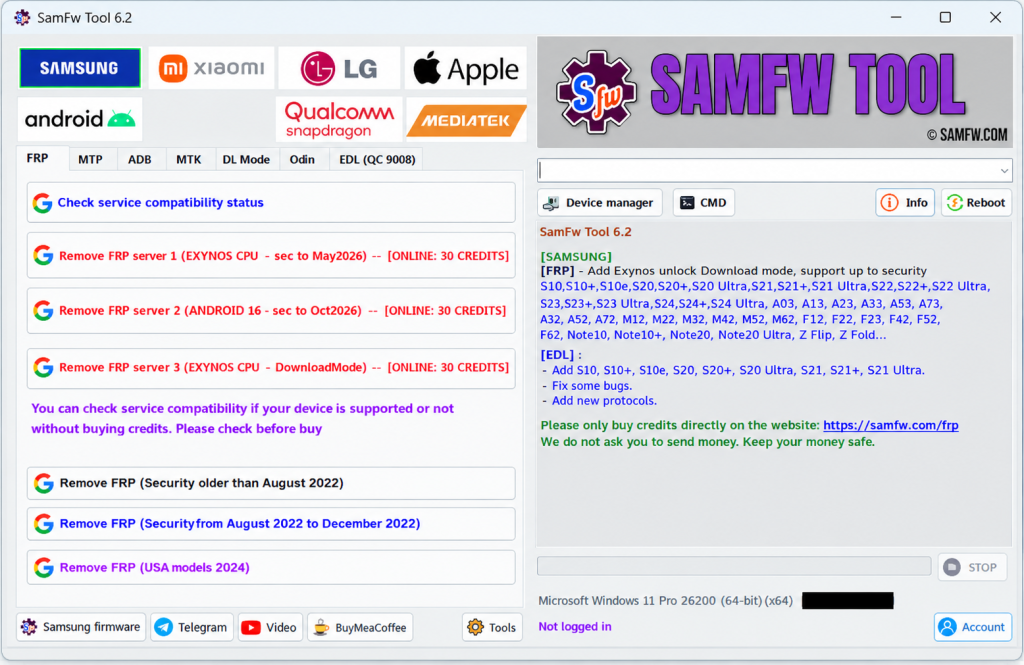
What is SamFw Tool v6.2?
SamFw Tool v6.2 is a specialized, Windows-based mobile servicing utility engineered primarily for Samsung Galaxy devices, alongside dedicated modules for Xiaomi, LG, MediaTek, and Qualcomm smartphones. It enables technicians and device owners to remove Google FRP locks, flash official Odin firmware, change region CSC codes, manage Android applications, and perform low-level EDL 9008 servicing from a single unified dashboard.
What’s New in SamFw Tool v6.2 Update
The v6.2 release delivers major upgrades tailored for newer hardware and firmware binaries:
- Samsung Exynos FRP Unlock in Download Mode: Added direct Download Mode FRP removal supporting Exynos chipsets from
Exynos 850up toExynos 2600and wearable processors (W920,W930,W1000), with automatic USB debugging acceptance. - Android 16 & USA 2024 Security Support: Includes dedicated FRP server modules (
Remove FRP Server 2 - Android 16andUSA Models 2024) to handle recent security patches. - 10+ New Qualcomm EDL Firehose Loaders: Expanded Emergency Download (9008) loader support for modern models including:
- Galaxy S24 / S24 Ultra (
SM-S921UBIT 6,SM-S928BBIT 6,SM-S928NBIT 6) - Galaxy S23 / S23+ / S23 Ultra (
SM-S911NBIT 8,SM-S916NBIT 8,SM-S918BBIT A) - Galaxy S22 Ultra (
SM-S908NBIT 9) & Galaxy S21 FE (SM-G990BBIT K,SM-G990UBIT N) - Galaxy Z Fold5 (
SM-F946BBIT 7), Galaxy A05s (SM-A057FBIT E,SM-A057GBIT B), Galaxy A23 (SM-A235NBIT C), Galaxy F14 (SM-E145FBIT C), Galaxy Tab Active4 Pro (SM-T630BIT B), andSC52EBIT 1.
- Galaxy S24 / S24 Ultra (
- Enhanced Samsung EDL Functions: Added direct Read Info, Factory Reset, Reset FRP, and EDL serial number display in the COM port list.
Complete Feature Breakdown of SamFw Tool v6.2
Beyond the v6.2 additions, the utility organizes its tools into specialized functional tabs:
- Built-In Odin Flasher: Auto-detects firmware files (
BL,AP,CP,CSC), auto-extracts.ziparchives, saves recent flash files, and includes an option to ignore MD5 checksum verification. - One-Click CSC Changer: Switch country/carrier CSC codes via ADB or root mode without wiping user data, plus a toggle to block automatic CSC changes when inserting a new SIM card.
- Download Mode Utilities: One-click Exit Download Mode, Soft-Brick Fix, and legacy FRP removal for Android 5/6 devices.
- ADB & App Manager: Check battery health info, disable/enable OTA system updates, set device language, hide Developer Options, install multi-APK/xAPK files, enable Dual Messenger for any app, and remove carrier bloatware (Korean, Japanese, and US variants).
- Xiaomi, MediaTek & LG Modules: Includes Xiaomi Sideload FRP/Factory Reset, Qualcomm Anti-Relock Mi Cloud bypass, MediaTek BROM Auth Bypass, bootloader unlock/relock, and LG MTP/EDL servicing.
Comprehensive Lock Removal Capabilities (FRP, MDM, KG, PIN & Pattern Locks)
Modern smartphones incorporate multi-layered security encryption to safeguard user and enterprise data. SamFw Tool v6.2 provides targeted methods to clear every major type of device lock:
1. FRP Bypass (Factory Reset Protection)
When an Android smartphone is factory reset without signing out of the primary Google account, FRP locks the setup wizard. SamFw Tool v6.2 removes FRP across multiple protocols:
- Odin Download Mode: 1-click unlock for supported Samsung Exynos devices.
- Qualcomm EDL 9008 Mode: Direct FRP partition erase using the updated Firehose loaders.
- MTP Test Mode (
*#0*#) & Server Methods: Supports legacy patches, USA 2024 models, and Android 16 security builds. - MediaTek BROM & Xiaomi Sideload: Clears Google verification on non-Samsung Android handsets.
2. MDM & Knox Guard (KG) Removal
Corporate-managed phones, school tablets, or financed devices often carry strict Mobile Device Management (MDM) or Samsung Knox Guard (KG) restrictions. Using the Disable Knox utility, ADB device management commands, and clean Odin firmware flashing, technicians can neutralize active MDM profiles and prevent restrictive lock prompts.
3. PIN, Password, and Pattern Lock Reset
Forgetting a screen security lock—whether a numeric PIN, alphanumeric password, or gesture pattern—renders a phone inaccessible. SamFw Tool v6.2 includes EDL Factory Reset, MTP Factory Reset, ADB Factory Reset, Xiaomi Sideload Wipe, and MediaTek Format Userdata options to erase screen locks safely without corrupting core system files.
4. Brand Account Locks (Xiaomi Mi Cloud & Samsung Account)
In addition to standard Google locks, the dashboard features dedicated modules for Xiaomi Mi Cloud Reset/Bypass (Anti-Relock) via Sideload/Qualcomm modes and Samsung Account removal from device settings via ADB.
Supported Brands and Chipsets
SamFw Tool v6.2 delivers broad hardware compatibility across global smartphone platforms:
- Samsung Exynos Chipsets:
Exynos 850,880,980,990,1080,1280,1330,1380,1480,1580,1680,2100,2200,2400,2500,2600, plus watch chipsets (W920,W930,W1000). - Qualcomm Snapdragon: Full EDL 9008 flashing and FRP servicing with updated Firehose loaders.
- MediaTek (MTK): BROM Auth bypass, factory reset, and bootloader management.
- Supported Brands: Samsung Galaxy (S, Note, Z Fold/Flip, A, M, F, and Tab series), Xiaomi, Redmi, POCO, LG, and general MediaTek/Qualcomm Android models.
System Requirements
| Component | Minimum Requirement |
| Operating System | Windows 7, 8, 10, or 11 (32-bit or 64-bit) |
| Processor | Intel or AMD Dual-Core Processor (2.0 GHz or higher) |
| RAM | 4 GB Minimum (8 GB Recommended) |
| Storage Space | At least 1 GB of free disk space (~115 MB setup package) |
| USB Drivers & Runtimes | Official Samsung USB Drivers, Qualcomm 9008, MTK VCOM, and Visual C++ 2015 |
How to Download and Use SamFw Tool v6.2
- Download the Setup Archive: Download the official SamFw Tool v6.2 (
SamFwToolSetup_v6.2.zip) package from a trusted source. - Disable Antivirus Temporarily: Windows Defender and third-party antivirus suites often flag servicing tools due to packed ADB/exploit scripts. Temporarily pause real-time protection or add an exclusion folder before extracting.
- Extract & Install: Right-click the downloaded
.ziparchive, extract it using WinRAR or 7-Zip, and run the installer orSamFwTool.exeas an administrator. - Install USB Drivers: Use the built-in Misc tab to install official Samsung USB Drivers and Visual C++ 2015 runtimes, or disable Windows Driver Signature Enforcement if required.
- Connect Device & Execute Task: Boot your Samsung device into the appropriate mode—Download Mode (for Exynos FRP), EDL 9008 Mode (for supported Qualcomm loaders), or Normal/Test Mode (
*#0*#)—connect via a reliable USB cable, and click your desired servicing option.
Frequently Asked Questions (FAQ)
Q1: What is the biggest new feature in SamFw Tool v6.2?
Ans: Version v6.2 introduces direct FRP unlocking in Download Mode for Samsung Exynos chipsets (from Exynos 850 up to Exynos 2600), adds Android 16 FRP server support, and includes over 10 new Qualcomm EDL Firehose loaders for Galaxy S21–S24, Z Fold5, and A-series models.
Q2: Is SamFw Tool v6.2 completely free to use?
Ans: Yes, SamFw Tool v6.2 is free to download and use for standard MTP, ADB, Odin flashing, CSC changing, and EDL functions, though certain server-based FRP methods (such as Exynos Server 1 or Android 16 Server 2) may require official server credits.
Q3: Will removing a PIN, pattern, or FRP lock erase personal data?
Ans: Performing a Factory Reset or EDL userdata wipe to clear a forgotten PIN or pattern lock will erase all personal files on the device. Removing FRP on an already-reset device clears the Google verification lock so you can set up the phone again.
Q4: Why is my PC not detecting my Samsung phone in EDL 9008 or Download Mode?
Ans: Detection issues usually occur due to missing drivers or faulty USB cables. Open the tool’s Misc tab to verify that Samsung USB Drivers and Qualcomm HS-USB QDLoader 9008 drivers are installed, and connect your phone directly to a motherboard USB port.
Conclusion
The SamFw Tool v6.2 Latest Version is a major upgrade for mobile repair technicians servicing modern Samsung Galaxy smartphones and tablets. By combining Exynos Download Mode FRP unlocking, Android 16 support, 10+ new Qualcomm EDL Firehose loaders, and built-in Odin/CSC utilities into a streamlined dashboard, it drastically reduces repair times. Always ensure proper USB drivers are installed and verify device binary (BIT) versions before flashing or executing EDL operations.


