Cleaning Raw Ext Firmware Tool Download | Complete Clean ROM Guide
Table of Contents
In the mobile software repair and custom ROM engineering industry, technicians frequently work with raw partition dumps (system.img, vendor.img, product.img, super.img, and userdata.img) extracted via UFS/eMMC ISP pinouts, EDL 9008 readbacks, or MediaTek BROM dumps. Flashing uncleaned raw images often transfers residual user locks, carrier bloatware, or enterprise restrictions onto the target device. Cleaning Raw Ext Firmware Latest Version provides a dedicated Windows utility engineered to unpack, sanitize, debloat, and repack raw Android EXT/EXT4 firmware images cleanly before flashing.
Operating without requiring expensive dongles or recurring server credits, this workflow-focused utility helps GSM technicians prepare brick-safe, lock-free stock images for clean device restoration. This comprehensive guide covers every feature, lock-handling capability, system requirement, and step-by-step usage procedure.
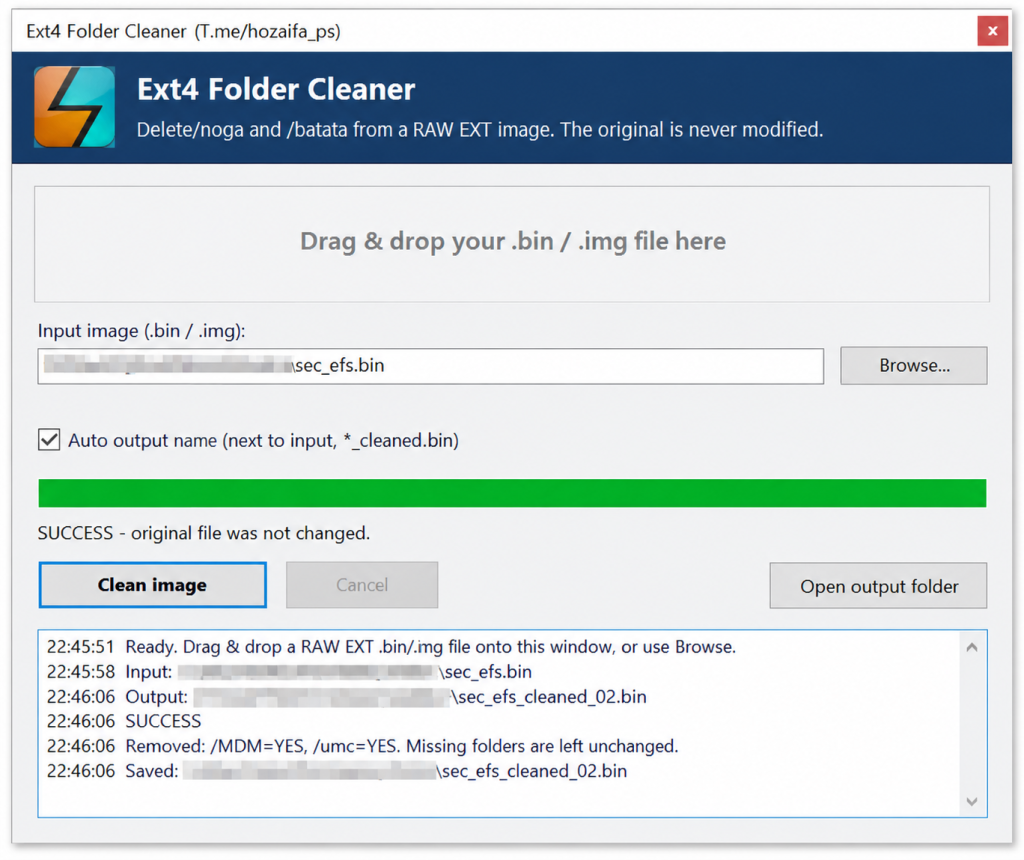
What is Cleaning Raw Ext Firmware?
Cleaning Raw Ext Firmware is a specialized Windows-based Android firmware extraction, sanitization, and repacking utility built for mobile repair technicians and ROM developers. Designed to process raw ext2, ext3, and ext4 partition images (as well as unpacked super.img sub-partitions), it allows technicians to inspect filesystem structures, strip unwanted system APKs, clear persistent lock flags, preserve Linux file permissions/SELinux contexts, and rebuild flash-ready .img binaries.
Complete Features & Firmware Servicing Modules
The utility packs an essential set of low-level filesystem and firmware preparation tools into a fast, technician-friendly workflow:
- Raw EXT / EXT4 Partition Unpacking & Mounting: Extracts raw Android
ext4partition images (system,vendor,product,odm,oem, anduserdata) without corrupting file ownership (UID/GID) or SELinux security labels (file_contexts). - Sparse-to-Raw & Raw-to-Sparse Image Conversion (
simg2img/img2simg): Automatically converts Android sparse images into raw mountable images for editing and repacks them into flashable sparse formats compatible with Fastboot, Odin, SP Flash Tool, and QFIL/EDL flashers. - System Debloater & Carrier Bloatware Cleaner: Removes pre-installed carrier apps, regional demo packages, and stubborn background telemetry services directly from the firmware image prior to flashing.
- Dynamic
super.imgSub-Partition Handler: Works seamlessly alongsidelpunpack/lpmakeworkflows so technicians can clean individual logical partitions inside modern Android dynamic super partitions. - File Integrity & Partition Size Alignment: Maintains exact byte/sector boundaries (
4096-byteUFS and512-byteeMMC alignment) so repacked images flash cleanly without size overflow ordm-veritymount failures. - Lightweight, Dongle-Free Standalone Operation: Runs directly on Windows workstations without requiring a physical smart-card box or internet license checks.
Lock Removal & Security Servicing Capabilities (FRP, MDM, Knox, PIN & Pattern Locks)
Cleaning raw EXT firmware images at the filesystem level gives technicians direct control over software-enforced locks before the ROM is written back to the phone:
1. FRP Bypass (Factory Reset Protection)
When raw firmware dumps or factory engineering packages retain Google setup wizard flags or persistent account hooks, flashing them directly can trigger immediate FRP locks. By sanitizing system setup overlays and pairing the cleaned ROM with a clean frp / persistent partition format, technicians eliminate FRP setup blocks cleanly.
2. MDM, Knox Guard (KG) & Retail Demo Lock Removal
Corporate-managed smartphones, school tablets, financed handsets, and retail demo units frequently embed Mobile Device Management (MDM) agents, Device Owner policies, or Demo Mode APKs inside system, product, or vendor partitions. Cleaning Raw Ext Firmware lets technicians strip those enterprise/demo packages directly from the raw image before flashing—preventing automatic MDM re-enrollment on boot.
3. PIN, Password, and Pattern Lock Reset
Forgetting a screen security credential—whether a numeric PIN, alphanumeric password, or gesture pattern—locks users out of their device. By cleaning or formatting userdata.img and removing residual locksettings.db / gatekeeper credential states from raw dumps, technicians can restore a clean, unlocked user environment without damaging baseband calibration partitions (EFS, NVRAM, Persist).
4. Brand Account & Carrier Restriction Cleaning
Beyond standard Google locks, stripping regional carrier lock agents and cloud-sync bloatware from raw firmware images helps prevent unwanted carrier overlays or background account prompts after flashing.
Supported Firmware Formats and Chipsets
Cleaning Raw Ext Firmware supports Android filesystem structures across all major hardware architectures:
- Supported Image & Filesystem Formats: Raw
EXT2 / EXT3 / EXT4.imgdumps, Android Sparse images,system.img,vendor.img,product.img,userdata.img, and unpackedsuper.imgpartitions. - Supported Chipsets & Platforms: Qualcomm Snapdragon (EDL 9008 / QFIL), MediaTek (MTK Scatter / BROM readbacks), Samsung Exynos (Odin
.tar/ raw dumps), and Unisoc / Spreadtrum (SPD.pacextracted images). - Supported Brands: Samsung, Xiaomi, Redmi, POCO, OPPO, Realme, OnePlus, Vivo, iQOO, Motorola, TECNO, Infinix, Nokia, and generic Android devices.
System Requirements
| Component | Minimum Requirement | Recommended Specification |
| Operating System | Intel Core 2 Duo / AMD Dual-Core (2.0 GHz) | Intel Core i5 / AMD Ryzen 5 or higher |
| Processor | Intel Core 2 Duo / AMD Dual-Core (2.0 GHz) | Intel Core i5 / AMD Ryzen 5 or higher |
| RAM | 4 GB RAM | 8 GB RAM or higher |
| Storage Space | 5 GB free disk space | 30 GB+ SSD space (for unpacking large super.img files) |
| Companion Tools | WinRAR / 7-Zip | Fastboot, Odin, SP Flash Tool, or QFIL/EDL Flasher |
How to Download, Set Up, and Use Cleaning Raw Ext Firmware
- Download the Utility Package: Download the Cleaning Raw Ext Firmware compressed
.zipor.rararchive from a trusted repository. - Extract to a Clean Drive Path: Unpack the archive into a dedicated folder without spaces in the path (e.g.,
C:\Clean_Ext_Firmware) using WinRAR or 7-Zip. - Copy Your Raw Firmware Image: Place your target raw
.imgfile (such assystem.img,vendor.img, or an unpacked partition from a readback dump) into the tool’s working directory. - Launch the Tool as Administrator: Right-click the main executable or batch utility and select Run as administrator.
- Unpack & Clean the EXT Filesystem: Load your target
.imgfile, extract/mount the EXT4 filesystem, remove unwanted MDM/demo APKs, carrier bloatware, or residual lock files, and verify partition size limits. - Repack & Flash to Device: Click Build / Repack Image to generate a clean, properly aligned
.imgbinary, then flash the sanitized image onto your smartphone using your preferred Fastboot, Odin, MediaTek, or Qualcomm EDL flashing tool.
Frequently Asked Questions (FAQ)
Q1: Why is cleaning raw EXT firmware important before flashing a readback dump?
Ans: Raw firmware dumps extracted from donor phones or ISP/EDL readbacks often contain leftover carrier bloatware, MDM/Demo agents, or corrupted user configurations. Cleaning the EXT4 image ensures you flash a sanitized, stable ROM without transferring unwanted restrictions.
Q2: Does Cleaning Raw Ext Firmware preserve SELinux contexts and Linux file permissions?
Ans: Yes, proper Android EXT4 repacking tools preserve file ownership (UID/GID) and SELinux file_contexts metadata—preventing boot loops caused by permission mismatches on modern Android versions.
Q3: Will cleaning userdata.img or flashing a cleaned firmware remove PIN, pattern, and FRP locks?
Ans: Yes, formatting or cleaning userdata.img erases forgotten PIN, password, and pattern locks (along with existing user data), while removing MDM/Demo packages and pairing the flash with an frp partition wipe clears FRP and MDM restrictions cleanly.
Q4: Do I need a hardware dongle or paid credits to use this utility?
Ans: No, Cleaning Raw Ext Firmware runs as a free, standalone Windows utility without requiring a physical dongle or server credits.
Conclusion
The Cleaning Raw Ext Firmware Latest Version workflow is an essential asset for advanced mobile repair technicians and firmware specialists working with raw Android partition dumps. By simplifying sparse-to-raw image conversion, EXT4 filesystem debloating, and partition-level FRP, MDM, PIN, and pattern lock sanitization while preserving SELinux integrity, it ensures clean, reliable firmware restorations. Always keep an unmodified backup of your original readback dump and EFS/NVRAM partitions before editing or flashing firmware images.