

A.N.TOOL v4.6 (AN Tool v4.6) Latest Version Free Download | Complete Multi-Brand FRP, MDM & Lock Removal Guide
Table of Contents
Introduction
In the mobile software repair and flashing industry, technicians often have to switch between separate utilities to service different chipsets and brands. A.N.TOOL v4.6 (AN Tool v4.6) Latest Version solves this challenge by bringing Qualcomm, MediaTek, Samsung, Xiaomi, Unisoc, Exynos, Kirin, Transsion, and Apple servicing modules together into one unified Windows application.
Whether you need to bypass Android 14–16 Google FRP locks via QR provisioning, remove MDM and Knox Guard (KG) restrictions, flash Samsung Odin firmware, or reset forgotten screen locks, A.N.TOOL v4.6 delivers an organized, technician-friendly workflow. This complete guide covers all features, lock-removal methods, system requirements, and setup steps.
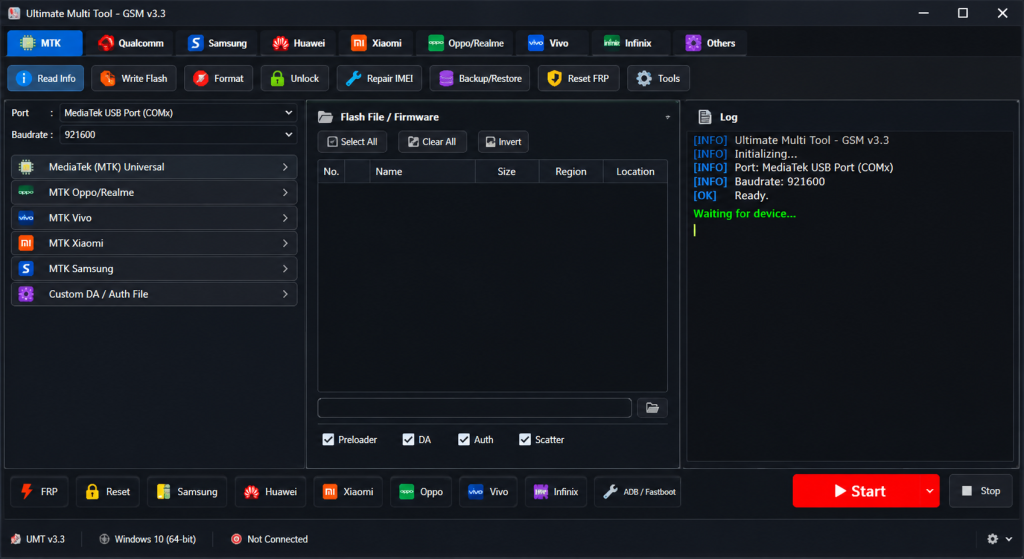
What is A.N.TOOL v4.6?
A.N.TOOL v4.6 is an all-in-one Windows desktop mobile servicing and unlocking utility designed for GSM repair technicians. It combines low-level chipset protocols—such as Qualcomm EDL 9008, MediaTek BROM/Preloader/META, HiSilicon Test Point, Samsung Download/MTP Mode, ADB, and Fastboot—into clearly labeled tabs with a live diagnostic log window.
Complete Features & Servicing Modules of A.N.TOOL v4.6
The v4.6 release organizes its extensive toolset into specialized brand and protocol sections:
1. Qualcomm & MediaTek (MTK) Modules
- Qualcomm Servicing: Supports Model, Loader, and Auto selection modes; Reset FRP + Factory Reset; Remove Mi Account; full Firmware Backup / Restore; Dump Security Partitions; and selective partition flashing/erasing.
- MediaTek Servicing: Includes Auth Bypass, FRP Reset (BROM / Preloader / Download Mode), Bootloader Unlock/Relock, META Mode Read Info, Partition Manager (Write, Erase, Backup), and specialized factory reset modes (
Safe,Erase,eMMC New OS,UFS,Android 5G,Vivo Y1s–Y30,Rebuild Userdata).
2. Samsung Odin & MTP Module
- Built-In Odin Flasher: Load
BL,AP,CP,CSC,Home CSC, andPITfiles with Auto Reboot, Flash/Backup PIT, Bypass MDM, and legacy Android 5/6/7/8 Download Mode FRP Reset. - Samsung MTP Operations: Enable ADB, Reset FRP, Bypass MDM / Knox KG / FRP, Remove FRP (Android 16), CSC Region Change, Change Serial Number, Factory Reset, and Enter/Exit Download Mode.
3. Xiaomi, Infinix / Tecno / Itel & Kirin (HiSilicon) Modules
- Xiaomi Recovery 5.0 & Servicing: MediaTek/Qualcomm FRP Reset, Bypass Mi Account (Qualcomm), Write Partition by Name, Reset EFS / Fix NV Data, Enable Diag (No Root), and Factory Reset.
- Infinix / Tecno / Itel (Transsion): One-Click Brand Auto-CPU operations, FRP Reset (Preloader/eMMC), Remove MDM (Preloader/eMMC), and Enter BROM (Erase Preloader).
- Kirin (HiSilicon): Fastboot and Factory Fastboot tools, Boot by CPU (Test Point), Temporary Bootloader Unlock, Reset FRP / Format, Remove Huawei ID (Erase/Patch Oeminfo), and Backup/Flash Oeminfo.
4. QR Code / IT Admin / MDM Provisioning (Android 11–16)
- Automated QR Generators: Generate setup screen QR codes for Enable ADB QR (Methods 1, 2, 3 with SN), Enable ADB QR Auto (No SN), and Android 14–15–16 Auto QR.
- DPC & Enterprise QR Profiles: Includes Test DPC IT Admin QR, SafeKey IT Admin QR, and Install Shieldx QR generators.
5. FRP-MTP, ADB, Fastboot & Apple Utilities
- FRP-MTP & ADB: Multi-brand browser launchers (Open Chrome, YouTube, Google Maps), Reset FRP (ADB), Remove Ads, Check Root/Battery State, and Add Arabic Language/Keyboard.
- Fastboot & Partition Manager: Read/erase partitions, switch Slot A / Slot B, Format Data, Fix dm-verity, Relock Bootloader, and run
.batflash scripts. - Apple Device Info: Read detailed hardware and firmware information from connected iOS devices.
Comprehensive Lock Removal Capabilities (FRP, MDM, KG, PIN & Pattern Locks)
Modern smartphones rely on multi-layered security protocols to restrict unauthorized access. A.N.TOOL v4.6 provides dedicated tools to clear every major type of device lock:
1. FRP Bypass (Factory Reset Protection)
When an Android smartphone is factory reset without unlinking the primary Google account, FRP blocks setup access. A.N.TOOL v4.6 clears FRP across Samsung MTP (including Android 16), QR Provisioning (Android 11–16), Qualcomm EDL, MediaTek BROM/Preloader, Xiaomi Recovery 5.0, and HiSilicon Test Point modes.
2. MDM, Knox Guard (KG) & IT Admin Removal
Corporate-managed phones, school tablets, and financed devices often carry strict Mobile Device Management (MDM), Samsung Knox Guard (KG), or IT Admin policies. Using Bypass MDM / Knox KG (MTP), Odin Bypass MDM, Preloader/eMMC MDM Removal (for Infinix/Tecno/Itel), and Test DPC / SafeKey QR tools, technicians can neutralize enterprise restrictions cleanly.
3. PIN, Password, and Pattern Lock Reset
Forgetting a screen security lock—whether a numeric PIN, alphanumeric password, or gesture pattern—renders a phone inaccessible. The software includes specialized Factory Reset (Safe, Erase, UFS, eMMC, Rebuild Userdata) and Fastboot Format Data options to erase screen locks safely without corrupting core system files.
4. Brand Account Locks (Xiaomi Mi Account & Huawei ID)
Beyond standard Google locks, the utility features dedicated functions to Bypass Mi Account on Qualcomm Xiaomi devices and Remove Huawei ID via Oeminfo patching/erasure on Kirin platforms.
Supported Chipsets and Brands
A.N.TOOL v4.6 delivers broad cross-platform compatibility across global smartphone architectures:
- Supported Chipsets: Qualcomm Snapdragon, MediaTek (MTK Helio & Dimensity), Samsung Exynos, Unisoc / Spreadtrum (SPD), HiSilicon Kirin, and Apple A-Series.
- Supported Brands: Samsung, Xiaomi, Redmi, POCO, Huawei, Honor, OPPO, Realme, Vivo, OnePlus, Infinix, Tecno, Itel, Motorola, Nokia/HMD, Lenovo, Sony, Alcatel, BlackBerry, and Apple iPhone/iPad.
System Requirements
| Component | Minimum Requirement | Recommended Specification |
| Operating System | Windows 7 / 8 / 10 (32-bit & 64-bit) | Windows 10 / 11 (64-bit) |
| Processor | Intel Core 2 Duo / AMD Dual-Core (2.0 GHz) | Intel Core i3 / AMD Ryzen 3 or higher |
| RAM | 4 GB RAM | 8 GB RAM or higher |
| Storage Space | 1 GB free disk space (~386 MB archive) | 5 GB available space (for firmware backups) |
| USB Drivers | Samsung, Qualcomm 9008, MTK VCOM & ADB Drivers | Full Chipset USB Drivers + USBDK |
How to Download, Install, and Use A.N.TOOL v4.6
- Download the Setup Archive: Download the official A.N.TOOL v4.6 compressed
.raror.zippackage from a trusted repository. - Temporarily Pause Antivirus: Windows Defender and third-party antivirus suites often flag mobile servicing tools due to packed loaders and exploit scripts. Temporarily disable real-time protection or add an exclusion folder before extracting.
- Extract All Files to One Folder: Use WinRAR or 7-Zip to unpack the archive into a dedicated folder on your
C:drive. Ensure any included loader executable stays in the exact same directory as the main application files. - Install Required USB Drivers: Install official Samsung USB, Qualcomm HS-USB QDLoader 9008, MediaTek Preloader VCOM, and ADB drivers on your Windows system.
- Launch & Log In: Right-click the loader or main executable file, select Run as administrator (accepting any certificate prompt if required), and sign in using the active login credentials provided with the release.
- Connect Device & Execute Task: Select your target brand or protocol tab (Qualcomm, MTK, Samsung, Xiaomi, QR Code, or Fastboot), connect your phone in the required mode (MTP, Download Mode, BROM, EDL 9008, or Setup QR), and click your desired repair operation. (Tip: Run the included cleanup script as administrator after closing the tool if provided in your package).
Frequently Asked Questions (FAQ)
Q1: What makes A.N.TOOL v4.6 useful for mobile repair technicians?
Ans: A.N.TOOL v4.6 combines servicing modules for Qualcomm, MediaTek, Samsung, Xiaomi, Kirin, Unisoc, and Apple devices into one single Windows program—eliminating the need to install separate utilities for Odin flashing, QR ADB provisioning, EDL 9008, and BROM operations.
Q2: Does A.N.TOOL v4.6 support Android 15 and Android 16 FRP and MDM removal?
Ans: Yes, v4.6 includes dedicated Android 14–15–16 Auto QR ADB enabling methods, Samsung Android 16 MTP FRP removal, and Bypass MDM / Knox KG utilities.
Q3: Will removing a PIN, pattern, or FRP lock delete personal data?
Ans: Performing a Factory Reset, Userdata Wipe, or Fastboot Format Data to clear a forgotten PIN or pattern lock will erase personal files on the device. Always back up accessible data and security partitions before servicing.
Q4: Why is my PC failing to detect my phone in BROM, EDL 9008, or Download Mode?
Ans: Detection issues usually stem from missing chipset drivers or faulty USB cables. Verify that MediaTek VCOM, Qualcomm 9008, or Samsung USB Drivers are properly installed in Windows Device Manager, and connect your phone directly to a rear motherboard USB port using a reliable data cable.
Conclusion
The A.N.TOOL v4.6 (AN Tool v4.6) Latest Version is a versatile, all-in-one servicing platform for mobile repair professionals working across multiple smartphone brands and chipsets. With its built-in Samsung Odin flasher, Android 11–16 QR ADB provisioning, Xiaomi Recovery 5.0 tools, and comprehensive FRP, MDM, Knox Guard, PIN, and pattern lock removal capabilities, it streamlines complex daily repairs. Always ensure proper USB drivers are installed and back up security partitions before executing low-level modifications


