

Android Professional Recovery v7.8 (LEGENDroid Universal Recovery) Free Download | Complete ADB Data Extraction, Backup & Lock Status Guide
Table of Contents
Introduction
In the mobile software repair and data recovery industry, technicians frequently encounter smartphones with broken screens, unresponsive touch panels, or system glitches where standard MTP file transfers fail. Android Professional Recovery v7.8 (LEGENDroid Universal Recovery)—developed by Engineer Ammar Al-Faqih—solves this challenge by providing a lightweight, structured Windows utility for automated data extraction and backup via ADB mode without requiring root access.
With the release of v7.8, the software adds a Live Remote Folder Browser, Android 11+ scoped storage support for WhatsApp and Telegram, automatic root fallback extraction, and an extended free built-in license valid until June 2028. This comprehensive guide covers every feature, lock-handling behavior, system requirement, and setup step.
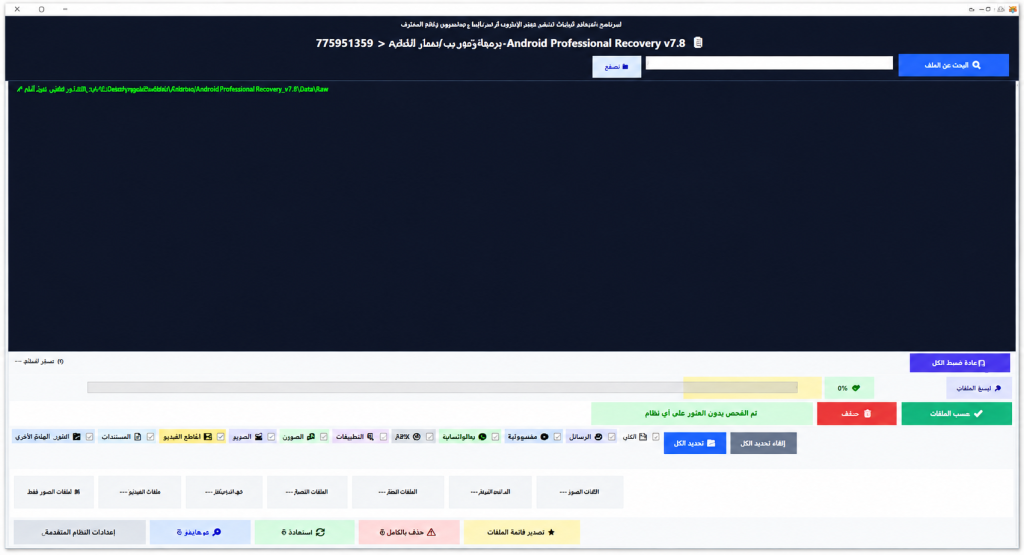
What’s New & Complete Feature Modules in v7.8
The v7.8 release combines upgraded storage parsing with automated recovery workflows:
1. What’s New in v7.8 Changelog
- Live Remote Folder Browser: Features an interactive directory tree browser allowing technicians to inspect both Internal Storage and SD Cards and select custom folders for extraction.
- Android 11+ Scoped Storage Media Support: Added direct extraction paths for Android 11 and newer scoped storage directories covering WhatsApp, WhatsApp Business, and Telegram media folders.
- Automatic Root Fallback Extraction: Automatically switches to root-level extraction methods if standard ADB directory pulling is restricted on rooted handsets.
- Enhanced Windows PnP USB Discovery: Improved automatic USB detection and ADB reconnection stability.
- Extended Built-In License: Includes an active built-in license valid until June 2, 2028, protected by anti-clock-tampering verification.
2. Core Data Extraction & Diagnostic Features
- Complete Device Information Reader: Automatically reads and logs Device Model, Brand/Manufacturer, Android Version, Serial Number, Battery Percentage, and Total Storage Capacity.
- Category-Based Media & File Extraction:
- Images / Camera: Extracts
DCIM,Pictures, andMIUI Gallerydirectories. - Videos, Audio & Documents: Pulls
Movies,Music,Documents,Downloads, and compressedArchives. - Social Media & Messenger Backup: Backs up media from WhatsApp, WhatsApp Business, Telegram, Instagram, and Facebook.
- Images / Camera: Extracts
- Installed APK Extractor: Scans the connected smartphone and extracts
.apkbackup packages for all installed third-party applications.
Lock Handling & Security Capabilities (PIN, Pattern, Fingerprint, FRP & MDM Context)
When servicing locked or damaged smartphones, understanding how security locks interact with data extraction is critical. Android Professional Recovery v7.8 provides specialized diagnostic support alongside clear technical boundaries:
1. Screen Lock Security Status Check (PIN, Pattern & Fingerprint)
The utility includes a built-in Screen Lock Security Status Check that automatically inspects and logs whether the connected Android device is protected by a PIN, Gesture Pattern, Password, or Fingerprint lock. If USB Debugging (ADB) was previously authorized on a phone with a cracked or black screen, technicians can extract user data even while the screen lock is active.
2. Pre-Reset Backup Before Clearing PIN, Pattern, FRP, or MDM Locks
Unlike dedicated BROM/EDL unlocking boxes that wipe userdata to remove FRP (Factory Reset Protection), MDM (Mobile Device Management), PIN, or Pattern locks, Android Professional Recovery v7.8 is specifically engineered as a non-destructive data extraction and backup utility. Technicians use it as the crucial first step—backing up irreplaceable photos, WhatsApp media, and documents via ADB—before wiping or flashing the handset to clear FRP, MDM, or forgotten screen locks.
3. Android 11+ Scoped Storage & Root Fallback Access
Modern Android security policies restrict external access to app directories under Scoped Storage rules. Version v7.8 navigates standard scoped media paths for messengers automatically, and on rooted devices, engages Root Fallback Extraction to pull restricted app folders.
Supported Brands and Platforms
Android Professional Recovery v7.8 provides universal compatibility across virtually any Android smartphone or tablet with USB Debugging enabled:
- Supported Brands: Samsung Galaxy, Xiaomi, Redmi, POCO (including dedicated
MIUI Gallerypath support), LG, OPPO, Realme, Vivo, OnePlus, Motorola, Huawei, Honor, Nokia/HMD, Google Pixel, Tecno, Infinix, and Itel. - Supported Android Versions: Android 5.0 Lollipop up to Android 15 / 16 (with dedicated Android 11+ scoped storage path handling
System Requirements
| Component | Minimum Requirement | Recommended Specification |
| Operating System | Windows 7 / 8 / 10 (32-bit & 64-bit) | Windows 10 / 11 (64-bit) |
| Processor | Intel Core 2 Duo / AMD Dual-Core (1.8 GHz) | Dual-Core (1.8 GHz) Intel Core i3 / AMD Ryzen 3 or higher |
| RAM | 2 GB RAM | 4 GB RAM or higher |
| Storage Space | 100 MB free disk space ( ~4 MB archive) | 20 GB+ available space (to store extracted backups) |
| USB Drivers | Universal ADB Drivers & Manufacturer USB Drivers | Google Platform-Tools + Samsung/Xiaomi/LG USB Drivers |
How to Download, Log In, and Use Android Professional Recovery v7.8
- Download the Archive Package: Download the official Android Professional Recovery v7.8 compressed package (
Android Professional Recovery v7-1.8.zip, ~4.0 MB; no archive password) from a trusted repository. - Extract All Files to One Folder: Unpack the
.ziparchive using WinRAR or 7-Zip. Ensure all supporting runtime folders (including theadbdirectory) remain in the exact same folder as the main executable. - Install Universal ADB Drivers: Make sure official ADB Drivers and brand-specific USB drivers (Samsung, Xiaomi, LG, etc.) are installed in Windows Device Manager.
- Launch & Log In: Right-click the executable file, select Run as administrator, and enter the built-in login credentials when prompted:
- Username:
legend - Password:
123(Note: Ensure you enter the credentials accurately, as the application automatically closes after 3 failed login attempts.)
- Username:
- Connect Device & Extract Data: Connect your Android smartphone via a reliable USB data cable with USB Debugging enabled, accept the RSA fingerprint prompt on the phone screen if required, verify the device details and lock status in the log panel, and select your desired media categories or custom folders from the Live Remote Folder Browser to start extraction.
Frequently Asked Questions (FAQ)
Q1: Is Android Professional Recovery v7.8 free to use, and what are the login details?
Ans: Yes, Android Professional Recovery v7.8 is completely free and includes a built-in license valid until June 2, 2028. Use Username: legend and Password: 123 to log in.
Q2: Does Android Professional Recovery v7.8 require root access?
Ans: No, root access is not required for standard ADB extraction of photos, videos, documents, APKs, and Android 11+ scoped storage media folders (WhatsApp, WhatsApp Business, and Telegram). If the device is rooted, the tool automatically uses Root Fallback Extraction when needed.
Q3: Can this tool bypass FRP, MDM, or remove a forgotten PIN/pattern lock?
Ans: No, Android Professional Recovery v7.8 is a data backup, extraction, and lock-status diagnostic tool—not an FRP/MDM/PIN unlock flasher. However, it checks screen lock status (PIN, Pattern, Fingerprint) and lets technicians safely back up personal files via ADB before performing a factory reset or using dedicated flashing tools to remove FRP, MDM, or screen locks.
Q4: Why did the application close when I tried to log in?
Ans: As a built-in security measure, Android Professional Recovery v7.8 automatically closes after 3 failed login attempts. Reopen the program as an administrator and enter the exact case-sensitive credentials (legend / 123).
Conclusion
The Android Professional Recovery v7.8 (LEGENDroid Universal Recovery) utility is an indispensable, lightweight companion for mobile repair technicians and everyday users needing reliable data extraction. With its Live Remote Folder Browser, Android 11+ WhatsApp and Telegram scoped storage support, installed APK extractor, and built-in screen lock security diagnostics, it makes pre-repair data backups fast and structured. Always ensure USB Debugging is authorized and back up customer files before performing factory resets or lock-removal procedures.


