

Best Android Root Tool (ART) v8.0.2.0 Latest Version Free Download | Complete Root, FRP & IMEI Repair Guide
Table of Contents
In the mobile software repair and flashing industry, technicians require powerful, multi-functional tools to tackle complex security locks, root privileges, bootloader restrictions, and network issues. One of the most advanced utilities in the servicing sector is the Android Root Tool (ART).
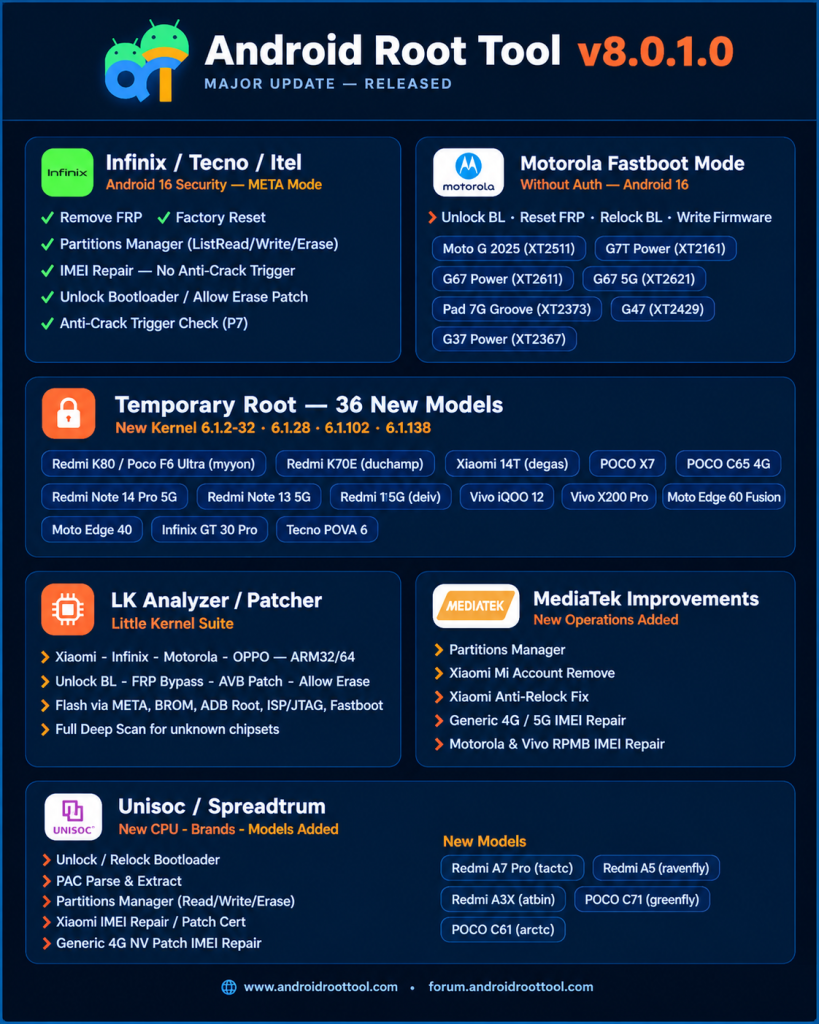
With the major release of Android Root Tool v8.0.2.0, the software introduces cutting-edge features including Android 16 META mode support for Infinix, Tecno, and Itel, advanced Little Kernel (LK) patching, expanded Unisoc operations, and robust security lock bypassing capabilities. This comprehensive guide covers all features and lock-removal functions included in v8.0.2.0.
What is Android Root Tool (ART)?
Android Root Tool (ART) is a specialized, high-performance Windows utility designed for mobile repair technicians and advanced users. It functions as an all-in-one desktop platform enabling low-level chipset communications, Magisk boot image patching, partition management, bootloader operations, and secure security unlocking across a vast array of global smartphone brands.
What’s New in Android Root Tool v8.0.2.0
The v8.0.2.0 update brings massive improvements and newly added device modules:
- Android 16 META Mode Support: Added dedicated META mode operations for Infinix, Tecno, and Itel MediaTek devices for seamless FRP removal and partition handling.
- MediaTek LK Analyzer, Patcher & Signer: Advanced Little Kernel tools for Xiaomi, Infinix, Motorola, OPPO, and legacy platforms to unlock bootloaders and bypass security states.
- Motorola Fastboot Mode (Without Auth): Direct Fastboot operations for newer Motorola devices without requiring official server authorization.
- Expanded Unisoc Operations: Enhanced support for Unisoc (Spreadtrum) devices, including PAC file extraction, partition read/write/erase, and bootloader relocking.
- Temporary Root Support: Upgraded temporary root mechanisms covering 50+ new models and multiple recent kernel versions.
Comprehensive Lock Removal Capabilities (FRP, MDM, PIN, Pattern & Account Locks)
Modern Android devices use multi-layered security encryption to protect user and corporate data. Android Root Tool v8.0.2.0 provides specialized modules to clear every major type of lock:
1. FRP Bypass (Factory Reset Protection)
When an Android smartphone is hard-reset without signing out of the primary Google account, Factory Reset Protection (FRP) blocks setup access. ART v8.0.2.0 features 1-click FRP removal via MTP Mode (for Samsung up to Android 16), META Mode (for Transsion MediaTek devices), Fastboot, EDL, and Flash modes.
2. MDM and Enterprise Security Removal
Corporate-managed devices, school tablets, or restricted handsets often enforce strict Mobile Device Management (MDM) or administrative security profiles. The tool’s deep partition manager and firmware flashing capabilities help technicians clean active MDM restrictions and restore normal device functionality.
3. PIN, Password, and Pattern Lock Reset
Forgetting a screen security lock—such as a numerical PIN, alphanumeric password, or gesture pattern—renders a phone inaccessible. ART allows technicians to execute safe factory resets, user data wipes, and partition formatting to clear screen locks without bricking the system.
4. Xiaomi Mi Account & Account Locks
In addition to standard Google security locks, the tool includes dedicated modules for clearing Xiaomi Mi Account verification barriers on supported MIUI and HyperOS versions via ADB, Fastboot, and BROM modes.
Supported Chipsets and Brands
Android Root Tool v8.0.2.0 delivers broad cross-platform compatibility across major hardware architectures:
- MediaTek (MTK): Comprehensive support for Helio and Dimensity chipsets in BROM, Preloader, and Android 16 META modes.
- Qualcomm Snapdragon: Full EDL 9008 flashing, QCN/NV backup, and bootloader management.
- Unisoc (Spreadtrum): Advanced Flash Mode operations, PAC file parsing, and IMEI repair.
- Samsung Exynos & Rockchip: Low-level connection, partition management, and firmware flashing.
- Supported Brands: Samsung, Xiaomi, Redmi, POCO, Infinix, Tecno, Itel, Motorola, OPPO, Realme, Vivo, and Google Pixel.
System Requirements
| Component | Minimum Requirement |
| Operating System | Windows 7, 8, 10, or 11 (32-bit or 64-bit) |
| Processor | Intel or AMD Dual-Core Processor (2.0 GHz or higher) |
| RAM | 4 GB Minimum (8 GB Recommended) |
| Storage Space | At least 2 GB to 3 GB of free disk space |
| Drivers | Proper Samsung USB, MediaTek VCOM, Unisoc FDL, and ADB Drivers |
How to Download and Install Android Root Tool v8.0.2.0
- Download the Archive Package: Get the official compressed setup package for Android Root Tool v8.0.2.0 from a trusted repository.
- Disable Antivirus Temporarily: Security suites frequently flag mobile servicing tools due to packed exploit scripts, root binaries, and patch loaders. Temporarily pause real-time protection before installation.
- Extract Files: Use WinRAR or 7-Zip to extract the downloaded archive contents into a dedicated folder on your
C:drive. - Install USB Drivers: Ensure all necessary manufacturer USB drivers (Samsung, MediaTek VCOM, Qualcomm 9008, Unisoc) are properly installed on your Windows system.
- Launch Application: Open the main executable file as an administrator, connect your supported device in the required mode (MTP, Fastboot, META, or EDL) via a stable USB cable, and execute your desired repair task.
Frequently Asked Questions (FAQ)
Q1: What are the main highlights of Android Root Tool v8.0.2.0?
Ans: The v8.0.2.0 update introduces Android 16 META mode support for Infinix, Tecno, and Itel devices, MediaTek Little Kernel (LK) patchers, unauthorized Motorola Fastboot operations, and expanded Unisoc partition tools.
Q2: Does ART v8.0.2.0 support FRP bypass for Samsung devices on Android 15 and 16?
Ans: Yes, ART features dedicated MTP and Download mode FRP bypass handlers designed to clear Google verification locks on modern Samsung Android versions.
Q3: Will rooting or removing FRP erase my personal data?
Ans: Yes, performing a factory reset, formatting user data, or executing security lock removals clears user storage to lift security barriers safely. Always back up important files beforehand if accessible.
Q4: Do I need a digital license or activation to run ART v8.0.2.0?
Ans: Android Root Tool is a professional servicing platform that generally requires an authorized license or subscription activation for full access to its advanced server modules and developer features.
Conclusion
The Android Root Tool (ART) v8.0.2.0 Latest Version is an essential, all-in-one utility for mobile repair technicians dealing with modern Android firmware. With its updated Android 16 META mode modules, LK patchers, and comprehensive support for FRP, MDM, PIN, pattern, and account lock removals, it significantly reduces troubleshooting time. Always ensure proper USB drivers are installed and follow safe flashing procedures when servicing customer devices.
Password: ART


