

EFT Pro Dongle Update v5.6.5 Latest Version Free Download | Complete Samsung Qualcomm, FRP, MDM & Lock Removal Guide
Table of Contents
Introduction
In the mobile software repair and flashing industry, technicians require a versatile, multi-platform servicing utility capable of keeping pace with rapid binary (BIT) security updates, new Android versions, and low-level hardware protocols. Developed by the Easy Firmware Team, EFT Pro Dongle Update v5.6.5 introduces exclusive Qualcomm support for 10+ Samsung models with updated BIT versions, Android 15 and Android 16 translation features for One UI 8.5, and expanded Apple A12/A13 Boot Diag utilities.
If you want to explore every feature of EFT Pro Dongle v5.6.5, its newly supported Samsung models, and how it clears FRP, MDM, KG, PIN, pattern, and passcode locks, this comprehensive guide covers all the details.
What is EFT Pro Dongle v5.6.5?
EFT Pro Dongle v5.6.5 is a professional Windows-based mobile servicing software that works with either a physical EFT Pro hardware dongle or an authorized digital account license. It integrates direct chipset communication protocols—including Qualcomm EDL 9008, MediaTek BROM/META, Unisoc/SPD, Samsung Odin/MTP, Rockchip, Amlogic, and Apple DFU/Recovery—into one unified dashboard for unlocking, flashing, and diagnostics.
What’s New in EFT Pro Dongle Update v5.6.5
The v5.6.5 release brings targeted upgrades across Samsung Qualcomm, Android 16, and Apple modules:
1. Qualcomm — New Samsung Exclusive BIT Support
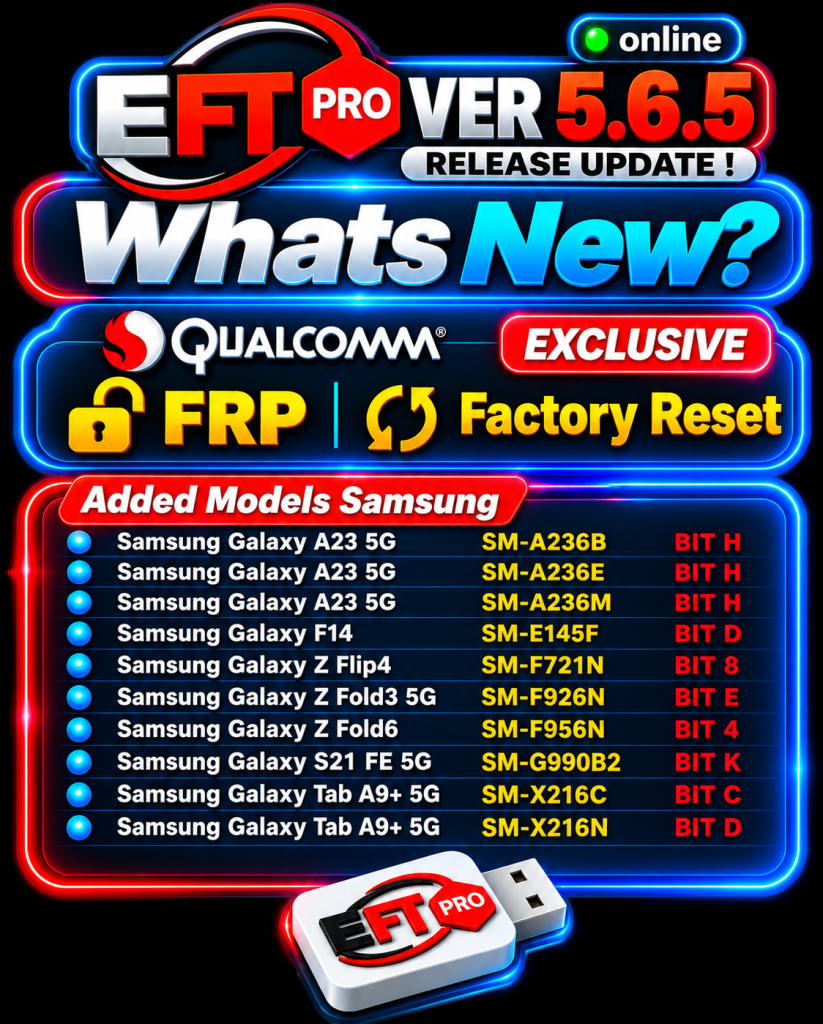
Added direct Reset FRP Lock and Factory Reset support for 10 Samsung models with updated binary (BIT) versions:
- Galaxy A23 5G:
SM-A236B(BIT H),SM-A236E(BIT H),SM-A236M(BIT H) - Galaxy F14 4G:
SM-E145F(BIT D) - Galaxy Z Flip4:
SM-F721N(BIT 8) - Galaxy Z Fold3 5G:
SM-F926N(BIT E) - Galaxy Z Fold6:
SM-F956N(BIT 4) - Galaxy S21 FE 5G:
SM-G990B2(BIT K) - Galaxy Tab A9+ 5G:
SM-X216C(BIT C)
2. Samsung Android 15, Android 16 & One UI 8.5 Support
- Translate Device (Android 15 & 16): Added rootless device language translation support for Android 15 and Android 16 devices running One UI 8.5.
3. Apple A12 / A13 Boot Diag & Hardware Pwner Utilities
- Boot Diag (Beta) & Erase (Beta): Added Boot Diag for supported Apple A12 and A13 devices in Pwned DFU mode to read Serial Numbers, Wi-Fi/Bluetooth/Ethernet MAC addresses, and execute factory-level wipes on the next device boot.
- Prepare
usbliter8Board Utility: Automatically detects compatibleRP2350hardware pwner boards and flashes the requiredusbliter8firmware.
Complete Feature Modules in EFT Pro Dongle
Beyond the v5.6.5 changelog, the software includes a full suite of multi-brand servicing modules:
- Xiaomi New Auth Sideload & Bootloader V2: Download and flash OTA packages automatically by IMEI/SN, flash local OTA files, and execute Unlock Bootloader V2 (Mi Account) with full 2FA (SMS/Email) and multi-domain server support.
- Multi-Brand Firmware Flashing: Flash official stock ROMs across Samsung (Odin 4-file/5-file), MediaTek (Scatter), Qualcomm (XML/Firehose), Unisoc (
.pac), Rockchip, and Amlogic SoCs. - Forced BROM & Boot Mode Operations: Includes Forced BROM without test points, Boot Mode network unlocking, disk read/write, and partition formatting.
- IMEI, NVRAM & Patch Cert Repair: Back up, restore, and repair corrupted IMEI numbers, NVRAM calibration partitions, and Patch Cert security on supported Xiaomi, Redmi, POCO, and MediaTek devices.
Comprehensive Lock Removal Capabilities (FRP, MDM, KG, PIN & Pattern Locks)
Modern smartphones incorporate multi-layered security encryption to safeguard user and enterprise data. EFT Pro Dongle v5.6.5 provides dedicated modules to clear every major type of lock:
1. FRP Bypass (Factory Reset Protection)
When an Android smartphone is factory reset without removing the synced Google account, FRP blocks setup access. EFT Pro v5.6.5 removes FRP via Qualcomm EDL 9008 (including newly added Samsung BIT models), Samsung MTP/Download Mode, MediaTek BROM/META, and Unisoc Flash Mode.
2. MDM & Knox Guard (KG) Removal
Corporate-managed phones, school tablets, or financed devices often enforce strict Mobile Device Management (MDM) or Samsung Knox Guard (KG) restrictions. Using dedicated Remove MDM Boot Mode, Bypass Knox (ADB/MTP), and Remove KG Lock Direct functions, technicians can clear active enterprise restrictions cleanly.
3. PIN, Password, and Pattern Lock Reset
Forgetting a screen security lock—whether a numeric PIN, alphanumeric password, or gesture pattern—renders a phone inaccessible. The software includes Qualcomm Factory Reset, META Factory Reset, Safe Format, and Userdata Wipe modules to erase screen locks safely without corrupting core system files.
4. Brand Account & Apple iCloud Locks
In addition to standard Android locks, the utility provides targeted modules for Huawei/Honor ID removal, Xiaomi Mi Account bypass, and Apple iOS Hello/Passcode servicing.
Supported Chipsets and Brands
EFT Pro Dongle v5.6.5 delivers broad cross-platform compatibility across global hardware architectures:
- Supported Chipsets: Qualcomm Snapdragon (EDL 9008), MediaTek (MTK Helio & Dimensity), Unisoc / Spreadtrum (SPD), Samsung Exynos, HiSilicon Kirin, Rockchip, Amlogic, and Apple A-Series processors.
- Supported Brands: Samsung (Galaxy S, Note, Z Fold/Flip, A, F, M, and Tab series), Xiaomi, Redmi, POCO, OPPO, Realme, Vivo, OnePlus, Huawei, Honor, Motorola, Lenovo, Infinix, Tecno, Itel, Alcatel/TCL, and Apple iPhone/iPad.
System Requirements
| Component | Minimum Requirement | Recommended Specification |
| Operating System | Windows 7 / 8 / 10 (32-bit & 64-bit) | Windows 10 / 11 (64-bit) |
| Processor | Intel Core 2 Duo / AMD Dual-Core (2.0 GHz) | Intel Core i3 / AMD Ryzen 3 or higher |
| RAM | 4 GB RAM | 8 GB RAM or higher |
| Storage Space | 2 GB free disk space ( ~88 MB update package) | 10 GB available space (for firmware & backups) |
| Hardware & Drivers | EFT Pro Dongle (or Online License) + USB Drivers | Smart-Card, Samsung, Qualcomm 9008, MTK & |
How to Download, Install, and Use EFT Pro Dongle v5.6.5
- Download the Setup Archive: Download the official EFT Pro Dongle v5.6.5 compressed update package (
update143.7z, ~88 MB; standard archive password:123if prompted) from a trusted repository. - Temporarily Pause Antivirus: Windows Defender and third-party antivirus suites often flag mobile servicing utilities due to packed loaders and exploit scripts. Temporarily disable real-time protection or whitelist the installation folder before extracting.
- Extract & Run Installer: Use 7-Zip or WinRAR to unpack the archive, right-click the installer or update executable, and select Run as administrator.
- Connect Dongle & Log In: Insert your EFT Pro Dongle into a direct rear USB port (or use your online digital activation), launch the EFT Pro desktop app, and sign in with your registered Email ID and Password.
- Select Model & Execute Task: Choose your target brand/chipset tab (Samsung, Qualcomm, MTK, Xiaomi, SPD, or Apple), select the operation (Reset FRP, Factory Reset, Translate Device, or Remove MDM), connect your phone in the required service mode (EDL 9008, Download Mode, BROM, or DFU), and click Start.
Frequently Asked Questions (FAQ)
Q1: What are the main highlights of EFT Pro Dongle Update v5.6.5?
Ans: Version v5.6.5 adds Qualcomm Reset FRP and Factory Reset support for 10 exclusive Samsung models with updated BIT versions (including Galaxy Z Fold6, Z Fold3, Z Flip4, S21 FE, A23 5G, F14, and Tab A9+ 5G), introduces One UI 8.5 / Android 15–16 device translation, and adds Apple A12/A13 Boot Diag (Beta) utilities.
Q2: Do I need a physical EFT Pro Dongle to run v5.6.5?
Ans: EFT Pro works with both the physical EFT Pro Dongle smart-card hardware and official EFT Pro Digital Activation licenses (online login without a dongle).
Q3: Will removing a PIN, pattern, or FRP lock delete personal data?
Ans: Performing a Factory Reset, Safe Format, or userdata wipe to clear a forgotten PIN or pattern lock will erase all user data on the device. Always back up accessible files and NVRAM/security partitions before servicing.
Q4: Why is my PC failing to detect my Samsung Qualcomm phone in EDL 9008 mode?
Ans: Detection issues usually occur due to missing drivers or faulty USB cables. Ensure Qualcomm HS-USB QDLoader 9008 Drivers and Samsung USB Drivers are properly installed in Windows Device Manager, and use an original data cable connected directly to a rear motherboard USB port.
Conclusion
The EFT Pro Dongle Update v5.6.5 Latest Version reinforces its position as an essential, fast-evolving servicing platform for mobile repair professionals. By adding Qualcomm FRP and Factory Reset support for 10 newly updated Samsung BIT models, Android 15/16 One UI 8.5 translation, and expanded Apple Boot Diag utilities alongside comprehensive MDM, KG, PIN, and pattern lock removal, it streamlines complex daily repairs. Always ensure proper USB drivers are installed and verify device binary (BIT) versions before executing low-level operations.