

KG Killer Tool v3.8.0 (v380) Latest Version Free Download | Complete KG, MDM, FRP & Lock Removal Guide
Table of Contents
Introduction
In the mobile software repair industry, technicians regularly encounter complex administrative restrictions, financed device locks, and strict enterprise security barriers on modern Android smartphones. KG Killer Tool v3.8.0 (v380) Latest Version stands out as a specialized, multi-brand Windows servicing utility designed to bypass Knox Guard (KG), Mobile Device Management (MDM), IT Admin policies, and Factory Reset Protection (FRP).
With the release of v3.8.0, the software introduces expanded support for 40+ Qualcomm models (including 28 ASUS and 12 Huawei/Honor devices), Android 15 and 16 FRP/MDM handlers, and an integrated Samsung Odin firmware flasher. This comprehensive guide details every module, lock-removal method, and setup step
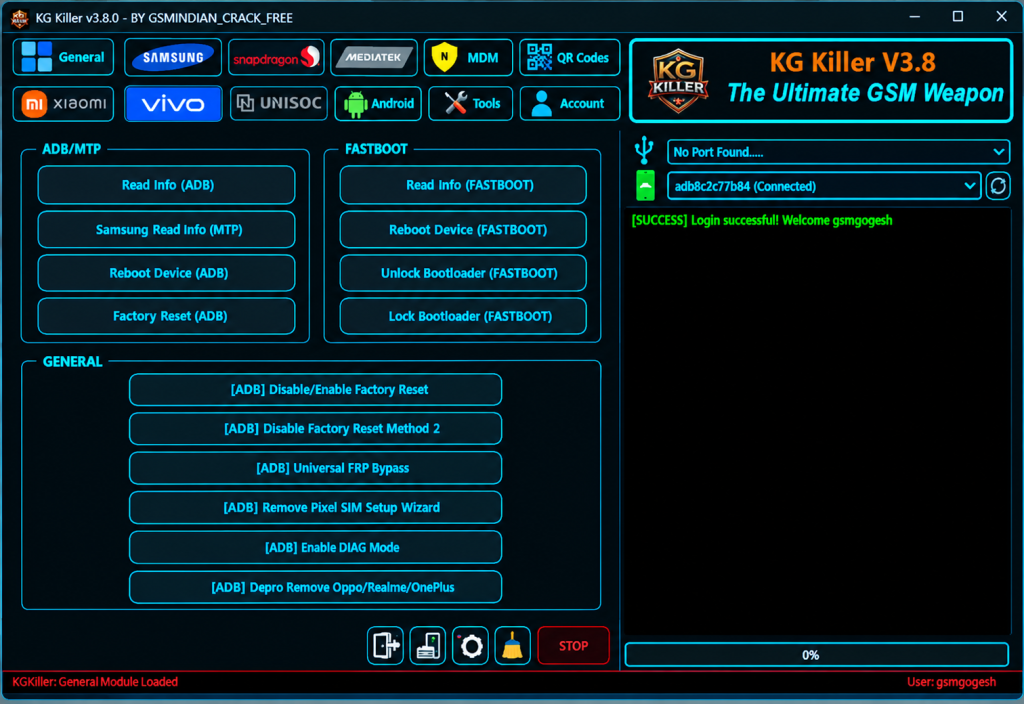
What is KG Killer Tool v3.8.0 (v380)?
KG Killer Tool v3.8.0 is an all-in-one Windows desktop utility built for mobile repair professionals. Organized into dedicated brand and chipset tabs—including Samsung, Qualcomm, MDM, QR Codes, Xiaomi, Vivo, Android App Manager, and Tools—it enables technicians to execute ADB, Fastboot, Odin Download Mode, and EDL 9008 servicing operations without complicated manual command-line setups.
What’s New & Complete Feature Modules in v3.8.0
The v3.8.0 release combines newly expanded device loaders with a multi-threaded, lag-free user interface:
1. What’s New in v3.8.0
- 40+ Newly Added Qualcomm Models: Expanded EDL 9008 servicing, factory reset, and FRP reset coverage for 28 ASUS models and 12 Huawei/Honor devices.
- Android 15 & Android 16 Security Support: Upgraded IT Admin, DPC, and Samsung FRP protocols to handle Android 15 and Android 16 security iterations.
- Enhanced Stability & OTP Login Security: Includes an added OTP authentication layer for account protection alongside bug fixes and faster background execution.
2. Samsung Servicing & Odin Flash Module
- Samsung FRP & Exynos Tools: Supports Exynos FRP removal with CPU/device selection (including
Exynos 1280,1380, and1480), direct FRP removal via Odin Download Mode, and Samsung Android 16 FRP bypass via MTP and ADB. - Samsung System Utilities: Remove Samsung Account via ADB, change CSC region codes, enable Diagnostic (Diag) Mode, enable OEM Unlocking, disable OTA updates, disable carrier/service provider bloatware, and remove Demo Mode.
- Built-In Odin Firmware Flasher: Load
BL,AP,CP,CSC, andPITfiles with configurable options for Auto Reboot, Repartition, Clear EFS, Update Bootloader, and Read PIT Information.
3. MDM, IT Admin & QR Codes Module
- Multi-Brand IT Admin & DPC Removal: Dedicated Method 1 and Method 2 DPC/IT Admin removal options for Android 15 and Android 16, plus targeted IT Admin handlers for Tecno, Infinix, and Itel.
- Automated QR Code Generators: Generate setup QR codes to enable ADB automatically on Android 13 and Android 14 (Method 1 & Method 2), alongside HyperOS QR methods for Xiaomi devices.
4. Qualcomm EDL 9008 & Multi-Brand Modules (Xiaomi, Vivo, Motorola)
- Qualcomm Firehose Operations: Auto-detect devices in EDL 9008 mode, select custom Firehose programmers, test loader compatibility, flash
rawprogram0.xml, read/write/erase individual partitions (FRP,Userdata,Persist), and unlock/lock bootloaders. - Xiaomi / Redmi / POCO: Remove Redmi/HyperOS/MIUI IT Admin and Axio Lock (via ADB and QR), bypass Mi Cloud accounts with Anti-Relock protection, enable Diag Mode, and reboot to EDL.
- Vivo & Motorola: Vivo IT Admin removal, Demo Mode removal, Exception Erase, and FRP bypass; Motorola Fastboot FRP bypass and bootloader unlock/relock.
5. Android App Manager & Advanced Utilities
- App & APK Management: Search and filter System, Disabled, and User apps; install
.apkand.apkspackages; pull/backup APKs; and uninstall or disable unwanted bloatware. - System & Screen Controls: View a Live Android Screen mirror via ADB, hide Developer Options, switch active A/B slots, switch Oppo carriers via ADB, and install required USB drivers directly from the tool.
Comprehensive Lock Removal Capabilities (FRP, MDM, KG, PIN & Pattern Locks)
Modern Android smartphones employ multi-layered security frameworks to restrict unauthorized access. KG Killer Tool v3.8.0 provides targeted modules to clear every major type of lock:
1. Knox Guard (KG) & Financed Lock Removal (PayJoy / Axio)
Devices locked by Samsung Knox Guard (KG), PayJoy, or Axio financing restrictions often display persistent lock screens or disable factory resets. The tool neutralizes KG states, removes PayJoy/Axio locks via ADB and QR provisioning, and disables OTA updates to prevent relocking.
2. MDM & IT Admin / Device Owner Removal
Corporate-managed phones and school tablets enforce strict Mobile Device Management (MDM) or Device Owner profiles that survive standard resets. Using DPC Method 1 & 2 and brand-specific IT Admin modules (Samsung, Xiaomi, Vivo, Tecno, Infinix, Itel), technicians can clear enterprise restrictions up to Android 16.
3. FRP Bypass (Factory Reset Protection)
When a phone is reset without removing the synced Google account, FRP blocks setup access. KG Killer Tool v3.8.0 erases FRP via Samsung Odin Download Mode, MTP/ADB Methods (Android 16), Fastboot FRP Erase, and Qualcomm EDL Persist Partition Erase.
4. PIN, Password, and Pattern Lock Reset
Forgetting a screen security lock—whether a numeric PIN, alphanumeric password, or gesture pattern—renders a phone inaccessible. The utility includes Screen Lock Removal, ADB Factory Reset, Fastboot Erase Userdata, and EDL Userdata Wipe options to clear screen locks safely.
Supported Brands and Chipsets
KG Killer Tool v3.8.0 delivers broad cross-platform compatibility across major hardware architectures:
- Supported Chipsets: Qualcomm Snapdragon (Sahara & Firehose EDL 9008), Samsung Exynos (
Exynos 1280,1380,1480, and more), MediaTek (MTK), and Unisoc/SPD (via ADB/QR/IT Admin). - Supported Brands: Samsung (Galaxy S, Note, A, M, and Tab series), Xiaomi, Redmi, POCO, Vivo, OPPO, Realme, Motorola, ASUS (28 newly added Qualcomm models), Huawei/Honor (12 newly added Qualcomm models), TECNO, Infinix, and Itel.
System Requirements
| Component | Minimum Requirement | Recommended Specification |
| Operating System | Windows 7 / 8 / 10 (32-bit & 64-bit) | Windows 10 / 11 (64-bit) |
| Processor | Intel Core 2 Duo / AMD Dual-Core (2.0 GHz) | Intel Core i3 / AMD Ryzen 3 or higher |
| RAM | 4 GB RAM | 8 GB RAM or higher |
| Storage Space | 1 GB free disk space | 3 GB available space (for firmware & logs) |
| Drivers & Runtimes | Samsung USB, Qualcomm 9008, MTK & ADB Drivers | Visual C++ (x86/x64) Runtimes + Full USB Drivers |
How to Download and Use KG Killer Tool v3.8.0
- Download the Setup Archive: Download the official KG Killer Tool v3.8.0 compressed archive package from a trusted repository.
- Disable Antivirus Temporarily: Windows Defender and third-party antivirus suites often flag mobile servicing tools due to packed ADB/exploit scripts. Temporarily pause real-time protection or add an exclusion folder before extracting.
- Extract & Install Runtimes: Use WinRAR or 7-Zip to unpack the archive into a folder on your
C:drive, and ensure Microsoft Visual C++ (x86/x64) runtimes are installed. - Install Required USB Drivers: Install official Samsung USB, Qualcomm HS-USB QDLoader 9008, MediaTek VCOM, and ADB drivers (or use the tool’s built-in driver downloader).
- Launch & Log In: Right-click the main executable file, select Run as administrator, and sign in with your authorized credentials (and OTP verification if prompted).
- Connect Device & Execute Task: Select the appropriate tab (Samsung, MDM, QR Codes, Qualcomm, Xiaomi, or Vivo), connect your phone in the required mode (Setup Screen QR, ADB, Odin Download Mode, Fastboot, or EDL 9008), and click your desired repair operation.
Frequently Asked Questions (FAQ)
Q1: What are the main highlights of KG Killer Tool v3.8.0?
Ans: The v3.8.0 update adds EDL/FRP/Factory Reset support for 40+ Qualcomm models (including 28 ASUS and 12 Huawei/Honor devices), Android 15 and 16 IT Admin/FRP handlers, Samsung Exynos Download Mode FRP removal, and a built-in Odin firmware flasher.
Q2: How does the QR Code ADB Enable feature work on locked phones?
Ans: On the initial welcome/setup screen of a locked Android 13, Android 14, or HyperOS device, you can tap the screen multiple times to open the QR scanner and scan the QR code generated by KG Killer Tool. This provisions temporary device permissions and enables USB Debugging (ADB) so you can run MDM or IT Admin removal commands.
Q3: Will removing a PIN, pattern, or FRP lock delete personal data?
Ans: Yes, executing a Factory Reset, EDL Userdata Wipe, or Screen Lock Removal clears user storage partitions to lift security barriers safely. Always back up accessible data before servicing.
Q4: Does KG Killer Tool v3.8.0 require a physical hardware box?
Ans: No, KG Killer Tool is a standalone Windows software utility that operates via an authorized account login/activation license without requiring a physical dongle or box.
Conclusion
The KG Killer Tool v3.8.0 (v380) Latest Version is an essential utility for mobile repair technicians dealing with stubborn enterprise locks and modern Android security patches. With its dedicated Knox Guard (KG), MDM, IT Admin, and FRP removal modules—alongside 40+ newly added ASUS and Huawei/Honor Qualcomm loaders and a built-in Samsung Odin flasher—it significantly streamlines daily servicing workflows. Always ensure proper USB drivers are installed and verify device compatibility before executing firmware or partition operations.


