

mdUnlockerMainTool V2.6 (2026) Latest Powerful Version Download
Table of Contents
In the mobile software repair and flashing industry, technicians face increasingly strict security layers on Android 15 and Android 16 devices, including patched MediaTek Preloader ports, Transsion Anti-Crack protections, and persistent enterprise or carrier financing locks. mdUnlockerMainTool V2.6 (2026) Latest Version stands out as an all-in-one Windows servicing utility engineered specifically to overcome these challenges.
Combining Android 16 56-chip MediaTek BROM authentication bypass, permanent MDM and PayJoy unlocking, Transsion Anti-Crack P7 engine fixes, Qualcomm EDL 9008, SPD / Unisoc BROM & ADL modes, Samsung Odin/MTP, and META / Custom Preloader protocols into a single dashboard, mdUnlockerMainTool V2.6 streamlines multi-brand mobile servicing. This comprehensive guide covers every feature, lock-removal method, system requirement, and setup step.
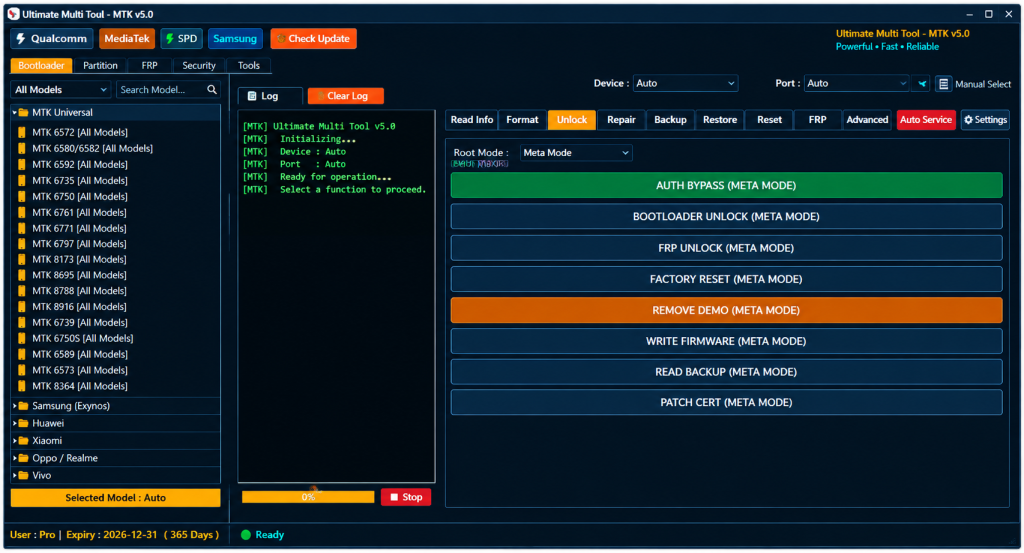
What is mdUnlockerMainTool V2.6 (2026)?
mdUnlockerMainTool V2.6 (2026) is a multi-protocol Windows desktop mobile repair, flashing, and unlocking suite built for Android smartphones and tablets. Designed for professional GSM repair technicians, it unifies low-level hardware communication modes including MediaTek BROM/Preloader/META, Qualcomm EDL 9008, Spreadtrum/Unisoc BROM/ADL, MTP, ADB, and Fastboot/Fastbootd allowing operators to remove FRP, permanently clear MDM/PayJoy locks, reset forgotten screen credentials, repair IMEI/baseband partitions, and flash stock firmware cleanly.
Complete Features & Servicing Modules of mdUnlockerMainTool V2.6
The V2.6 (2026) release packs an extensive collection of chipset, protocol, and anti-relock modules into one structured interface:
1. MediaTek (MTK), Android 16 BROM & Anti-Crack Modules
- Android 16 SLA / DAA 56-Chip Universal Auth Bypass: Bypasses MediaTek authentication barriers across 56 chipsets in BROM mode alongside Preloader Crash, MTK Auto Detect, and Generic BROM Mode.
- Transsion Anti-Crack & P7 Engine: Dedicated Transsion Anti-Crack Auto Fix, Transsion Engine P7, BL Unlock + Anti-Crack Fix, DM-Verity Fix, Recovery Loop Fix, and Bootloop Fix for Tecno, Infinix, and Itel devices.
- Security & Partition Manager: Back up, restore, and erase NVRAM and NVDATA, back up PROINFO, read GPT, perform Baseband IMEI Repair, and read/write/erase individual partitions.
2. META Mode, Custom Preloader & MTK MDM ADB Modules
- META Mode Servicing Suite: Features Balla MDM USB Bypass, Balla MDM File Dump Bypass, Tecno / Infinix PROINFO Patcher, SPMETA MT6580 Factory Reset, eMMC / UFS / Android 11 / Auto Safe Factory Reset, Enable ADB, and Reboot META / Android.
- Custom Preloader Module: Supports Safe Format PARA, Safe Format MISC, Dump Operations, Bootloader Operations, Remove Demo, and DM-Verity Fix.
- MTK MDM ADB & Anti-Relock Suite: Includes MDM BlackScreen Fix 1, MDM Bypass 2025, Uninstall Overlay Applications, Uninstall App Updaters, Disable Scorpio Security, Fix Black Screen Wake Display, Private DNS Anti-Relock, Complete User Setup, and Launch Home Screen.
3. Qualcomm EDL 9008 & SPD / Unisoc Modules
- Qualcomm EDL 9008 Module: Provides Qualcomm Auto Detect, Firehose Programmer Support, VIP Server Authentication Loader, EDL Safe Format, QCN & EFS Backup/Restore, Modem Partition Operations, and Bootloader Unlock/Relock.
- SPD / Unisoc Module: Supports SPD / Unisoc Auto Detect Chipset, BROM Mode Operations, ADL Mode Operations, Recovery Operations, and Read Device Information.
4. Multi-Mode Flashing, MTP, ADB & Fastboot Utilities
- Universal Firmware Flasher: Supports MTK Scatter & Partition Flashing (with Download Agent & Auth support), Read MTK Dump, Samsung Odin Flashing, SPD / Unisoc
.PACFlashing, and Fastboot / Fastbootd Anti-Crack Flashing. - MTP & ADB Repair Utilities: Launch YouTube, Google Maps, or generic browsers via MTP; execute Samsung & Universal ADB FRP; Disable Factory Mode; and repair broken SMS, Call, and Navigation functions.
Comprehensive Lock Removal Capabilities (FRP, MDM, PayJoy, PIN & Pattern Locks)
Modern Android firmware enforces layered cryptographic and administrative locks across boot, system, and user partitions. mdUnlockerMainTool V2.6 provides dedicated tools to clear every major lock category:
1. FRP Bypass (Factory Reset Protection)
When a smartphone is factory reset without removing the previously synced Google account, FRP blocks device setup. mdUnlockerMainTool V2.6 clears FRP across Android 16 MTK BROM, Custom Preloader, META Mode (Multiple FRP Variants), Qualcomm EDL 9008, SPD / Unisoc BROM & ADL, Samsung MTP & ADB, and Fastboot Mode.
2. Permanent MDM, PayJoy & Enterprise Lock Removal
Corporate-managed devices, school tablets, financed handsets, and retail demo units frequently carry strict Mobile Device Management (MDM), PayJoy, or Scorpio Security restrictions. The tool offers Permanent MDM Unlock (BROM & META), One-Click Anti-Crack MDM, PayJoy / MDM Patch, Balla MDM USB/Dump Bypass, Private DNS Anti-Relock, Uninstall Overlay Applications, and Demo Removal.
3. PIN, Password, and Pattern Lock Reset
Forgetting a screen security credential—whether a numeric PIN, alphanumeric password, or gesture pattern—renders a device inaccessible. Technicians can use Safe Format (PARA / MISC), EDL Safe Format, META eMMC/UFS Factory Reset, ADB Screen Lock Reset, or Fastboot Factory Reset to clear forgotten screen locks safely while protecting baseband calibration.
4. Brand Account & Bootloader Locks (Mi Cloud & OEM Unlock)
Beyond Google and enterprise locks, mdUnlockerMainTool V2.6 includes dedicated Mi Cloud Unlock routines for Xiaomi/Redmi devices alongside Bootloader Unlock & Relock functions across MediaTek, Qualcomm, and Fastboot platforms.
Supported Brands and Chipsets
mdUnlockerMainTool V2.6 (2026) covers a wide spectrum of Android brands and hardware chipsets:
- Supported Chipsets: MediaTek (
MT6580,MT67xxHelio &MT68xx/MT69xxDimensity 56-chip universal support), Qualcomm Snapdragon (EDL 9008 & VIP Auth loaders), Spreadtrum / Unisoc (SPDBROM & ADL), and Samsung Exynos. - Supported Brands: Tecno, Infinix, Itel (Transsion devices), Samsung Galaxy, Xiaomi, Redmi, POCO, OPPO, Realme, Vivo, Motorola, Nokia, and generic Android smartphones.
System Requirements
| Component | Minimum Requirement | Recommended Specification |
| Operating System | Windows 7 / 8 / 10 (64-bit) | Windows 10 / 11 (64-bit) |
| Processor | Intel Core 2 Duo / AMD Dual-Core (2.0 GHz) | Intel Core i3 / AMD Ryzen 3 or higher |
| RAM | 4 GB RAM | 8 GB RAM or higher |
| Storage Space | 1 GB free disk space | 15 GB+ available space (for firmware dumps & NVRAM/QCN backups) |
| Network & Drivers | Internet access (for VIP/Server auth) + USB Drivers | High-Speed Internet + MTK VCOM, USBDK, Qualcomm 9008 & SPD Drivers |
How to Download, Install, and Use mdUnlockerMainTool V2.6
- Download the Setup Archive: Download the official mdUnlockerMainTool V2.6 (2026) compressed
.zipor.rarpackage from a trusted repository. - Temporarily Pause Antivirus: Windows Defender and third-party antivirus suites frequently flag multi-protocol GSM utilities due to packed BROM exploits, DA loaders, and Firehose programmers. Temporarily disable real-time protection or add an exclusion folder before extracting.
- Extract & Install Setup: Unpack the archive using WinRAR or 7-Zip, right-click the installer executable, and select Run as administrator to complete installation.
- Install Required Chipset USB Drivers: Ensure official MediaTek Preloader VCOM, USBDK, Qualcomm HS-USB QDLoader 9008, SPD/Unisoc, and Samsung USB drivers are installed in Windows Device Manager.
- Launch & Log In: Right-click the mdUnlockerMainTool V2.6 desktop icon, choose Run as administrator, and sign in with your account credentials to activate server modules.
- Select Module & Execute Operation: Navigate to your target tab (MediaTek, Android 16 MTK BROM, MTK BROM MDM, META Mode, Qualcomm, SPD/Unisoc, MTP, ADB, or Fastboot), back up NVRAM/NVDATA or EFS/QCN first, select your operation (Auto Erase FRP, Permanent MDM Unlock, Safe Format, PayJoy Patch, or Flash), connect your device to a direct rear USB port in the required mode, and click Start.
Frequently Asked Questions (FAQ)
Q1: What makes mdUnlockerMainTool V2.6 (2026) effective for newer MediaTek devices?
Ans: Version V2.6 features an Android 16 SLA / DAA 56-Chip Universal Authentication Bypass, Preloader Crash, and a dedicated Transsion Anti-Crack P7 Engine enabling technicians to service Tecno, Infinix, Itel, Samsung MTK, and Xiaomi/Redmi MTK handsets without external auth files.
Q2: Can mdUnlockerMainTool V2.6 permanently remove MDM and PayJoy locks?
Ans: Yes, the tool includes Permanent MDM Unlock (BROM & META), One-Click Anti-Crack MDM, PayJoy / MDM Patch, and Private DNS Anti-Relock + App Updater Removal via ADB to neutralize enterprise and financing locks cleanly.
Q3: Will removing a PIN, pattern, or FRP lock erase personal user data?
Ans: Executing Safe Format (PARA / MISC) or EDL Safe Format on supported builds helps preserve user partitions, whereas performing a full Factory Reset or META eMMC/UFS Reset will erase personal photos, apps, and forgotten screen locks. Always back up accessible data as well as NVRAM/NVDATA and EFS/QCN before servicing.
Q4: Why is Windows failing to detect my phone in BROM, META, or Qualcomm EDL 9008 mode?
Ans: Detection issues usually stem from missing USB drivers or USB hub interference. Install the latest MediaTek VCOM, USBDK (64-bit), Qualcomm 9008, and SPD drivers, restart your PC, and connect the phone directly to a rear motherboard USB port.
Conclusion
The mdUnlockerMainTool V2.6 (2026) Latest Version is a feature-packed, professional-grade servicing suite for mobile repair technicians handling modern Android devices. By uniting Android 16 56-chip MediaTek BROM auth bypass, Transsion Anti-Crack P7 fixes, Qualcomm EDL 9008 Firehose operations, SPD BROM/ADL servicing, and permanent FRP, MDM, PayJoy, PIN, and pattern lock removal into one Windows dashboard, it simplifies complex daily repairs. Always back up critical NVRAM, NVDATA, PROINFO, and EFS partitions before performing low-level modifications.


