

Mobile Support Tool UPROM Latest Version Free Download | Complete Android Firmware & Lock Removal Guide
Table of Contents
In the modern mobile repair industry, technicians and smartphone users frequently encounter software glitches, boot loops, and forgotten security credentials. Finding a reliable, multi-functional utility program is essential to resolve these software issues smoothly. One of the trending solutions in the servicing sector is Mobile Support Tool UPROM.
If you want to know everything about Mobile Support Tool UPROM Latest Version, its advanced functions, and how it handles rigid security locks, this comprehensive guide will provide all the necessary details.
What is Mobile Support Tool UPROM?
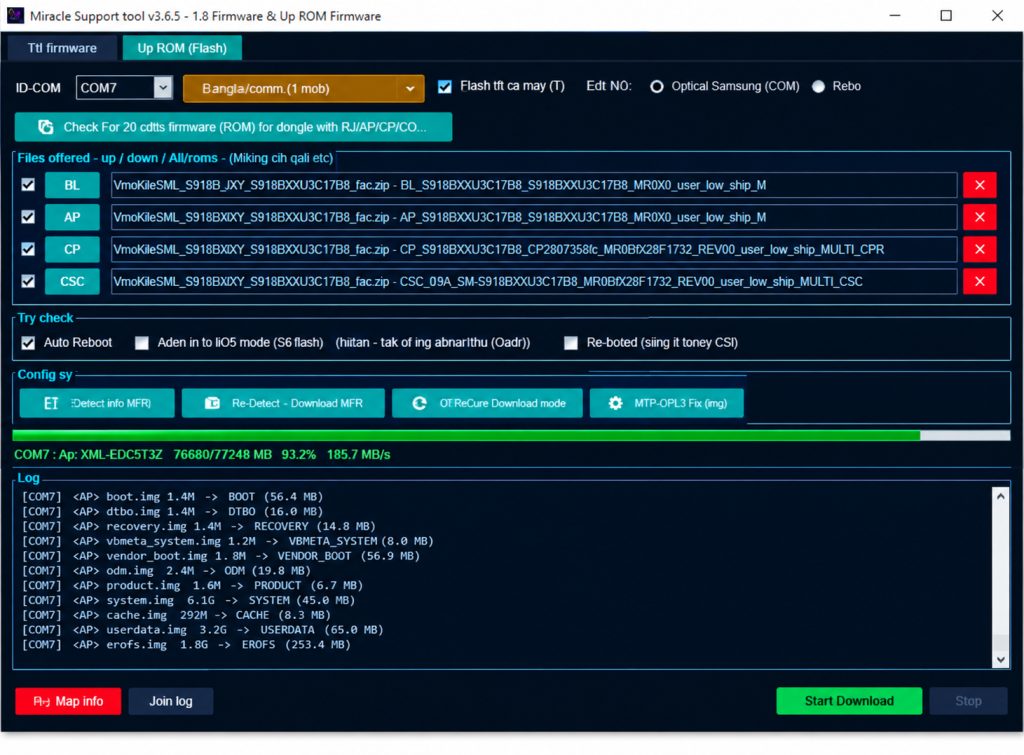
Mobile Support Tool UPROM is a specialized Windows-based software application engineered for mobile repair technicians and advanced users. It serves as an all-in-one utility tool designed to handle firmware flashing, system recovery, deep-layer diagnostics, and security lock bypass operations across a vast variety of Android smartphones and tablets.
Key Features of Mobile Support Tool UPROM
The software comes packed with advanced modules to optimize and streamline device repair workflows:
- All-in-One Dashboard: Integrates flashing, security servicing, partition management, and diagnostic features into a single, user-friendly interface.
- Firmware Flashing & Upgrading: Safely flash stock ROMs, package updates, and resolve system boot-loops or software corruption.
- Backup and Restore Utility: Securely back up critical device data, parameters, and NVRAM settings before executing major system changes.
- Advanced Diagnostic Tools: Single-click access to hidden device ports, test points, fastboot states, and Meta/EDL operational modes.
- Fast Processing Speed: Optimized scripts to handle heavy firmware files and secure flashing protocols efficiently.
Comprehensive Lock Removal Capabilities (FRP, MDM, PIN, Pattern & Screen Locks)
Modern smartphones feature intense security architectures to safeguard personal and corporate data. However, secondary buyers or owners who forget their credentials often get locked out. Mobile Support Tool UPROM excels exceptionally in complex lock removal procedures:
1. FRP Bypass (Factory Reset Protection)
When a device undergoes a hard reset without unlinking the primary Google account, Factory Reset Protection (FRP) blocks access. Mobile Support Tool UPROM provides seamless FRP removal solutions across multiple brands and recent Android security patches via ADB, Fastboot, EDL, and Brom modes.
2. MDM (Mobile Device Management) Removal
Corporate-issued phones, school devices, or rental handsets often include restrictive Mobile Device Management (MDM) profiles. The tool features specialized bypass algorithms to clean and remove MDM restrictions safely without causing device instability.
3. PIN, Password, and Pattern Lock Reset
Forgetting a screen lock (PIN, complex password, or gesture pattern) can render a phone unusable. This utility allows technicians to bypass and clear screen locks on supported chipsets, helping recover device accessibility without permanent hardware damage.
Supported Brands and Chipsets
Mobile Support Tool UPROM offers broad hardware architecture support, ensuring compatibility with major global smartphone manufacturers:
- Supported Chipsets: Qualcomm Snapdragon, MediaTek (MTK), Unisoc (SPD), and modern security architecture platforms.
- Supported Brands: Samsung, Xiaomi, Redmi, POCO, Oppo, Realme, Vivo, OnePlus, Motorola, Infinix, Tecno, and various other Android variants.
System Requirements
To run Mobile Support Tool UPROM smoothly on your computer, verify that your PC meets these specifications:
| Component | Minimum Requirement |
| Operating System | Windows 7, 8, 10, 11 (32-bit or 64-bit) |
| Processor | Intel or AMD Dual-Core Processor (2.0 GHz or higher) |
| RAM | 4 GB Minimum (8 GB Recommended) |
| Storage Space | At least 2 GB to 5 GB of free disk space |
| Drivers | Proper Android USB, MTK, and Qualcomm Drivers installed |
How to Download and Use Mobile Support Tool UPROM
- Download the Package: Get the official compressed archive package of Mobile Support Tool UPROM from a trusted source.
- Disable Antivirus Temporarily: Security software often flags utility tools due to patched system scripts. Disable real-time protection temporarily during setup.
- Extract Files: Use extraction programs like WinRAR or 7-Zip to unpack the downloaded archive.
- Install Required Drivers: Ensure your PC has all necessary manufacturer USB drivers and runtime frameworks installed.
- Launch Application: Open the main tool executable file as an administrator.
- Connect Your Device: Put your target Android phone into the required mode (Fastboot, EDL, or MTP) and connect it via a stable USB cable to execute your desired repair task.
Frequently Asked Questions (FAQ)
Q1: Is Mobile Support Tool UPROM free to use?
Ans: The application offers free downloadable packages for its updates, though specific server-based functions, premium credits, or authorized modules may require developer activation.
Q2: Can this tool remove FRP lock on the latest Android versions?
Ans: Yes, the utility includes updated exploit protocols and bypass methods to handle recent Android security patch iterations effectively.
Q3: Will unlocking my screen lock or FRP delete my personal data?
Ans: Yes, operations like FRP bypass, MDM removal, and screen lock resets trigger security clearances that wipe phone data to restore factory safety standards.
Q4: Do I need test points for MediaTek or Qualcomm devices?
Ans: Standard operations work via normal USB debugging or fastboot modes, but severely bricked or deep-security devices may occasionally require test point engagement.
Conclusion
The Mobile Support Tool UPROM Latest Version is a powerful utility asset for mobile technicians handling complex Android repairs. By integrating robust support for FRP bypass, MDM removal, and screen lock clearing across multiple chipsets, it significantly reduces troubleshooting time. Always ensure you download official packages and maintain backups before carrying out advanced system operations.


