

SamFw Tool V6.3 (v6.3) Latest Powerful Version Free Download | Complete Samsung & Multi-Brand FRP, MDM, PIN, Pattern & Lock Removal Guide
Table of Contents
Introduction
In the mobile software repair and flashing industry, technicians depend on fast, reliable utilities capable of bypassing Factory Reset Protection (FRP), modifying carrier CSC codes, and flashing stock firmware without complicated manual setups. SamFw Tool V6.3 (v6.3) Latest Version stands out as one of the most popular free Windows servicing utilities engineered primarily for Samsung Galaxy smartphones while also integrating dedicated modules for Xiaomi, LG, Qualcomm, MediaTek, and general Android devices.
With the release of V6.3, SamFw enhances its Samsung MTP/ADB security handlers, expands Qualcomm EDL 9008 and MediaTek BROM loaders, and refines its built-in Odin firmware flasher. This comprehensive guide covers every feature, lock-removal method, system requirement, and setup step.
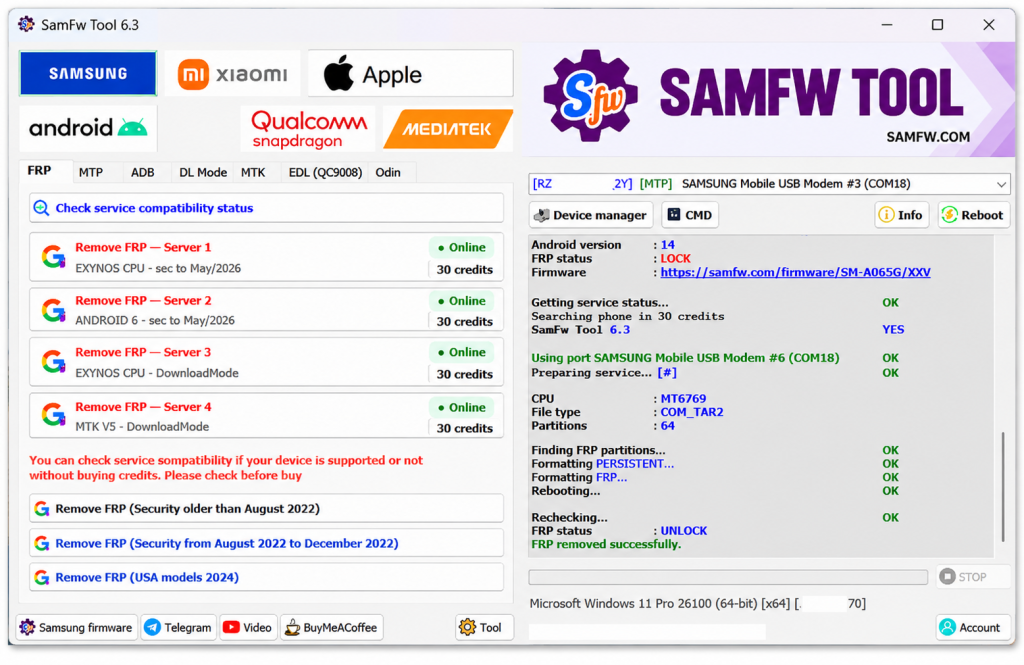
What is SamFw Tool V6.3?
SamFw Tool V6.3 is a free, lightweight Windows desktop servicing and unlocking application developed by the SamFw Team. Built to simplify everyday GSM repairs without requiring a physical hardware box or dongle for its core free modules, it unifies Samsung MTP, ADB, Odin Download Mode, Qualcomm EDL 9008, MediaTek BROM/META, and Fastboot protocols into one clean, tabbed interface.
What’s New & Complete Feature Modules in SamFw Tool V6.3
The V6.3 release organizes its extensive toolset into dedicated brand and protocol tabs:
1. Samsung MTP, ADB & Download Mode Module
- 1-Click FRP Bypass (Test Mode & Modern Security): Supports classic
*#0*#Test Mode ADB enabling alongside updated security patch handlers (covering 2022–2026 security iterations and US carrier models). - Change CSC (Region / Carrier Code): Switch Samsung CSC codes in one click via MTP/ADB without root—enabling native call recording, carrier features, and regional OTA firmware updates.
- Samsung System Utilities: Remove Samsung Account via ADB, disable Knox and OTA updates, enable Mobile Data / Hotspot toggles, read full device/battery info, and enter or exit Download Mode in one click.
- Built-In Odin Firmware Flasher: Load
BL,AP,CP,CSC, andHOME_CSCpackages directly inside SamFw Tool with Auto Reboot, F. Reset Time, and Nand Erase controls.
2. Xiaomi Servicing Module
- ADB & Fastboot Operations: Read device info, bypass Mi Account (relock patch), reset FRP via Sideload / Mi Assistant Mode, disable OTA updates, and reboot from Fastboot to EDL 9008 mode.
- EDL 9008 Operations: Flash factory XML packages, erase FRP, and format userdata on supported Qualcomm Xiaomi, Redmi, and POCO models.
3. Qualcomm EDL 9008 & MediaTek (MTK) Modules
- Qualcomm Firehose Tools: Auto-detect
Qualcomm HS-USB QDLoader 9008ports, select built-in or custom Firehose loaders, reset FRP, perform factory resets, and read/write/erase individual partitions. - MediaTek BROM & META Tools: Execute SLA/DAA Auth Bypass, 1-click BROM FRP Reset, Safe Format, META Factory Reset, and Bootloader Unlock/Relock on supported MTK devices.
4. LG & General Android Utilities
- LG Servicing: Read device info, execute Factory Reset, and perform Download Mode / MTP FRP bypass on supported LG smartphones.
- Universal Android Manager: Includes an App Manager (install, uninstall, or disable system bloatware APKs), Screen Lock / PIN helpers, MTP Browser Launchers (YouTube, Google Maps, Chrome), and a Driver Signature Enforcement Disabler to fix unsigned USB driver issues on Windows.
Comprehensive Lock Removal Capabilities (FRP, MDM, KG, PIN & Pattern Locks)
Modern Android smartphones incorporate multi-layered security encryption to safeguard user and enterprise data. SamFw Tool V6.3 provides dedicated tools to clear every major type of device lock:
1. FRP Bypass (Factory Reset Protection)
When an Android smartphone is factory reset without signing out of the primary Google account, FRP blocks setup access. SamFw Tool V6.3 clears FRP across Samsung MTP / Test Mode (*#0*#), Samsung Download Mode, Xiaomi Sideload Mode, Qualcomm EDL 9008, MediaTek BROM, and LG MTP/Download Mode.
2. MDM, Knox Guard (KG) & Carrier Bloatware Removal
Corporate-managed phones, school tablets, and carrier-restricted devices often enforce strict Mobile Device Management (MDM), Samsung Knox restrictions, or carrier bloatware. Using Disable Knox, ADB Package Disabler, and clean Odin stock firmware flashing, technicians can clear administrative restrictions and stabilize device operation.
3. PIN, Password, and Pattern Lock Reset
Forgetting a screen security credential—whether a numeric PIN, alphanumeric password, or gesture pattern—renders a phone inaccessible. The software includes Factory Reset (MTP / ADB / Download Mode), MTK Safe Format, and Qualcomm EDL Userdata Wipe functions to erase screen locks safely without damaging system firmware.
4. Samsung Account & Xiaomi Mi Account Locks
Beyond standard Google locks, SamFw Tool V6.3 offers dedicated modules to Remove Samsung Account via ADB and Bypass Mi Account on supported Xiaomi/Redmi/POCO models.
Supported Brands and Chipsets
SamFw Tool V6.3 delivers broad compatibility across major Android brands and hardware architectures:
- Supported Chipsets: Samsung Exynos, Qualcomm Snapdragon (EDL 9008), MediaTek (MTK Helio & Dimensity), and Unisoc / Spreadtrum (via MTP/ADB).
- Supported Brands: Samsung Galaxy (S, Note, Z Fold/Flip, A, F, M, J, and Tab series), Xiaomi, Redmi, POCO, LG, OPPO, Realme, Vivo, Motorola, Infinix, Tecno, and generic Android devices.
System Requirements
| Component | Minimum Requirement | Recommended Specification |
| Operating System | Windows 7 / 8 / 10 (32-bit & 64-bit) | Windows 10 / 11 (64-bit) |
| Processor | Intel Core 2 Duo / AMD Dual-Core (2.0 GHz) | Intel Core i3 / AMD Ryzen 3 or higher |
| RAM | 2 GB RAM | 4 GB RAM or higher |
| Storage Space | 300 MB free disk space (~90 MB setup) | 10 GB available space (for Samsung Odin firmware) |
| USB Drivers | Samsung USB Drivers + ADB Drivers | Samsung USB, Qualcomm 9008, MTK VCOM & LG Drivers |
How to Download, Install, and Use SamFw Tool V6.3
- Download the Setup Archive: Download the official SamFw Tool V6.3 compressed
.zipor.exepackage from a trusted repository. - Temporarily Pause Antivirus: Windows Defender and third-party antivirus suites often flag mobile servicing utilities due to packed ADB/MTP exploit scripts. Temporarily disable real-time protection or add an exclusion folder before extracting.
- Extract & Install Setup: Unpack the archive using WinRAR or 7-Zip, right-click the installer or
SamFwTool.exe, and select Run as administrator. - Install Required USB Drivers: Ensure official Samsung USB Drivers, Qualcomm HS-USB QDLoader 9008, MediaTek VCOM, and ADB drivers are installed in Windows Device Manager. (If Windows blocks unsigned drivers, use SamFw’s built-in Disable Driver Signature button and reboot your PC).
- Connect Device & Execute Task: Connect your smartphone via a reliable USB data cable, select the corresponding brand tab (Samsung, Xiaomi, Qualcomm, MTK, or LG), choose your desired servicing function (Remove FRP, Change CSC, Factory Reset, or Odin Flash), and follow the on-screen prompts.
Frequently Asked Questions (FAQ)
Q1: Is SamFw Tool V6.3 free to use?
Ans: Yes, SamFw Tool V6.3 is completely free for its core servicing modules—including Samsung 1-click FRP bypass, CSC changing, Odin firmware flashing, and standard ADB/EDL/BROM resets—without requiring a physical dongle or box.
Q2: How do I use the Samsung Test Mode (*#0*#) FRP bypass in SamFw Tool V6.3?
Ans: Connect your locked Samsung phone to your PC, tap Emergency Call on the welcome screen, dial *#0*# to open the hardware diagnostic menu, click Remove FRP in SamFw Tool, and tap Allow when the USB Debugging authorization prompt appears on your phone screen.
Q3: Will changing CSC or removing a PIN/pattern/FRP lock delete personal data?
Ans: Changing your Samsung CSC code via SamFw Tool preserves all personal photos, apps, and data. However, performing a Factory Reset, Odin Nand Erase, or Userdata Wipe to clear a forgotten PIN, pattern, or FRP lock will erase user storage partitions. Always back up accessible data before servicing.
Q4: Why is SamFw Tool failing to enable ADB on my Samsung device?
Ans: If the *#0*# method does not trigger the ADB prompt, your device may be running a newer security patch or be a US carrier variant that restricts Test Mode exploits. Try selecting the updated security patch option under the Samsung FRP menu, or use the Qualcomm EDL / MediaTek BROM tab depending on your phone’s processor.
Conclusion
The SamFw Tool V6.3 (v6.3) Latest Version remains one of the most essential free utilities in every mobile technician’s toolkit. By combining 1-click Samsung FRP bypass, rootless CSC changing, a built-in Odin firmware flasher, and multi-chipset Qualcomm/MediaTek/Xiaomi lock-removal modules into a single lightweight application, it streamlines daily smartphone repairs. Always ensure official Samsung and chipset USB drivers are installed and back up customer data before executing factory resets or firmware flashes.


