

TMT ADB Temp Root Free Tool Latest Version Download
Table of Contents
In the mobile software repair and flashing industry, unlocking the bootloader or flashing permanent custom recoveries like Magisk or TWRP is often restricted on modern Android smartphones, or risks tripping security counters such as Samsung Knox. TMT ADB Temp Root Free Tool Latest Version provides a lightweight, dongle-free Windows desktop utility designed to grant temporary root privileges over Android Debug Bridge (ADB) without permanently modifying the boot image or unlocking the bootloader.
Built specifically for GSM repair technicians and advanced Android troubleshooters, TMT ADB Temp Root Free Tool streamlines privilege escalation, system app/package control, diagnostic reads, and authorized lock-servicing routines across compatible Android devices. This complete guide covers every feature, lock-handling capability, system requirement, and setup step.
What is TMT ADB Temp Root Free Tool?
TMT ADB Temp Root Free Tool is a standalone Windows desktop servicing utility built around Android Debug Bridge (ADB) temporary root execution. Unlike permanent rooting methods that patch boot.img or init_boot.img and require an unlocked bootloader, temporary root operates inside volatile system memory (RAM)—allowing repair technicians to execute privileged system commands, inspect protected partitions, disable restrictive management packages, and service device locks cleanly, with changes reverting or stabilizing upon reboot as needed.
Complete Features & Servicing Modules of TMT ADB Temp Root Free Tool
The latest TMT ADB Temp Root Free Tool release packs essential ADB diagnostic, temporary root, and system management capabilities into a clean single-window interface:
1. One-Click ADB Temporary Root Engine
- Bootloader-Locked Temp Root Execution: Initiates temporary superuser (
su) shell privileges over an active ADB connection without requiring OEM Bootloader Unlocking or custom recovery flashing. - Volatile Memory Operation (Preserves Stock Boot): Leaves original
boot/vbmetapartitions untouched sodm-verityand official OTA boot integrity remain intact after restarting.
2. ADB Device Detection & Hardware Diagnostics
- Live ADB Daemon & Device Info Reader: Automatically detects connected Android handsets over USB Debugging and displays exact model number, Android OS version, security patch level, build ID, hardware chipset, and root/SELinux status.
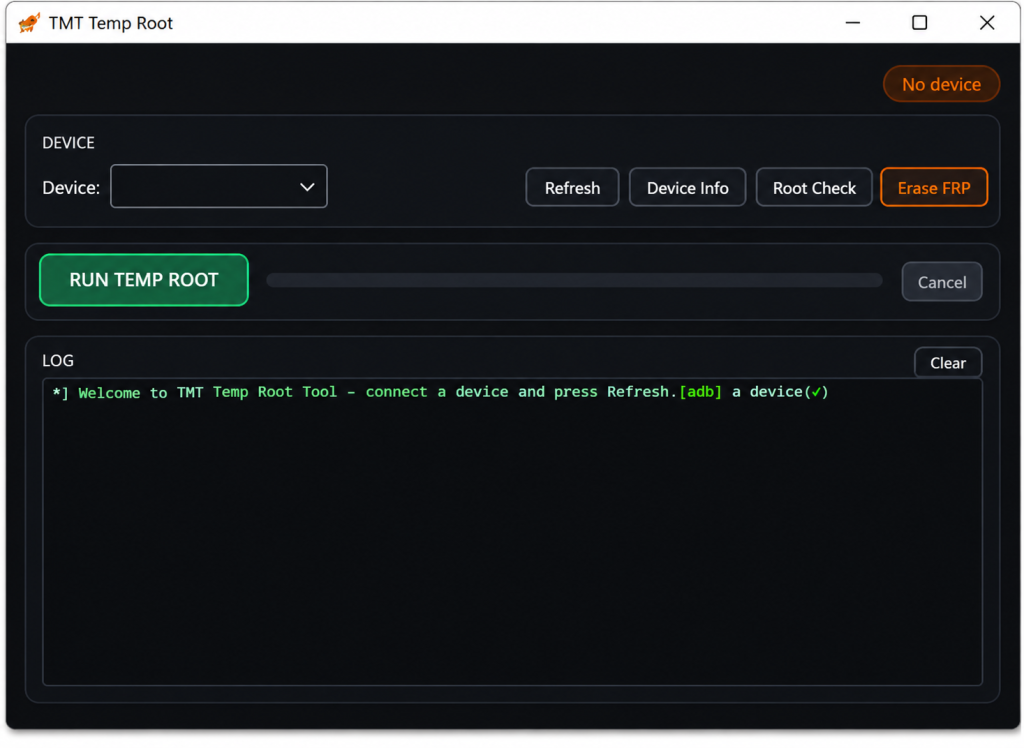
- Real-Time Execution Console: Features a live log window detailing ADB handshake progress, exploit execution status, and command outputs for transparent troubleshooting.
3. System Package, Bloatware & Diagnostic Utilities
- Privileged Package & Service Control: With temporary root active, technicians can freeze, disable, or uninstall stubborn system packages, carrier bloatware, and background update agents (
OTAblockers). - Multi-Mode Reboot & Shell Access: Quickly reboot connected devices into Normal System, Recovery Mode, Bootloader / Fastboot Mode, or Qualcomm EDL 9008 Mode (on supported models) directly from the tool interface.
Comprehensive Lock Removal Capabilities (FRP, MDM, Demo, PIN & Pattern Locks)
Modern Android smartphones enforce layered permission boundaries to protect user, enterprise, and retail data. By elevating standard ADB shell access to temporary superuser privileges, TMT ADB Temp Root Free Tool assists technicians across several lock-servicing workflows:
1. FRP Bypass (Factory Reset Protection)
When an Android phone has USB Debugging enabled (via *#0*# Test Mode, MTP exploit, or diagnostic mode) while locked on Google Factory Reset Protection (FRP), temporary root privileges allow technicians to clear setup wizard restrictions, reset FRP flags, and complete out-of-box setup cleanly without disassembling the handset.
2. MDM, IT Admin & Retail Demo Lock Removal
Corporate-managed phones, school tablets, and retail store display units frequently enforce Mobile Device Management (MDM), Device Owner policies, or Retail Demo overlays that standard non-root ADB commands cannot uninstall. Using temporary root privileges, technicians can disable Device Admin/Owner components, freeze MDM policy agents, and remove retail demo packages cleanly.
3. PIN, Password, and Pattern Lock Reset
Forgetting a screen security credential whether a numeric PIN, alphanumeric password, or gesture pattern locks users out of their device. On compatible builds with active ADB authorization (or when paired with Fastboot/Recovery servicing routines), temporary root access enables technicians to manage lock-credential database files (locksettings.db / keyguard configurations on supported legacy builds) or execute clean factory resets while keeping baseband calibration partitions safe.
4. Carrier & OTA Update Lock Prevention
Beyond screen and account locks, temporary root access allows repair technicians to disable carrier lock overlays and block forced OTA system updates that might otherwise re-lock serviced devices.
Supported Android Brands and Chipsets
TMT ADB Temp Root Free Tool supports a wide variety of Android smartphones and tablets running compatible security patch levels with active USB Debugging:
- Supported Brands: Samsung Galaxy, Xiaomi, Redmi, POCO, OPPO, Realme, OnePlus, Vivo, iQOO, TECNO, Infinix, Itel, Motorola, Nokia, and Lenovo.
- Supported Chipsets: MediaTek (
MTKHelio & Dimensity series), Qualcomm Snapdragon, Samsung Exynos, and Unisoc / Spreadtrum (SPD) devices.
System Requirements
| Component | Minimum Requirement | Recommended Specification |
| Operating System | Windows 7 / 8 / 10 (32-bit & 64-bit) | Windows 10 / 11 (64-bit) |
| Processor | Intel Core 2 Duo / AMD Dual-Core (1.8 GHz) | Intel Core i3 / AMD Ryzen 3 or higher |
| RAM | 2 GB RAM | 4 GB RAM or higher |
| Storage Space | 200 MB free disk space | 1 GB+ available space |
| USB Drivers | Universal ADB Driver + Brand USB Drivers | Latest Google Platform-Tools + Samsung/Vivo/MTK/Qualcomm ADB Drivers |
How to Download, Install, and Use TMT ADB Temp Root Free Tool
- Download the Tool Package: Download the TMT ADB Temp Root Free Tool Latest Version compressed
.zipor.rararchive from a trusted repository. - Temporarily Pause Antivirus: Windows Defender and third-party antivirus suites routinely flag ADB privilege-escalation and temporary root utilities. Temporarily disable real-time protection or add an exclusion folder (e.g.,
C:\TMT_ADB_Temp_Root) before extracting. - Extract All Files to One Folder: Unpack the archive using WinRAR or 7-Zip so the main executable and bundled
adb.exe/.dlldependencies remain in the same directory. - Install Official ADB & Brand USB Drivers: Ensure Universal ADB Drivers alongside brand-specific drivers (Samsung USB, Vivo USB, Xiaomi, MTK, or Qualcomm) are properly installed in Windows Device Manager.
- Enable USB Debugging & Connect Phone: Enable USB Debugging on your Android device (or trigger ADB via Test Mode / diagnostic routines), connect the phone to a direct rear motherboard USB port, and tap Allow on the Allow USB debugging? RSA fingerprint prompt on the phone screen.
- Run Tool as Administrator & Execute: Right-click the TMT ADB Temp Root Free Tool executable, select Run as administrator, verify device detection in the status bar, and click Temp Root (or select your desired ADB diagnostic/servicing function) while monitoring the live log window.
Frequently Asked Questions (FAQ)
Q1: Does TMT ADB Temp Root Free Tool require a physical dongle or paid credits?
Ans: No, TMT ADB Temp Root Free Tool is a free, standalone Windows desktop utility that works over standard USB connections without requiring a physical smart-card box or server credits.
Q2: What is the difference between Temp Root and permanent root (Magisk)?
Ans: Temp Root grants temporary superuser (su) access in system memory without unlocking the bootloader or modifying the boot.img partition meaning the device returns to its unrooted stock state upon rebooting. Permanent root modifies boot partitions and typically requires an unlocked bootloader.
Q3: Will using TMT ADB Temp Root Free Tool erase personal data?
Ans: Running Temp Root and reading device diagnostics over ADB does not erase personal photos or files. However, if you subsequently perform a full Factory Reset or userdata wipe to clear a forgotten PIN, password, or pattern lock, all user data on the phone will be erased. Always back up accessible files first.
Q4: Why is the tool failing to detect my phone over ADB?
Ans: Detection issues usually occur when USB Debugging is disabled, the RSA authorization popup on the phone screen was not accepted, or another background GSM tool is holding the adb.exe port. Close conflicting GSM programs, reinstall official ADB USB drivers, reconnect to a rear PC USB port, and tap Allow on the phone screen.
Conclusion
The TMT ADB Temp Root Free Tool Latest Version is a practical, lightweight utility for mobile repair technicians who need quick temporary superuser privileges over ADB without unlocking bootloaders or disassembling devices. By combining one-click ADB temp root execution, hardware diagnostics, package management, and support for FRP, MDM, demo, PIN, and pattern lock servicing workflows into a free Windows interface, it simplifies everyday GSM repairs. Always install official ADB USB drivers, authorize the USB debugging prompt on the device, and back up important data before making system-level changes.