

UMTv2 – UMT Pro Unisoc Module v2.3 Latest Version Free Download | Complete SPD FRP, MDM & Lock Removal Guide
Table of Contents
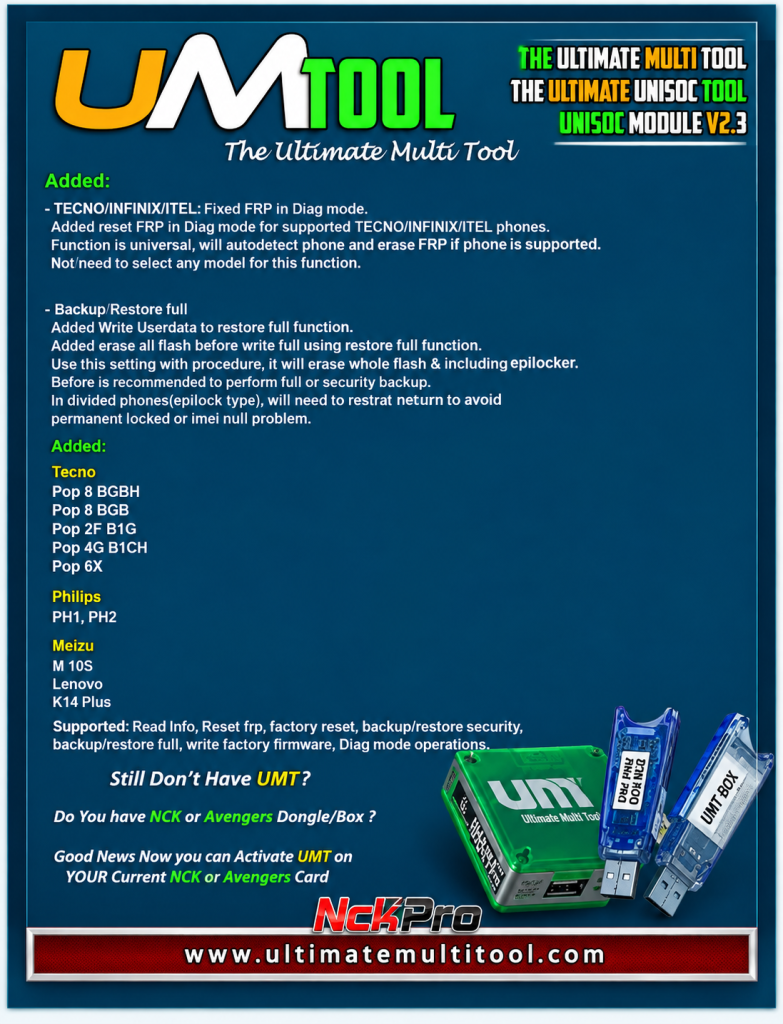
In the mobile software repair and flashing industry, servicing Unisoc (Spreadtrum / SPD) powered smartphones requires a specialized, stable utility capable of handling complex security partitions and boot protocols. Developed by the Ultimate Multi Tool (UMT) team, the UMTv2 / UMT Pro Unisoc Module v2.3 delivers 1-click Diag Mode FRP resets, custom loader generation, and deep firmware flashing capabilities for modern Android iterations.
If you want to explore every feature of UMT Pro Unisoc Module v2.3, its supported models, and how it clears FRP, MDM, PIN, pattern, and SIM locks, this comprehensive guide covers all the details.
What is UMTv2 / UMT Pro Unisoc Module v2.3?
UMTv2 / UMT Pro Unisoc Module v2.3 is a dedicated Windows-based mobile servicing software designed specifically for smartphones and feature phones running on Unisoc (formerly Spreadtrum) processors. Working alongside a UMT Box, UMT Pro Dongle, or official digital activation via UMT Support Access, it allows technicians to read/write firmware, back up security NVRAM, repair network parameters, and remove rigid device locks safely.
What’s New & Key Features in v2.3
The v2.3 update brings advanced servicing protocols and expanded device definitions:
- Universal Diag Mode FRP Reset: Automatic device detection to reset FRP in Diagnostic Mode without manually selecting a model for supported TECNO, Infinix, and Itel handsets.
- Firmware Flashing & Partition Parsing: Read and write factory
.pacfirmware and XML dumps with automatic filesystem detection (UFS,eMMC,EXT4,F2FS, andEROFS), plus super partition parsing and A/B flash slot switching. - Custom Loader Builder: Generate and verify custom SPL/FDL loaders directly from stock phone firmware to service newly released or unlisted Unisoc devices.
- Security NV Backup & Restore: Automatically back up security NVRAM and FRP partitions prior to flashing or formatting to protect critical calibration data.
- IMEI, Serial & Bluetooth Repair: Repair or restore corrupted IMEI (1–4), Serial Numbers (SN), and Bluetooth addresses on supported models.
- ADB & Fastboot Utilities: Generate unlock signatures, unlock/relock bootloaders, read partition tables, and reboot into Recovery or Fastboot modes.
Comprehensive Lock Removal Capabilities (FRP, MDM, PIN, Pattern & SIM Locks)
Modern Unisoc smartphones incorporate multiple layers of security encryption to protect user and carrier data. UMT Pro Unisoc Module v2.3 provides targeted functions to clear every major type of lock:
1. FRP Bypass (Factory Reset Protection)
When an Android smartphone is factory reset without unlinking the primary Google account, FRP locks the setup wizard. Version v2.3 removes FRP via Flash Mode, Fastboot Mode, and Universal Diag Mode across UFS and eMMC storage chips—supporting newer Android 14, 15, and 16 security patches.
2. MDM & Enterprise Security Removal
Corporate-managed devices, financed phones, or restricted handsets often enforce strict Mobile Device Management (MDM) profiles. Using deep partition wiping, low-level formatting, and clean factory .pac firmware flashing, technicians can neutralize active MDM restrictions and restore normal device operation.
3. PIN, Password, Pattern & Privacy Lock Reset
Forgetting a screen security credential—such as a numeric PIN, alphanumeric password, gesture pattern, or keypad privacy code—renders a phone inaccessible. The module includes Read Password, Safe Format, Low-Level Format, and Factory Reset (Wipe Phone) options to clear user locks without bricking the handset.
4. SIM Lock, Carrier & Regional Unlocking
For devices restricted to specific mobile carriers or geographic regions, v2.3 features Read Simlock Info (Unlock Codes), Remove Simlock, Unlock via Custom UID, and Regional Unlock (including dedicated methods for Realme and global models).
Supported Chipsets and Brands
The UMTv2 / UMT Pro Unisoc Module v2.3 offers wide hardware compatibility across legacy and modern Spreadtrum/Unisoc architectures:
- Supported Unisoc / SPD Chipsets: Unisoc Tiger series (
T606,T610,T612,T616,T618,T700,T760,T820),SC9863A,SC9832E,SC9820E,SC7731E, and feature phone chips (SC6530,SC6531E,T107,T127). - Supported Brands: TECNO, Infinix, Itel, Samsung (Unisoc variants like A03/A03s/A03 Core), Realme, Motorola (
Moto G35, etc.), Xiaomi (Redmi A3x), ZTE (Nubia Focusseries,Blade A54/A75), HMD/Nokia (Crest,Crest Max), Lava, Coolpad, Blackview, Meizu, Doogee, Ulefone, and Symphony.
System Requirements
| Component | Minimum Requirement |
| Operating System | Windows 7, 8, 10, or 11 (32-bit or 64-bit) — Enhanced Windows 11 compatibility |
| Processor | Intel or AMD Dual-Core Processor (2.0 GHz or higher) |
| RAM | 4 GB Minimum (8 GB Recommended) |
| Storage Space | At least 2 GB of free disk space |
| Hardware & Drivers | UMT Box / UMT Pro Dongle (or Active License) + Spreadtrum/Unisoc USB Drivers |
How to Download and Use UMT Pro Unisoc Module v2.3
- Download UMT Support Access: Download the official UMT Support Access installer and extract it using WinRAR or 7-Zip.
- Temporarily Pause Antivirus: Security suites often flag mobile servicing tools due to packed loader scripts. Temporarily disable real-time protection or add an exclusion folder before installing.
- Connect UMT Hardware & Download v2.3: Plug in your UMT Box or UMT Pro Dongle, launch UMT Support Access, navigate to the Installers / Modules tab, and download UMTv2 / UMT Pro Unisoc Module v2.3.
- Install Unisoc Drivers & Setup: Run the downloaded v2.3 setup file as an administrator and ensure Spreadtrum/Unisoc SCI USB drivers are properly installed in Windows Device Manager.
- Select Operation & Connect Phone: Launch the Unisoc Module v2.3, select your brand/model (or choose Universal/Custom Loader mode), pick your desired task (Reset FRP, Factory Reset, Remove Simlock, or Flash PAC), and connect the powered-off phone while holding the boot key (
Volume Up + Volume Down).
Frequently Asked Questions (FAQ)
Q1: Does UMT Pro Unisoc Module v2.3 require a physical box or dongle?
Ans: Yes, the UMTv2 / UMT Pro Unisoc Module v2.3 requires an active UMT Box, UMT Pro Dongle, or an authorized UMT digital renewal license to authenticate and run on your PC.
Q2: How does the Diag Mode FRP Reset work on TECNO, Infinix, and Itel in v2.3?
Ans: The Universal Diag Mode FRP Reset automatically detects supported Transsion devices (TECNO, Infinix, Itel) without needing manual model selection, clearing FRP locks quickly and safely.
Q3: Will removing a PIN, pattern, or FRP lock delete personal data?
Ans: Yes, performing a Factory Reset, Safe Format, or Low-Level Format wipes user data partitions to remove screen locks and security restrictions. Always back up accessible data and Security NV before servicing.
Q4: What if my Unisoc phone model is not listed in v2.3?
Ans: You can use the built-in Make Custom Loader utility with the device’s stock .pac firmware file to generate a compatible loader, allowing you to service unlisted Unisoc devices.
Conclusion
The UMTv2 – UMT Pro Unisoc Module v2.3 Latest Version is an indispensable servicing solution for mobile repair technicians dealing with Spreadtrum and Unisoc smartphones. With its Universal Diag Mode FRP reset, custom loader builder, SIM/regional unlock tools, and complete support for MDM, PIN, and pattern lock removal across UFS and eMMC devices, it streamlines complex repairs significantly. Always ensure proper Unisoc USB drivers are installed and back up Security NV partitions before modifying device firmware.
Password: UmtTeam


