AMT Files Map Builder Latest Version Free Download | Complete Firmware XML Partition Mapping, Flashing, FRP, MDM & Lock Removal Guide
Table of Contents
Introduction
In the mobile software repair and flashing industry, technicians frequently work with extracted firmware dumps, raw partition readbacks, or custom ROM packages that lack properly structured partition maps for flashing tools. AMT Files Map Builder Latest Version solves this challenge by providing a dedicated, lightweight Windows companion utility designed for Android Multi Tool (AMT) users and GSM repair professionals.
By scanning raw firmware folders and automatically generating accurate partition mapping files (XML, scatter layouts, and partition tables), AMT Files Map Builder streamlines complex dead-boot repairs, custom partition writes, and clean firmware restorations. This comprehensive guide covers every feature, lock-servicing workflow, system requirement, and setup step.
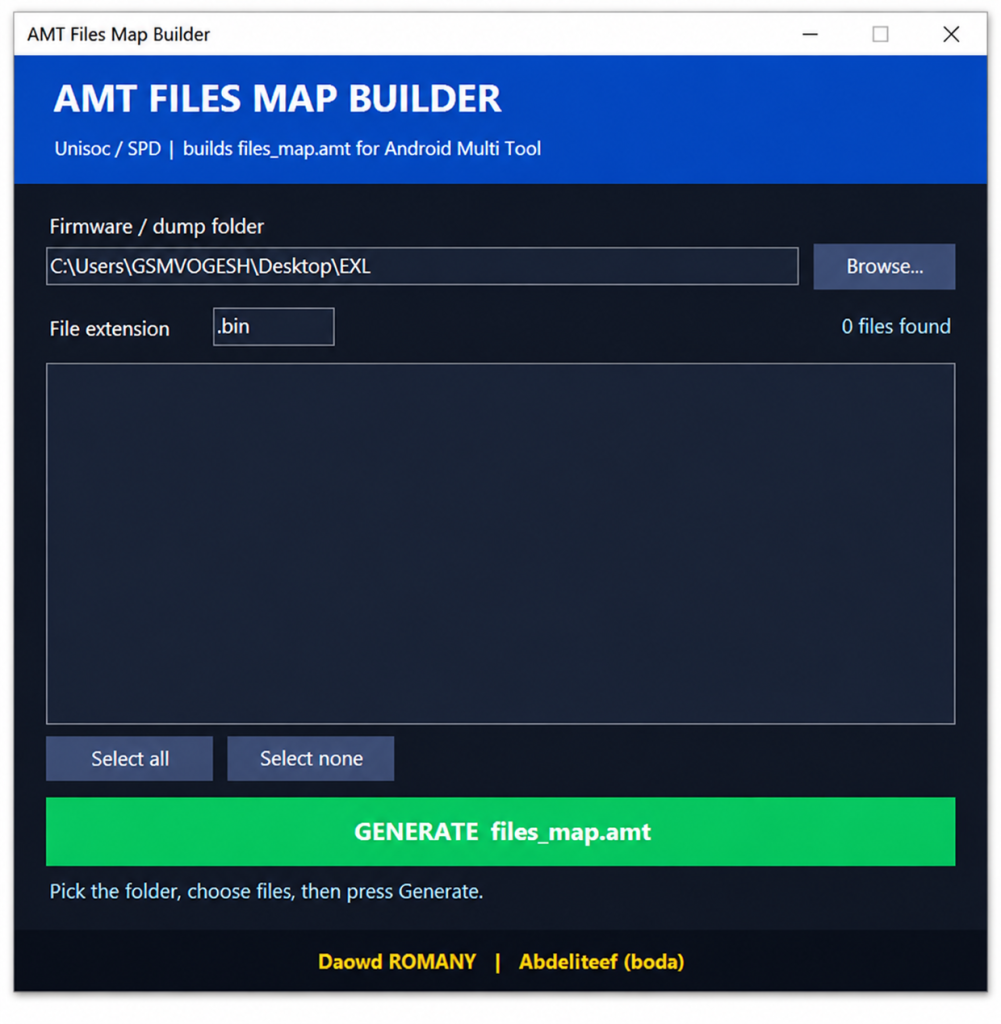
What is AMT Files Map Builder?
AMT Files Map Builder is a specialized Windows desktop firmware preparation and partition-mapping utility created for the Android Multi Tool (AMT) ecosystem. When a technician extracts a full storage dump or downloads unmapped firmware binaries (boot.img, super.img, vbmeta.img, userdata.img, persist.img, frp.bin), the utility automatically analyzes partition headers, offsets, and block sizes to build clean, flash-ready map definitions without manual hex editing.
Complete Features & Servicing Capabilities of AMT Files Map Builder
The latest release packs an essential suite of firmware parsing and partition-mapping tools into a fast, single-window interface:
- Automated Firmware Directory Scanner: Scans local folders containing extracted
.imgor.binpartition dumps and automatically identifies standard Android partition names, sizes, and sector alignments. - Flash-Ready Partition Map Generation: Builds structured partition map files compatible with Android Multi Tool (AMT) flasher modules so raw readbacks can be flashed directly back onto a target smartphone.
- Selective Partition Inclusion & Exclusion: Allows technicians to check or uncheck specific partitions—making it easy to exclude critical calibration blocks (
nvram,nvdata,efs,modemst1,modemst2,fsg) while flashing system images. - Dynamic
super.img& A/B Slot Recognition: Properly recognizes modern Android Dynamic Super Partitions and dual-slot (_a/_b) partition layouts used in Android 11 through Android 16 devices. - Storage Type Alignment (UFS & eMMC): Supports both 4096-byte (UFS) and 512-byte (eMMC) sector sizes to prevent offset mismatches or partition table corruption during flashing.
- Lightweight, Dongle-Free Standalone Execution: Runs directly on Windows without requiring a physical smart-card box, making firmware preparation fast on any repair workstation.
Lock Handling & Servicing Role (FRP, MDM, PIN, Pattern & Screen Locks)
While AMT Files Map Builder is fundamentally a firmware preparation and partition-mapping utility rather than a direct USB exploit tool, it plays a critical supporting role when technicians use Android Multi Tool (AMT) to resolve stubborn device locks:
1. FRP Bypass (Factory Reset Protection)
When servicing devices where standard ADB or MTP FRP methods fail, technicians often rely on partition-level flashing or clean stock ROM writes in Android Multi Tool (AMT). By mapping extracted firmware packages accurately—and isolating or formatting the frp and persistent partitions—AMT Files Map Builder ensures clean FRP clearing without damaging surrounding boot partitions.
2. MDM, Knox & Retail Demo Lock Removal
Corporate-managed phones, school tablets, and retail demo units often enforce persistent Mobile Device Management (MDM) or Demo restrictions embedded within system or vendor overlays. Generating a clean, full stock partition map allows technicians to overwrite modified demo/MDM partitions cleanly while keeping calibration partitions intact.
3. PIN, Password, and Pattern Lock Reset
Forgetting a screen security credential—whether a numeric PIN, alphanumeric password, or gesture pattern—renders a phone inaccessible. Using AMT Files Map Builder to map a clean userdata.img and cache.img layout enables technicians to re-flash clean user partitions via AMT, clearing forgotten screen locks safely.
4. Dead-Boot & Soft-Brick Recovery After Lock Servicing
If an interrupted FRP, MDM, or bootloader operation leaves a smartphone stuck in Qualcomm EDL 9008 or MediaTek BROM mode, AMT Files Map Builder converts raw readback backups into a structured flash package so technicians can revive the device cleanly.
Supported Firmware Formats and Chipsets
AMT Files Map Builder supports firmware structures across major Android hardware architectures:
- Supported Chipsets: MediaTek (
MTKScatter / Raw Readback dumps), Qualcomm Snapdragon (EDL 9008XML / Firehose partition dumps), and Unisoc / Spreadtrum (SPDextracted partition sets). - Supported Brands: Samsung, Xiaomi, Redmi, POCO, OPPO, Realme, OnePlus, Vivo, iQOO, TECNO, Infinix, Itel, Motorola, and Lenovo devices serviced via Android Multi Tool (AMT).
System Requirements
| Component | Minimum Requirement | Recommended Specification |
| Operating System | Windows 7 / 8 / 10 (32-bit & 64-bit) | Windows 10 / 11 (64-bit) |
| Processor | Intel Core 2 Duo / AMD Dual-Core (1.8 GHz) | Intel Core i3 / AMD Ryzen 3 or higher |
| RAM | 2 GB RAM | 4 GB RAM or higher |
| Storage Space | 100 MB free disk space | 20 GB+ available space (for extracted firmware dumps) |
| Companion Software | WinRAR / 7-Zip | Android Multi Tool (AMT) Latest Version |
How to Download, Install, and Use AMT Files Map Builder
- Download the Setup Archive: Download the official AMT Files Map Builder compressed
.zipor.rarpackage from a trusted repository. - Extract the Files: Right-click the downloaded archive and extract it into a dedicated folder on your
C:drive (e.g.,C:\AMT_Map_Builder) using WinRAR or 7-Zip. - Prepare Your Firmware Dump Folder: Place all extracted partition files (
boot.img,super.img,vbmeta.img,userdata.img, etc.) into a single clean directory without special characters in the folder path. - Launch AMT Files Map Builder: Right-click the main executable file (
AMT_Files_Map_Builder.exe) and select Run as administrator. - Select Storage Type & Source Folder: Choose the target storage architecture (UFS or eMMC), click Browse / Load Folder, and point the utility to your extracted firmware directory.
- Generate Map & Flash in AMT: Review the detected partition list (unchecking sensitive calibration partitions like
nvramorefsif needed), click Build / Save Map, and load the newly generated map file into Android Multi Tool (AMT) to flash your device.
Frequently Asked Questions (FAQ)
Q1: What is the main purpose of AMT Files Map Builder?
Ans: AMT Files Map Builder automatically scans folders containing raw extracted Android partition files (.img / .bin) and generates structured, flash-ready partition maps for Android Multi Tool (AMT)—saving technicians from manually writing XML or scatter partition tables.
Q2: Is AMT Files Map Builder free to use?
Ans: Yes, AMT Files Map Builder is a free companion utility designed to assist technicians working with Android Multi Tool (AMT) firmware readbacks and stock packages.
Q3: Can AMT Files Map Builder directly unlock FRP, MDM, or a screen PIN/pattern by itself?
Ans: No, AMT Files Map Builder is a firmware mapping and preparation tool, not a direct USB unlocking client. However, it builds clean partition maps that technicians load into Android Multi Tool (AMT) to flash clean firmware, wipe userdata for PIN/pattern resets, or clear frp and MDM-affected partitions safely.
Q4: Why is selecting the correct storage type (UFS vs. eMMC) important when building a map?
Ans: UFS storage chips use 4096-byte logical sectors, whereas older eMMC chips use 512-byte sectors. Selecting the matching storage type ensures accurate partition sector offsets so flashing does not corrupt the device’s GPT partition table.
Conclusion
The AMT Files Map Builder Latest Version is an indispensable companion utility for mobile repair technicians who regularly work with raw firmware readbacks and custom partition flashes. By automating UFS and eMMC partition mapping for Android Multi Tool (AMT), it eliminates manual XML editing errors and streamlines dead-boot recovery, clean stock flashing, and partition-level FRP, MDM, PIN, and pattern lock servicing workflows. Always verify your target device’s storage type (UFS vs. eMMC) and keep backups of EFS and NVRAM partitions before flashing.