

Android Multi Tool (AMT) v1.3.6.5 Latest Version Download | Complete FRP, MDM, PIN, Pattern & Lock Removal Guide
Table of Contents
Introduction
In the mobile software repair and flashing industry, servicing modern Android smartphones requires a fast, reliable utility capable of bypassing server authentication, handling latest binary (BIT) security patches, and clearing rigid screen locks. Android Multi Tool (AMT) v1.3.6.5 Latest Version stands out as one of the most popular dongle-free Windows servicing utilities engineered for GSM technicians.
With the release of v1.3.6.5, AMT introduces direct Samsung Exynos FRP removal via Download (Odin) Mode without consuming credits, Qualcomm Snapdragon 8 Elite (SM8750-AB) EDL support, and expanded Motorola and Vivo servicing. This comprehensive guide covers every feature, lock-removal method, system requirement, and setup step.
What is Android Multi Tool (AMT) v1.3.6.5?
Android Multi Tool (AMT) v1.3.6.5 is an all-in-one, server-based Windows desktop servicing software built for mobile repair professionals. Operating via a digital login account without requiring a physical USB dongle or hardware box, AMT integrates MediaTek BROM/Preloader, Qualcomm EDL 9008, Unisoc/SPD, Samsung Download/MTP, ADB, Fastboot, and Xiaomi Mi Assistant protocols into one streamlined interface.
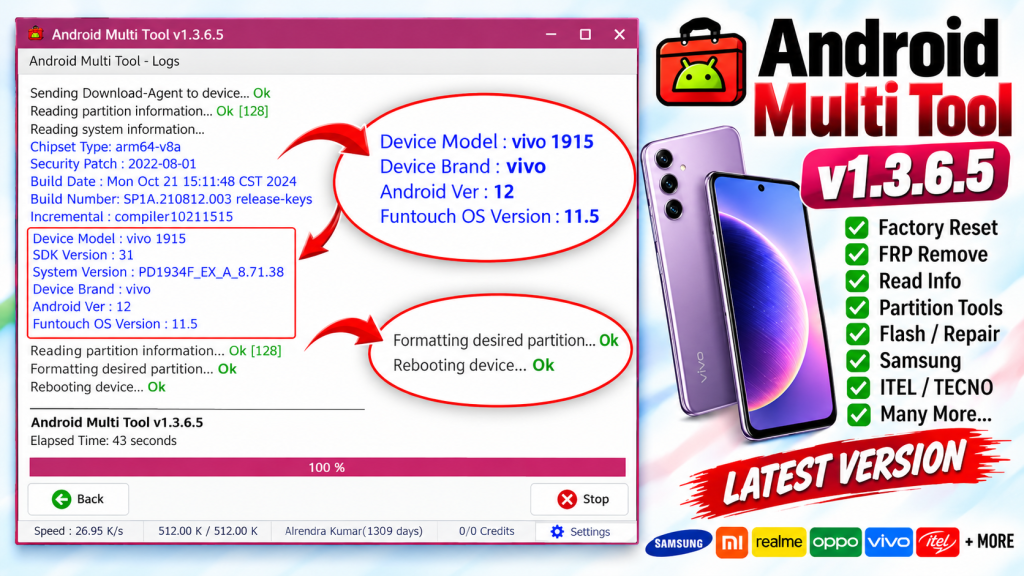
What’s New in Android Multi Tool v1.3.6.5 Changelog
The v1.3.6.5 update delivers major servicing breakthroughs across Samsung, Qualcomm, Motorola, and Vivo devices:
- Samsung Exynos FRP Remove (Download Mode — Zero Credits): Boot Samsung Exynos devices directly into Download (Odin) Mode; AMT automatically sends the required patch, reboots the device into ADB Mode, triggers the USB Debugging prompt, and removes Google FRP in one click without consuming any credits.
- Qualcomm Snapdragon 8 Elite (
SM8750-AB) Support: Added EDL Mode Factory Reset, FRP Reset, and an Advanced Partition Manager for newly supported flagship Qualcomm devices. - New Motorola Security Support: Added servicing support for
Moto E15 (XT2523),Moto G05 (XT2523),Moto G15 / G15 Power (XT2521),Moto G06 / G06 Power (XT2535), andMoto G17 / G17 Power (XT2623). - Expanded Samsung MTK & Vivo Support: Added support for Samsung
Galaxy A07 (SM-A075F/M BIT-1),Galaxy A22 5G (SM-A226B BIT-B),Galaxy M16 5G (SM-M166P BIT-1),Galaxy Tab A9 (SM-X117 BIT-4), and VivoX300 / X300 Promodels. - Dynamic Super Partition Flashing: Supports flashing official Qualcomm firmware packages with Dynamic Super Partitions for Oppo, OnePlus, and Realme devices.
Complete Feature Modules of Android Multi Tool (AMT)
Beyond the v1.3.6.5 changelog, AMT packs an extensive suite of daily repair tools:
- Multi-Brand Firmware Flasher: Flash official stock ROMs across MediaTek (Scatter), Qualcomm (XML/Firehose), Unisoc (
.pac), Oppo/Realme/OnePlus (.ofp/ Dynamic Super Partition), and Motorola (.xmlfirmware). - Built-In Server Auth Access: Provides direct online authentication for Vivo, Xiaomi Preloader/Mi Assistant, and Transsion (Tecno/Infinix/Itel) Anti-Crack Fix without needing external TeamViewer sessions.
- Advanced Partition & RPMB Manager: Read, write, erase, and back up individual partitions, plus RPMB Read / Write utilities on supported chipsets.
- IMEI, QCN & Baseband Repair: Read/write QCN calibration files, enable Diagnostic (Diag) Mode, and repair corrupted IMEI numbers on supported Qualcomm and MediaTek smartphones.
- Bootloader & Reboot Controls: Unlock or relock bootloaders (
BL Unlock), switch from Fastboot to EDL 9008 mode, and execute one-click reboots into Recovery, Download, or Normal modes.
Comprehensive Lock Removal Capabilities (FRP, MDM, Demo, PIN & Pattern Locks)
Modern Android smartphones employ multi-layered security encryption to safeguard user and enterprise data. Android Multi Tool v1.3.6.5 provides dedicated modules to clear every major type of lock:
1. FRP Bypass (Factory Reset Protection)
When an Android smartphone is factory reset without signing out of the primary Google account, FRP blocks setup access. AMT v1.3.6.5 removes FRP across Samsung Exynos Download Mode (1-Click, 0 Credits), Samsung MTP / Test Mode (*#0*#), Qualcomm EDL 9008 Mode, MediaTek BROM / Preloader Mode, and Xiaomi Mi Assistant Sideload Mode.
2. MDM, Knox & Retail Demo Lock Removal
Corporate-managed devices, financed phones, or retail display units often enforce strict Mobile Device Management (MDM), Samsung Knox restrictions, or Demo Mode locks. AMT includes dedicated Samsung Knox operations, Demo Mode Remove utilities (including supported Vivo and Xiaomi devices), and clean stock firmware flashing to restore standard device functionality.
3. PIN, Password, and Pattern Lock Reset
Forgetting a screen security lock—whether a numeric PIN, alphanumeric password, or gesture pattern—renders a phone inaccessible. AMT offers Safe Format (to remove screen locks without data loss on supported Vivo, Oppo, and Realme models) as well as Factory Reset and Format Userdata options in EDL, BROM, and Recovery modes.
4. Brand Account & Cloud Locks (Xiaomi Mi Account & Transsion ID)
In addition to standard Google locks, AMT provides targeted server-assisted functions for Xiaomi Mi Account removal (via EDL and Mi Assistant) and Tecno / Infinix ID removal.
Supported Chipsets and Brands
Android Multi Tool (AMT) v1.3.6.5 supports over 6,000 Android smartphones and tablets across major hardware platforms:
- Supported Chipsets: MediaTek (Helio & Dimensity series, including
MT6768,MT6833), Qualcomm Snapdragon (includingSM8750-AB Snapdragon 8 Elite), Samsung Exynos, and Unisoc / Spreadtrum (SPD). - Supported Brands: Samsung, Xiaomi, Redmi, POCO, Vivo, iQOO, OPPO, Realme, OnePlus, TECNO, Infinix, Itel, Motorola, Lenovo, Huawei, and Karbonn
System Requirements
| Component | Minimum Requirement | Recommended Specification |
| Operating System | Windows 7 / 8 / 8.1 (32-bit & 64-bit) | Windows 10 / 11 (64-bit) |
| Processor | Intel Core 2 Duo / AMD Dual-Core (2.0 GHz) | Intel Core i3 / AMD Ryzen 3 or higher |
| RAM | 4 GB RAM | 8 GB RAM or higher |
| Storage Space | 500 MB free disk space (~50 MB setup file) | 5 GB available space (for stock firmware & QCN backups) |
| Network & Drivers | Active Internet + MTK/Qualcomm/Samsung Drivers | High-Speed Internet + Full Chipset USB Driver Stack |
How to Download, Register, and Use AMT Tool v1.3.6.5
- Download the Setup Archive: Download the official AMT Tool v1.3.6.5 (
AMT_Tool_Latest_Setup.zip, ~50 MB) from a trusted source. - Temporarily Pause Antivirus: Windows Defender and third-party antivirus suites often flag servicing clients due to packed exploit loaders. Temporarily disable real-time protection or whitelist the installation folder before extracting.
- Extract & Install Setup: Use WinRAR or 7-Zip to unpack the archive, right-click the installer, and select Run as administrator.
- Install Required USB Drivers: Ensure MediaTek VCOM, Qualcomm HS-USB QDLoader 9008, Samsung USB, and ADB/Fastboot drivers are properly installed on your Windows PC.
- Log In to Your AMT Account: Launch Android Multi Tool as an administrator, enter your registered Email ID / Username and Password (activated via an official license plan), and click Login.
- Select Device & Execute Task: Choose your brand and model from the list, select your desired repair operation (Reset FRP, Factory Reset, Safe Format, Flash Firmware, or Mi Account Remove), connect the phone in the required mode (Download Mode, BROM, EDL 9008, or Mi Assistant), and click Start.
Frequently Asked Questions (FAQ)
Q1: Does Android Multi Tool v1.3.6.5 require a physical USB dongle or box?
Ans: No, AMT is a 100% digital, server-based Windows utility that works via an authorized account login (3-month, 6-month, or 12-month activation) without requiring any physical hardware box or dongle.
Q2: How does the new Samsung Exynos Download Mode FRP feature work in v1.3.6.5?
Ans: Boot your supported Samsung Exynos phone into Download (Odin) Mode and connect it to AMT. The software automatically sends a boot patch, restarts the phone into ADB Mode, enables USB Debugging, and removes the Google FRP lock in one click without using any credits.
Q3: Will removing a PIN, pattern, or FRP lock erase personal data?
Ans: Using Safe Format on supported Vivo, Oppo, and Realme models can remove screen locks without erasing personal data, whereas executing a standard Factory Reset or EDL Userdata Wipe will erase all user files on the device.
Q4: Are credits required for all operations in AMT v1.3.6.5?
Ans: Standard operations—including Samsung Exynos Download Mode FRP removal, many BROM/EDL resets, and firmware flashing—are included with your active subscription at zero credit cost, while certain server-authenticated tasks (such as specific Vivo, Xiaomi, or Transsion ID services) require account credits.
Conclusion
The Android Multi Tool (AMT) v1.3.6.5 Latest Version is an indispensable, high-speed servicing solution for mobile repair technicians working across modern Android ecosystems. With its credit-free Samsung Exynos Download Mode FRP removal, Qualcomm Snapdragon 8 Elite EDL support, Safe Format screen lock tools, and comprehensive MDM, Demo, and Mi Account removal modules, it significantly streamlines daily repair workflows. Always ensure proper chipset USB drivers are installed and maintain NVRAM/QCN backups before servicing customer devices.


