

HSD AIO Tool v1.0.6 Latest Version Free Download
Table of Contents
In the mobile software repair and flashing industry, technicians require an accessible, multi-brand servicing solution capable of handling Samsung Knox Guard (KG) restrictions, Android 13–16 MDM/IT Admin locks, and modern Factory Reset Protection (FRP) without expensive hardware boxes. HSD AIO Tool v1.0.6 Latest Version (developed by the HSD Team) delivers a unified, dongle-free Windows desktop servicing platform built specifically for GSM technicians.
Organizing its functions into dedicated tabs for Unlock, KG Tool, MDM Tool, Xiaomi ADB, and Utility Tools (MTP / ADB / Fastboot), HSD AIO Tool v1.0.6 adds updated Android 15 and Android 16 FRP bypass routines alongside expanded brand support for Vivo, iQOO, Infinix, Motorola, and Oppo. This comprehensive guide covers every feature, lock-removal method, system requirement, and setup step.
What is HSD AIO Tool v1.0.6?
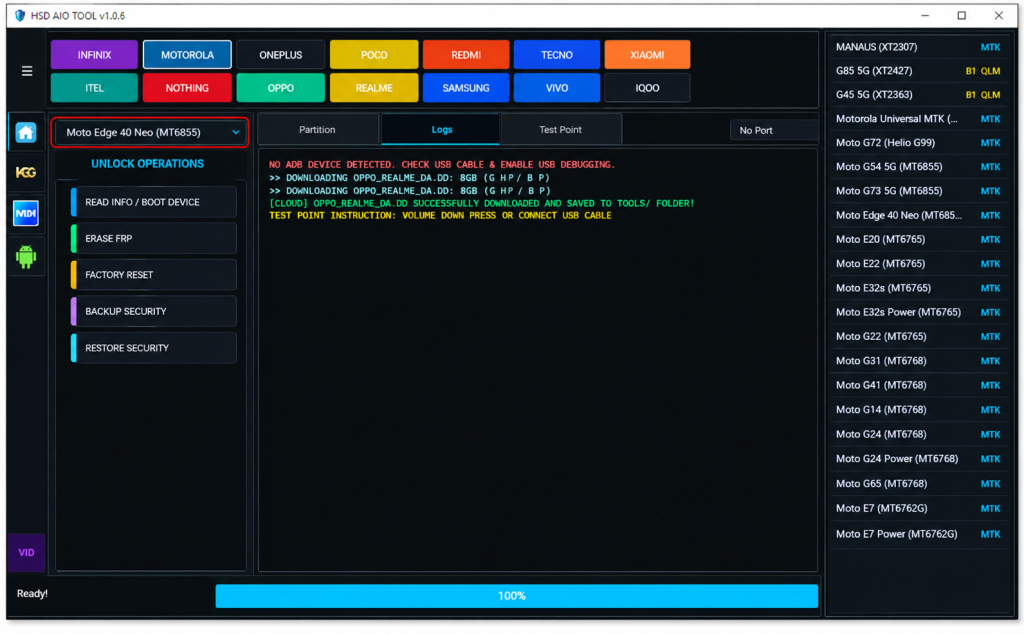
HSD AIO Tool v1.0.6 is a Windows-based, multi-brand mobile servicing and unlocking utility designed for Android smartphones and tablets. Operating through a free user account registration system without requiring a physical USB dongle or smart-card box, it integrates Samsung KG/MTP protocols, QR ADB provisioning, MDM/IT Admin patches, Xiaomi Critical Data/Mi Account tools, and universal ADB/Fastboot diagnostics into one clean interface.
What’s New & Complete Feature Modules in HSD AIO Tool v1.0.6
The v1.0.6 release expands multi-brand servicing support and organizes its tools into five core operational modules:
1. Unlock & Multi-Brand Servicing Module
- Expanded Brand & Android 15–16 Support: Adds 1-click Vivo / iQOO Android 15 & 16 FRP Bypass methods alongside updated support for Infinix, Motorola, and Oppo devices.
- Chipset & Security Operations: Supports FRP Erase, Factory Reset, Read/Write Partition Management, Backup & Restore Security Partitions, and eMMC / UFS Storage Health Diagnostics.
2. KG Tool / Samsung Knox Guard Module
- Multiple ADB Enabling Methods: Enable ADB via MTP Mode, Old Method, June 2023 Security Method, and Android 13 QR Code ADB Enable.
- Knox Guard (KG) Bypass & Relock Prevention: Includes Android 13 KG Lock / Knox Bypass (Method 1 & Method 2), Android 14 Universal KG Method, Android All Patch with QR & Auto ADB, Remove Knox, and Fix Relock.
- Samsung Diagnostics: Read full Samsung device, binary, and Knox status information via ADB.
3. MDM / IT Admin Tool Module
- Android 13–16 MDM & IT Admin Fixes: Dedicated Android 13 / 14 Fix and Android 15 / 16 Fix handlers to neutralize corporate Device Owner and IT Admin profiles.
- QR Provisioning & Screen Mirroring: Includes a built-in QR Code Generator, OTA Update Blocker, Enable Factory Reset toggle, Live Screen Mirroring (to control devices with damaged touch panels), and embedded Video Guides.
4. Xiaomi ADB Mode Module
- Mi Account & Critical Data Repair: Features Mi Account Reset, Mi Account Anti-Relock Fix, and Read / Generate / Write Critical Data for Xiaomi, Redmi, and POCO handsets.
- Deep Hardware & Network Inspection: Reads IMEI 1 & IMEI 2, CPU, Brand/Model, Bluetooth & Wi-Fi MAC Addresses, ENG State, and Phone IDs, plus 1-click device rebooting.
5. Utility Tool (MTP, ADB & Fastboot Modes)
- MTP Mode Utilities: Samsung MTP Read Info, Universal MTP Read Info, Open Browser via MTP Mode (YouTube/Chrome launcher), Enable ADB (Old & New MTP Methods), Factory Reset via MTP Mode, and a dedicated Android 16 FRP Option.
- ADB & Fastboot Utilities: Includes an App / Package Manager, Hardware Diagnostics, Disable OTA, Fastboot Read Info, Fastboot Reboot, and Reboot to Qualcomm EDL 9008 Mode.
Comprehensive Lock Removal Capabilities (FRP, MDM, KG, Mi Account, PIN & Pattern Locks)
Modern Android smartphones incorporate multi-layered security encryption to safeguard user and enterprise data. HSD AIO Tool v1.0.6 provides dedicated modules to clear every major type of device lock:
1. FRP Bypass (Factory Reset Protection)
When an Android smartphone is factory reset without signing out of the primary Google account, FRP blocks setup access. HSD AIO Tool v1.0.6 removes FRP across Samsung Android 16 MTP Mode, Vivo / iQOO Android 15 & 16, MTP Browser Launchers, QR Auto ADB, and chipset-level Erase FRP routines.
2. MDM, IT Admin & Samsung Knox Guard (KG) Removal
Corporate-managed phones, school tablets, and financed devices often enforce strict Mobile Device Management (MDM), IT Admin, or Samsung Knox Guard (KG) locks. Using Android 13–16 MDM Fixes, KG Bypass (Method 1/2 & Universal), Fix Relock, and OTA Update Blockers, technicians can neutralize enterprise and financing restrictions cleanly.
3. PIN, Password, and Pattern Lock Reset
Forgetting a screen security credential—whether a numeric PIN, alphanumeric password, or gesture pattern—renders a phone inaccessible. The software includes Factory Reset via MTP Mode, Hard Reset / Format Userdata, and Enable Factory Reset controls to erase forgotten screen locks safely.
4. Xiaomi Mi Account & Anti-Relock Locks
Beyond standard Google locks, HSD AIO Tool v1.0.6 features specialized functions to Reset Mi Account and apply Mi Account Anti-Relock patches on supported Xiaomi, Redmi, and POCO smartphones.
Supported Brands and Chipsets
HSD AIO Tool v1.0.6 supports 13+ major Android brands across leading hardware platforms:
- Supported Brands: Samsung, Xiaomi, Redmi, POCO, Vivo, iQOO, OPPO, Realme, Motorola, TECNO, Infinix, Itel, and Nothing.
- Supported Chipsets: Qualcomm Snapdragon (EDL 9008 & ADB/Fastboot), MediaTek (MTK Helio & Dimensity), Samsung Exynos, and Unisoc / Spreadtrum (SPD
System Requirements
| Component | Minimum Requirement | Recommended Specification |
| Operating System | Windows 7 / 8 / 10 (32-bit & 64-bit) | Windows 10 / 11 (64-bit) |
| Processor | Intel Core 2 Duo / AMD Dual-Core (2.0 GHz) | Intel Core i3 / AMD Ryzen 3 or higher |
| RAM | 4 GB RAM | 8 GB RAM or higher |
| Storage Space | 500 MB free disk space (~50–70 MB setup) | 2 GB available space |
| Runtimes & Drivers | .NET Framework 4.5 + Samsung/ADB USB Drivers | High-Speed Internet + All-in-One Chipset USB Driver Pack |
How to Download, Register, and Use HSD AIO Tool v1.0.6
- Download the Setup Archive: Download the official HSD AIO Tool v1.0.6 compressed
.raror.zippackage from a trusted repository. - Temporarily Pause Antivirus: Windows Defender and third-party antivirus suites often flag servicing clients due to packed ADB/MTP exploit loaders. Temporarily disable real-time protection or add an exclusion folder before extracting.
- Extract & Install Setup: Unpack the archive using WinRAR or 7-Zip (if prompted for an archive password on standard builds, try
12345or check if no password is set), right-clickHSD_AIO_TOOL.exe, and select Run as administrator. - Complete Setup Without Auto-Launch: Follow the installation wizard, create a desktop shortcut, uncheck Launch HSD_AIO_TOOL on the final screen, and click Finish.
- Register a Free Account & Log In: Right-click the desktop shortcut and choose Run as administrator. On the HSD LOGIN screen, click SIGN UP, enter your Name, Phone Number, Email, and Password (optional referral code:
SOFT11111), create your account, and sign in. - Allow Firewall & Execute Task: Allow Windows Defender Firewall access for
adb.exewhen prompted. Connect your Android phone via a reliable USB cable in the required mode (MTP, ADB, Setup QR, or Fastboot), select your module (Unlock, KG Tool, MDM Tool, Xiaomi, or Utility), and click your desired operation.
Frequently Asked Questions (FAQ)
Q1: Is HSD AIO Tool v1.0.6 free to use, and do I need a dongle?
Ans: Yes, HSD AIO Tool v1.0.6 is a dongle-free Windows desktop utility that operates via a free user account registration directly from the login screen—no physical hardware box or smart-card dongle is required.
Q2: What is new in HSD AIO Tool v1.0.6?
Ans: Version v1.0.6 expands multi-brand servicing with 1-click Vivo / iQOO Android 15 & 16 FRP Bypass routines alongside updated support for Infinix, Motorola, and Oppo smartphones, building upon the tool’s Android 16 Samsung MTP FRP, Knox Guard (KG), and MDM/IT Admin modules.
Q3: Will removing a PIN, pattern, or FRP lock erase personal data?
Ans: Performing a Factory Reset via MTP Mode or userdata wipe to clear a forgotten PIN or pattern lock will erase all personal files on the device. ADB and QR-based KG or MDM fixes performed on an active system generally preserve user data, though you should always back up important files and security partitions before servicing.
Q4: Why do some server-based operations show a loader download error?
Ans: Because the HSD AIO Tool series uses cloud-delivered loaders for specific models, certain server-dependent operations may display a loader error if the required model loader is undergoing server maintenance or is not yet uploaded. Ensure you have an active internet connection and use the built-in ADB, MTP, QR, KG, or MDM modules for immediate local servicing.
Conclusion
The HSD AIO Tool v1.0.6 Latest Version is a versatile, dongle-free servicing solution for mobile repair technicians working across modern Android ecosystems. By combining Samsung Knox Guard (KG) bypass, Android 13–16 MDM/IT Admin removal, Android 16 MTP FRP unlock, Vivo/iQOO Android 15–16 FRP routines, and Xiaomi Mi Account Anti-Relock utilities into one accessible Windows dashboard, it streamlines daily smartphone repairs. Always ensure official chipset USB drivers are installed and back up critical user data and security partitions before executing factory resets or system modifications.


