

UnlockTool 2026.11.16.0 Powerful Version Download | Complete Multi-Brand FRP, MDM, PIN, Pattern & Lock Removal Guide
Table of Contents
Introduction
In the mobile software repair and flashing industry, servicing modern smartphones requires a fast, reliable, and continuously updated utility capable of handling the latest Android 15, 16, and 17 security patches, updated binary (BIT) bootloaders, and Apple iOS RAMDISK workflows. UnlockTool 2026.11.16.0 Latest Version stands out as one of the leading dongle-free Windows servicing platforms built specifically for GSM technicians.
Operating via a server-authenticated account license without requiring a physical USB dongle or hardware box, UnlockTool 2026.11.16.0 unifies MediaTek BROM/Preloader, Qualcomm EDL 9008, Samsung Odin/EUB/MTP, Unisoc/SPD, HiSilicon Kirin, and Apple DFU/RAMDISK protocols into one streamlined dashboard. This comprehensive guide covers every feature, lock-removal capability, system requirement, and setup step
What is UnlockTool 2026.11.16.0?
UnlockTool 2026.11.16.0 is an all-in-one, cloud-connected Windows desktop mobile servicing and unlocking software. Designed for professional repair workstations, it supports over 3,500+ Android and iOS models enabling technicians to bypass Factory Reset Protection (FRP), remove Mobile Device Management (MDM) and Knox Guard (KG) restrictions, reset forgotten screen locks, flash stock firmware, and manage low-level security partitions from a single interface.
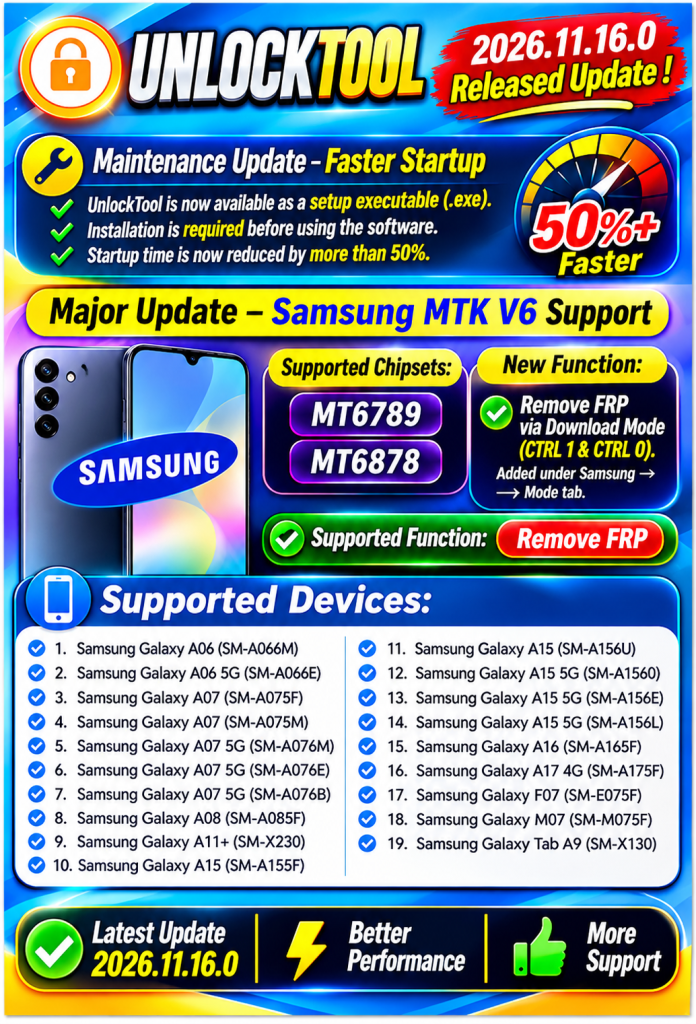
What’s New & Recent Updates in UnlockTool (November 2026 Build)
The 2026.11.16.0 release builds upon UnlockTool’s mid-November 2026 servicing milestones with expanded chipset support and stability fixes:
- Oppo / Realme / OnePlus MTK & Unisoc Expansion: Resolves previous MT6789 (
Helio G99 / G100) servicing issues across models likeOPPO Reno8 T 4G,Reno13 F 4G,A6 Pro 4G,realme 10 4G,realme 11 4G, andrealme Pad 2, while adding 8 new Oppo/Realme models on Unisoc T7250 (Erase FRP,Factory Reset,Readback, andFlash Backup). - 66+ Oppo / Realme / OnePlus 2026 Security Models: Supports Android 15 and Android 16 security builds across
MT6835 (Dimensity 6300),MT6878 (Dimensity 7300/7400),MT6895/MT6896, andMT6897 (Dimensity 8300/8350). - Samsung Exynos 1-Click Download Mode FRP (Android 15–17 / One UI up to 9.0): Automatic 1-click FRP removal directly in Odin Download Mode without manually enabling ADB across 19 Exynos chipsets (
Exynos 850up toExynos 2600andW920/W930/W1000). - Updated Samsung Qualcomm BIT Loaders: Adds Firehose loaders for 10+ newly updated Samsung BIT models (
SM-A236B/E/MBIT-H,SM-E145FBIT-D,SM-F721NBIT-8,SM-F926NBIT-E,SM-F956NBIT-4,SM-G990B2BIT-K, andSM-X216C/N). - Apple A12 / A13 Boot RAMDISK Support: Adds Pwned DFU / RAMDISK servicing (
Backup Passcode,Restore Passcode,Read Account,Read HW Info,Factory Reset) for compatible Apple A12 and A13 devices usingUSBLiter8(RP2350) hardware.
Complete Feature Modules of UnlockTool
Beyond its latest changelog, UnlockTool packs an extensive suite of daily repair tools:
- Multi-Brand Firmware Flasher: Flash official stock ROMs across Samsung (Odin 4-file/5-file), MediaTek (Scatter), Qualcomm (XML/Firehose), Oppo/Realme/OnePlus (
.ofp), Unisoc (.pac), and Xiaomi Fastboot/Sideload packages. - Advanced Partition & RPMB Manager: Read, write, erase, readback, and back up individual UFS/eMMC partitions alongside RPMB management on supported chipsets.
- IMEI, NVRAM, EFS & QCN Security Repair: Back up, restore, and repair corrupted IMEI numbers, NVRAM calibration blocks, EFS partitions, and Qualcomm QCN files on supported devices.
- Bootloader Unlock & Relock: Execute 1-click bootloader unlocking and relocking across MediaTek BROM, Qualcomm EDL, and Fastboot protocols.
- ADB, Fastboot & Diagnostic Utilities: Enable Diag Mode without root, switch active A/B slots, disable OTA updates, and change Samsung CSC region codes.
Comprehensive Lock Removal Capabilities (FRP, MDM, KG, PIN & Pattern Locks)
Modern smartphones employ multi-layered security encryption to safeguard user and enterprise data. UnlockTool 2026.11.16.0 provides dedicated modules to clear every major type of device lock:
1. FRP Bypass (Factory Reset Protection)
When an Android smartphone is factory reset without signing out of the primary Google account, FRP locks the setup wizard. UnlockTool clears FRP across Samsung Exynos Download Mode (1-Click, Android 15–17), Samsung MTP / Test Mode (*#0*#), Qualcomm EDL 9008, MediaTek BROM / Preloader, Unisoc Flash Mode, and Xiaomi Sideload / Mi Assistant Mode.
2. MDM, Knox Guard (KG) & Retail Demo Removal
Corporate-managed phones, school tablets, financed handsets, and retail display units often enforce strict Mobile Device Management (MDM), Samsung Knox Guard (KG), or Demo Mode locks. UnlockTool includes dedicated Remove MDM, Bypass Knox / KG, Demo Mode Remove (Vivo, Oppo, Realme, Samsung), and clean stock firmware flashing to restore normal device operation.
3. PIN, Password, Pattern & iOS Passcode Reset
Forgetting a screen security credential whether a numeric PIN, alphanumeric password, Android gesture pattern, or iOS passcode renders a phone inaccessible. The software offers Safe Format (to remove screen locks without erasing personal photos/files on supported unencrypted/legacy Oppo, Realme, and Vivo models), Factory Reset / Format Userdata (across MTK, Qualcomm, and Unisoc), and Apple RAMDISK Passcode Backup/Restore.
4. Brand Account & iCloud Locks (Mi Account, Huawei ID & Apple Hello Screen)
Beyond standard Google locks, UnlockTool provides specialized functions to Bypass / Disable Mi Account (Anti-Relock) on Xiaomi/Redmi/POCO devices, remove Huawei / Honor ID on Kirin models, and service Apple iOS Hello Screen / Passcode states on supported checkm8 and A12/A13 devices.
Supported Brands and Chipsets
UnlockTool 2026.11.16.0 covers over 3,500+ smartphone and tablet models across major hardware architectures:
- Supported Chipsets: MediaTek (
MT6768,MT6789,MT6835,MT6878,MT6895/97, and Dimensity/Helio series), Qualcomm Snapdragon (Sahara & Firehose EDL 9008), Samsung Exynos (Exynos 850toExynos 2600), Unisoc / Spreadtrum (T606,T612,T616,T7250), HiSilicon Kirin, and Apple A-Series (A7toA13). - Supported Brands: Samsung, Xiaomi, Redmi, POCO, OPPO, Realme, OnePlus, Vivo, iQOO, Huawei, Honor, Motorola, TECNO, Infinix, Itel, Nokia/HMD, Lenovo, ASUS, LG, Vsmart, and Apple iPhone/iPad.
System Requirements
| Component | Minimum Requirement | Recommended Specification |
| Operating System | Windows 7 / 8 / 10 (64-bit) | Windows 10 / 11 (64-bit) |
| Processor | Intel Core 2 Duo / AMD Dual-Core (2.0 GHz) | Intel Core i3 / AMD Ryzen 3 or higher |
| RAM | 4 GB RAM | 8 GB RAM or higher |
| Storage Space | 1 GB free disk space (~220 MB setup) | 15 GB available space (for firmware & readbacks) |
| Network & Drivers | Stable Internet + MTK/Qualcomm/Samsung Drivers | High-Speed Internet + Full USB Driver Stack & USBDK |
How to Download, Install, and Use UnlockTool 2026.11.16.0
- Download the Official Setup: Download the UnlockTool 2026.11.16.0 Windows installer (
UnlockTool-2026-11-16-0.exe, ~220 MB) from the official portal or trusted mirror. - Add an Antivirus Exclusion: Windows Defender and third-party antivirus suites routinely flag servicing utilities due to packed DA/Firehose loaders. Whitelist your destination folder (e.g.,
C:\UnlockTool) before extracting or installing so critical loader files are not quarantined. - Install Setup & Chipset USB Drivers: Right-click the installer, select Run as administrator, and install official Samsung USB, MediaTek VCOM, Qualcomm HS-USB QDLoader 9008, SPD/Unisoc, and Apple Mobile Device drivers.
- Launch & Log In: Right-click the UnlockTool shortcut on your desktop, choose Run as administrator, and sign in using your active UnlockTool account username and password (3-month, 6-month, or 12-month activation).
- Select Brand/Model & Execute Task: Choose your target brand tab (Samsung, Xiaomi, Oppo, Vivo, MediaTek, Qualcomm, Unisoc, or Apple), select your operation (Erase FRP, Factory Reset, Safe Format, Remove MDM, or Flash), connect your device to a direct rear USB 2.0/3.0 port in the required boot mode (Download Mode, BROM, EDL 9008, or DFU), and click Start.
Frequently Asked Questions (FAQ)
Q1: Does UnlockTool 2026.11.16.0 require a physical USB dongle or box?
Ans: No, UnlockTool is a 100% digital, dongle-free Windows desktop application. Once you download the setup, you only need an active online account license (available in 3-month, 6-month, or 12-month plans) to log in and use all supported features.
Q2: How does the new Samsung Exynos Download Mode FRP removal work?
Ans: Boot your supported Samsung Exynos smartphone into Odin Download Mode and connect it to your PC. Under the Samsung tab, click the 1-click Download Mode FRP option UnlockTool automatically patches the device and removes FRP across Android 15, 16, and 17 without requiring manual ADB enabling.
Q3: Will removing a PIN, pattern, or FRP lock delete personal data?
Ans: Using Safe Format on supported legacy/unencrypted models can clear a forgotten PIN or pattern lock without deleting user photos, whereas executing a full Factory Reset or Format Userdata on modern encrypted Android devices will erase user storage partitions. Always back up accessible data and readback/NVRAM partitions before servicing.
Q4: Why does UnlockTool fail with “Server connection failed” or USB detection errors?
Ans: Connection or login failures typically occur if antivirus software quarantined a file, a VPN/proxy is interfering with server authentication, or USB filter utilities (like FlexiHub) conflict with COM ports. Whitelist C:\UnlockTool, disable VPNs, connect your phone directly to a rear motherboard USB port without a hub, and ensure chipset drivers are properly installed.
Conclusion
The UnlockTool 2026.11.16.0 Latest Version remains one of the most comprehensive, fast-evolving servicing solutions for mobile repair technicians worldwide. By combining 1-click Samsung Exynos Download Mode FRP removal for Android 15–17, expanded Oppo/Realme/OnePlus MTK and Unisoc support, Apple A12/A13 RAMDISK utilities, and reliable MDM, Knox Guard, PIN, and pattern lock removal into a single dongle-free platform, it streamlines complex daily repairs. Always ensure official USB drivers are installed and perform readback/security partition backups before executing low-level operations.


